Prompt caching explained: how it cuts latency and cost

Taran Srivastava
Senior Product Manager
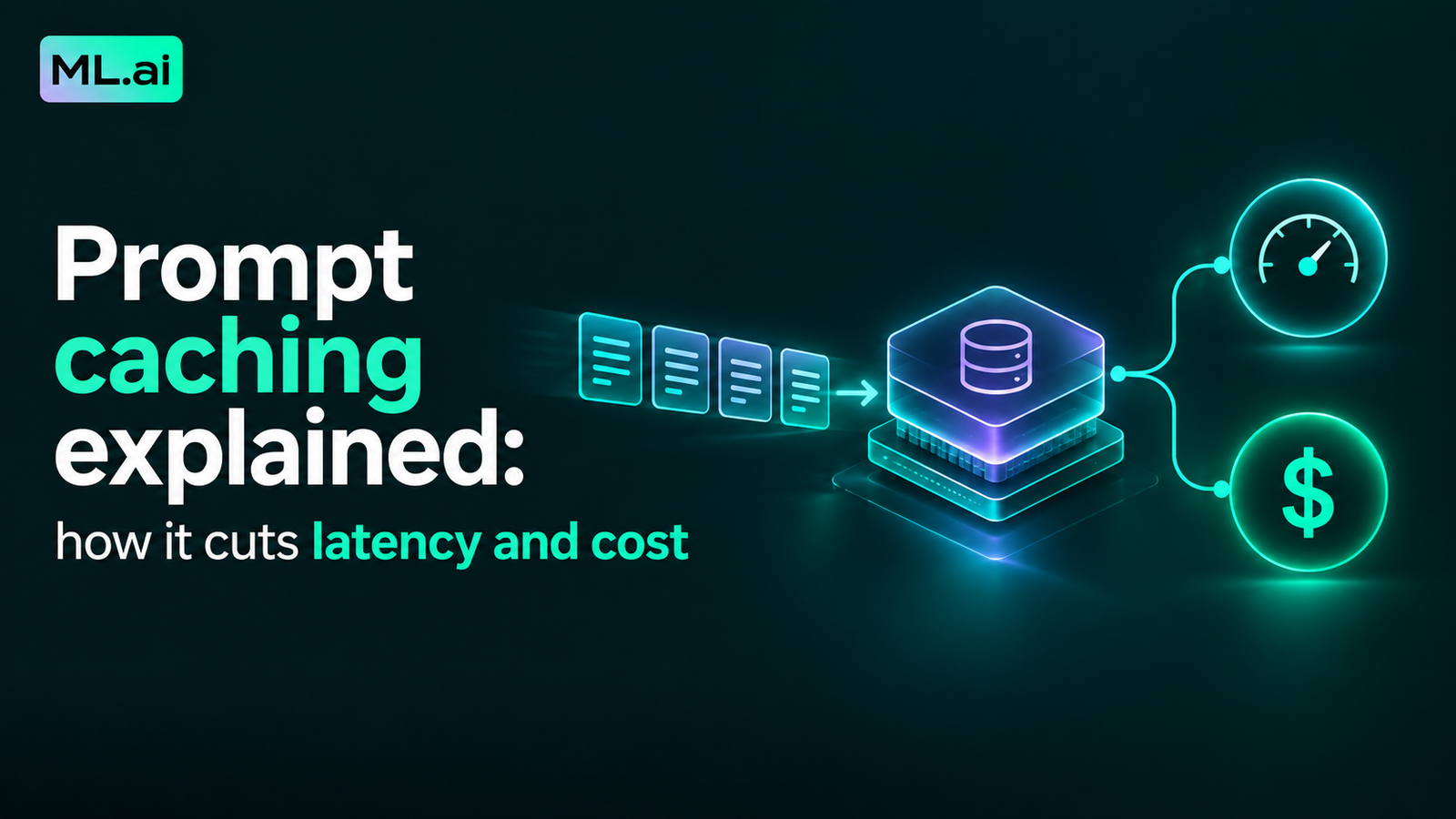
Prompt caching stores the key-value (KV) tensors a model computes while reading the start of your prompt, so the next request that opens with the same tokens skips that work. Cached tokens bill at 10% of the normal input rate on current Claude and GPT-5.6 models, and the wait for the first token drops by up to 80% on long prompts.
The size of the savings depends on how your prompt is laid out. Across more than 500 agent sessions, a 2026 evaluation by a PWC research team measured 41% to 80% lower API cost from caching alone. In a 40-step coding-agent session we modeled at published Claude Sonnet 5 rates, a stable rolling cache cut input cost by 85.5%, and one timestamp at the top of the system prompt made the same session 25% more expensive than using no cache at all.
This blog covers the mechanism, the break-even math, the 10 settings that void a cache without an error, and nine layout strategies, each with the team that used it and what they measured.
What is prompt caching, and what does the cache actually store?
Prompt caching is a provider-side feature that reuses the model's own intermediate computation for a repeated prompt prefix. It saves work on the input side only. The model still reads your new tokens and writes a fresh answer on every call.
The cache holds attention math, not your text
When a transformer reads a token, each attention layer turns it into a query, a key, and a value. The keys and values for every earlier token are what later tokens attend to. OpenAI's Prompt Caching 201 cookbook describes the stored object plainly: key and value tensors, which it calls “a bunch of numbers internal to the model.” No raw text, images, or audio sit in the cache.
Those tensors depend only on the token, its position, and the model weights. So if token 5,000 is the same token at the same position as last time, its keys and values are identical, and recomputing them is wasted GPU time.
How prompt caching differs from response caching and semantic caching
The three terms get mixed up, and some explainers list “stale responses” as a risk of prompt caching. That risk belongs to response caching.
| Technique | What is stored | What a hit returns | Match rule | Can return an outdated answer? |
|---|---|---|---|---|
| Prompt caching | KV tensors for a prompt prefix | A newly generated answer, computed faster | Exact token-for-token prefix | No |
| Response caching | A previous answer | The old answer, no model call | Exact request | Yes |
| Semantic caching | A previous answer plus an embedding | The old answer for a “similar” question | Embedding similarity | Yes |
The two answer-caching methods can sit in front of prompt caching. They solve a different problem: skipping the model call entirely for repeated questions.
Why cached and uncached requests return the same output
Anthropic's prompt caching documentation states that caching “has no effect on output token generation” and the response is identical to an uncached one. Erika Kettleson, a solutions engineer at OpenAI, made the same point in an OpenAI Build Hour on prompt caching: given an identical prefix, the KV cache is the same, so there is no intelligence difference. The only trade-off she described is architectural: when teams keep context, they should have trimmed it just to protect the cache.
How does prompt caching work inside a single API call?
Every request runs in two phases, and caching removes most of the first one. The rest of this section follows a request from the moment it arrives to the moment the first token streams back.
Prefill is the step caching skips
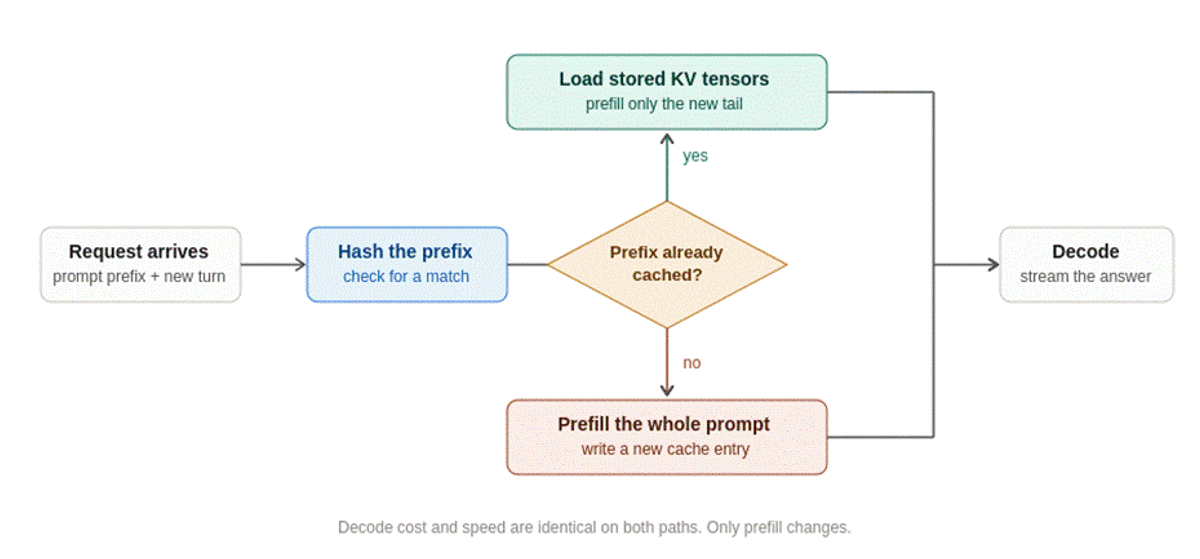
Prefill reads the whole input in parallel and builds the KV cache for it. It is compute-bound, and its length sets your time to first token (TTFT). Decode then generates output one token at a time and is limited by memory bandwidth.
A cache hit lets the server load the stored KV state for the matching prefix and run prefill only on the new tail. That is why caching shortens TTFT and leaves tokens-per-second during streaming unchanged.
How providers decide that your prefix matches
Both major APIs hash the prompt from the first token and compare it at fixed points called breakpoints.
The match has to be exact up to the breakpoint. One changed character before it produces a different hash, and everything after that point is processed and billed as new.
Where cached state lives, and why the machine matters
A cache entry lives on specific hardware. OpenAI's guide says cached states “live on individual machines,” that traffic above 15 requests per minute can overflow to other machines, and that caches never cross organizations or regional processing boundaries. Routing uses current load plus a hash of the first tokens of the prompt, including tool definitions.
Amazon Bedrock scopes entries to an AWS account and Region, and the AWS machine learning blog warns that cross-Region inference profiles “can occasionally increase cache write frequency.” Identical prompts are necessary for a hit. They are not sufficient.
How self-hosted inference servers do the same thing
If you serve open-weight models, the same idea runs inside the server. vLLM's PagedAttention paper splits the KV cache into fixed-size blocks so requests can share blocks for a common prefix, and reports 2 to 4 times higher throughput than earlier serving systems. SGLang's RadixAttention stores cached prefixes in a radix tree, so the longest match is one walk down the tree, and reports up to 6.4 times higher throughput on workloads such as agent control and multi-turn chat.
The research that started the provider features, Prompt Cache by Gim et al., measured TTFT improvements of 8 times on GPU and 60 times on CPU for long document prompts.
How much latency and cost does prompt caching save?
On price, the answer has converged: a cache read costs one tenth of normal input on both major APIs' current models. On latency, the answer depends on prompt length, and the gain is small below a few thousand tokens.
What a cache write and a cache read cost
Since GPT-5.6, OpenAI bills cache writes the way Anthropic does. Many explainers still describe OpenAI caching as free to write, which is true only for earlier models.
| Provider and model family | Cache write | Cache read | Default lifetime | Minimum cacheable prefix |
|---|---|---|---|---|
| Anthropic, 5-minute cache | 1.25x base input | 0.1x | 5 min, refreshed on each hit | 512–4,096 tokens by model |
| Anthropic, 1-hour cache | 2x base input | 0.1x | 1 hour | Same as above |
| OpenAI, GPT-5.6+ | 1.25x base input | 0.1x | 30 min, refreshed on each hit | 1,024 visible tokens |
| OpenAI, earlier models | No write charge | 50%–90% off, by family | 5–10 min in memory, or up to 24h extended | 1,024 tokens |
| Claude on Amazon Bedrock | 1.25x (2x for 1h) | 0.1x | 5 min, 1h on some models | 1,024–4,096 tokens |
Sources: Anthropic pricing table, OpenAI guide, OpenAI cookbook discount table, AWS. Anthropic's minimum is 512 tokens for Claude Opus 5, 1,024 for Claude Sonnet 5, and 4,096 for Claude Haiku 4.5.
Below the minimum, Anthropic processes the request normally and returns no error. If both cache_creation_input_tokens and cache_read_input_tokens come back as 0, nothing was cached.
How much faster the first token arrives
OpenAI's cookbook author ran 2,300 prompts of varying length. Cached requests were 7% faster at 1,024 tokens and 67% faster above 150,000 tokens. Anthropic reported more than 2 times lower latency for cached prompts when it launched the feature.
Agentic workloads sit in between. The PwC evaluation ran agents with 10,000-token system prompts and real web-search tool calls on DeepResearch Bench, using each model's best caching strategy.
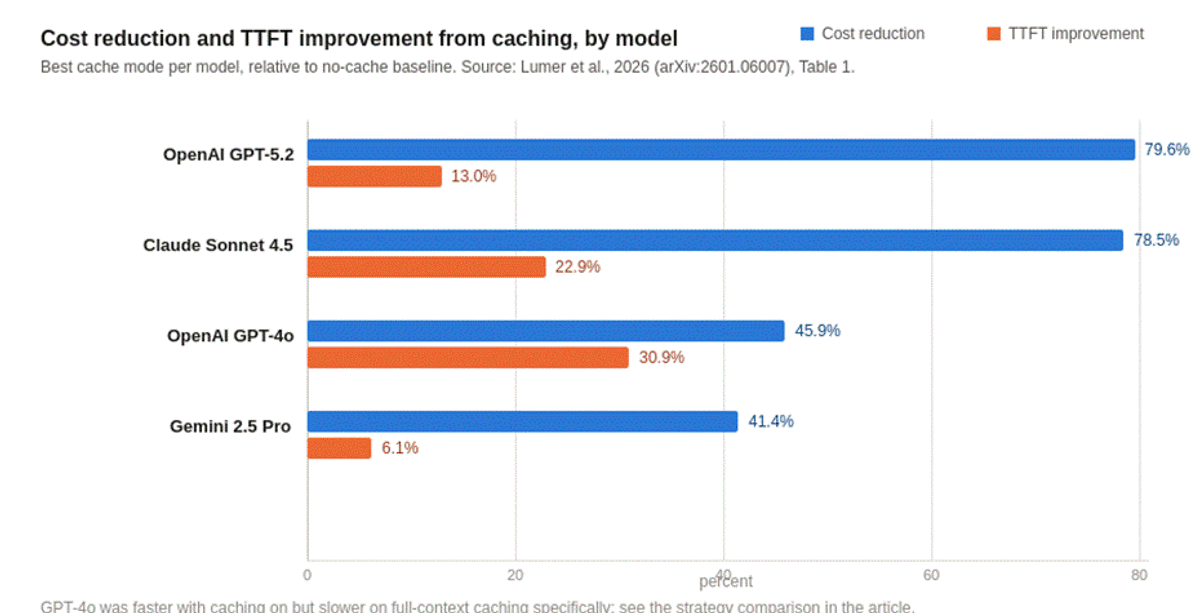
The same study found that caching the full context, tool results included, made GPT-4o's first token 8.8% slower than no caching, because the model kept writing cache entries that were never read.
When does a prompt cache pay for itself?
One read is enough on a 5-minute cache. Two reads are enough on a 1-hour cache. The arithmetic, with base input price set to 1:
OpenAI's guide gives the same figure for GPT-5.6: one write plus one full read costs 1.35 times the ordinary input cost, and one write plus nine reads costs 2.15 times against 10 times uncached. The losing case is a prefix written once and never read, which costs 25% more than no caching.
Which cache lifetime should you choose?
Pick the lifetime from the gap between requests that share a prefix. Anthropic's rule: if a prefix is reused more often than every 5 minutes, keep the 5-minute cache, because each hit refreshes it for free. The 1-hour cache is for gaps between 5 and 60 minutes, such as a user who pauses to read a diff.
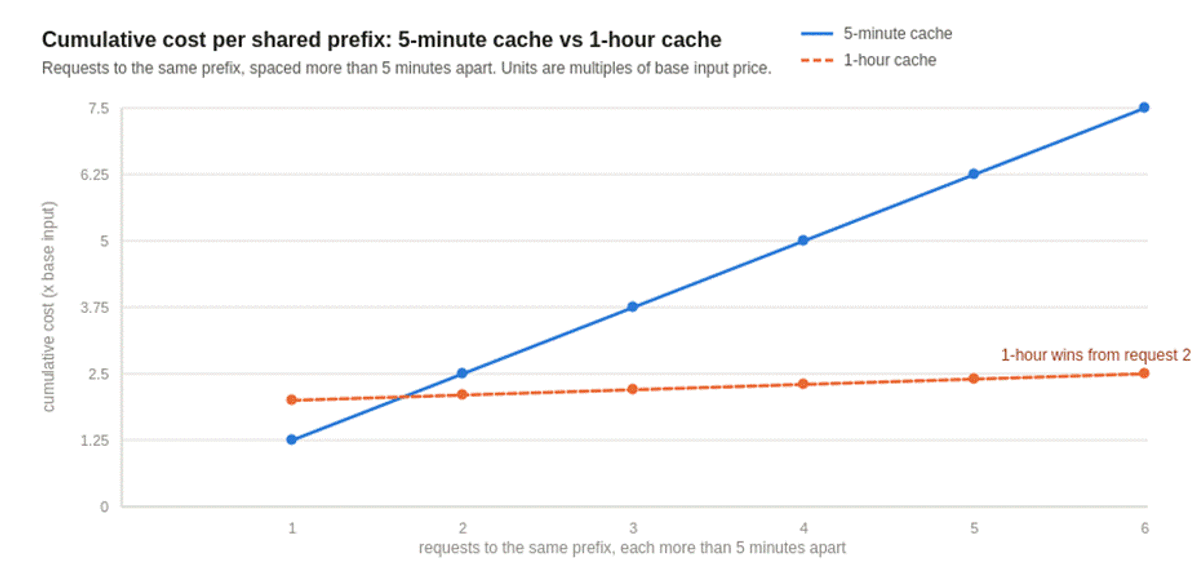
Two timing details are easy to miss. Anthropic measures the lifetime from the start of the request, so a response that streams for 4 minutes leaves about 1 minute for the follow-up. Anthropic also notes that cache hits are not deducted against your rate limit, which is a reason to prefer the 1-hour cache even when price is close.
What silently breaks a prompt cache?
The expensive failures return no error. The request succeeds, the usage fields show a write instead of a read, and nobody looks. We counted Anthropic's published invalidation table: it lists 10 separate settings that invalidate some or all of a cache without a single word of your prompt text changing.
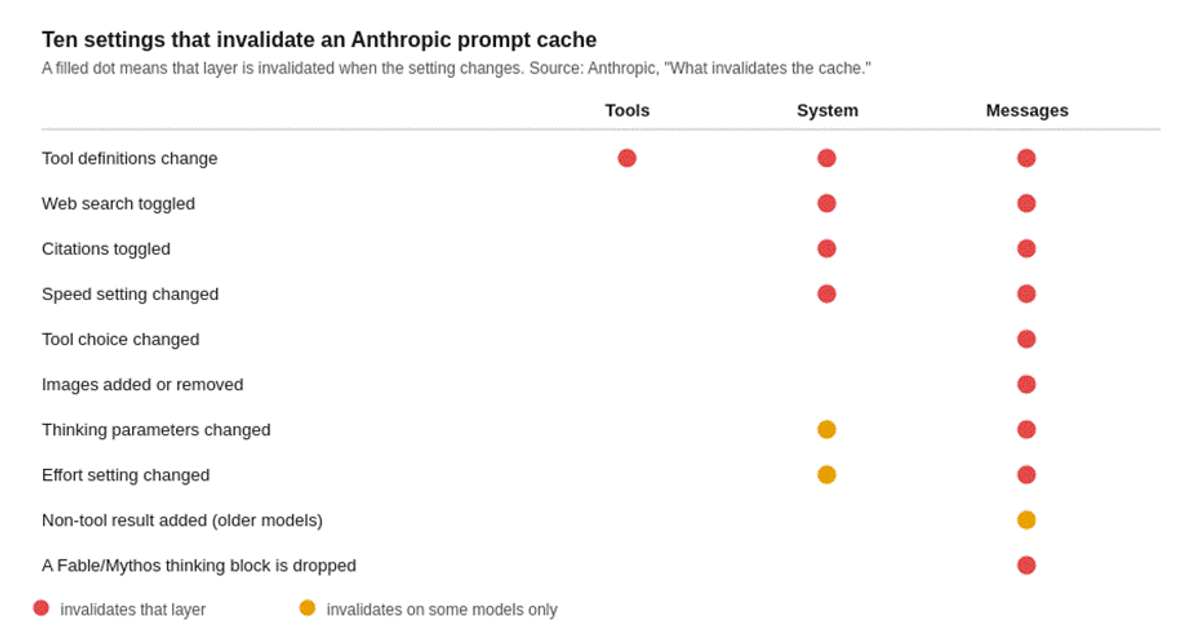
On the OpenAI side, the settings that change the cached prefix are model, tools, parallel_tool_calls, text.format, reasoning.effort, text.verbosity, and context_management.
Content changes that look harmless
Timing problems
Routing problems
Context-management problems
How do you structure prompts for a high cache hit rate?
Every strategy below does one of three things: keeps the prefix byte-identical, puts the change at the end, or gets the request to a machine that already holds the prefix. Here is the set before the detail.
| Strategy | What it fixes | Who reported results | Reported result |
|---|---|---|---|
| 1. Order the prompt by rate of change | Early changes voiding everything after them | OpenAI Codex CLI | Identical prefix on every Codex CLI turn |
| 2. Move per-user values out of the system prompt | Unique prefix per user | ProjectDiscovery, Warp | 7% to 74% hit rate overnight; ~15,000 cached tokens on a user's first request |
| 3. Cache in layers: global, user, task | One cache doing three jobs | Warp | Hits on the first request of every task |
| 4. Keep context append-only | Mid-session edits | Manus, Warp | Manus ranks hit rate as its top production metric |
| 5. Fix the tool list, restrict tools per turn | Tool churn at the front of the prefix | OpenAI, Manus, PwC study | PwC: changing tool sets void the cached prefix |
| 6. Put breakpoints where the prefix stops changing | Writes that are never read | Anthropic | Every request after the first reads the static prefix |
| 7. Route related requests together | Machine overflow and scatter | OpenAI customer, Warp | 60% to 87% hit rate; Warp's hit rate more than doubled |
| 8. Match lifetime to request gaps, pre-warm | Expiry between turns, cold first request | Anthropic, OpenAI | Coding customers saved up to 20% on input tokens |
| 9. Schedule compaction, not per-turn trimming | Constant prefix rewrites | OpenAI | 70% savings on 30-minute realtime sessions |
Strategy 1: Order the prompt by how often each part changes
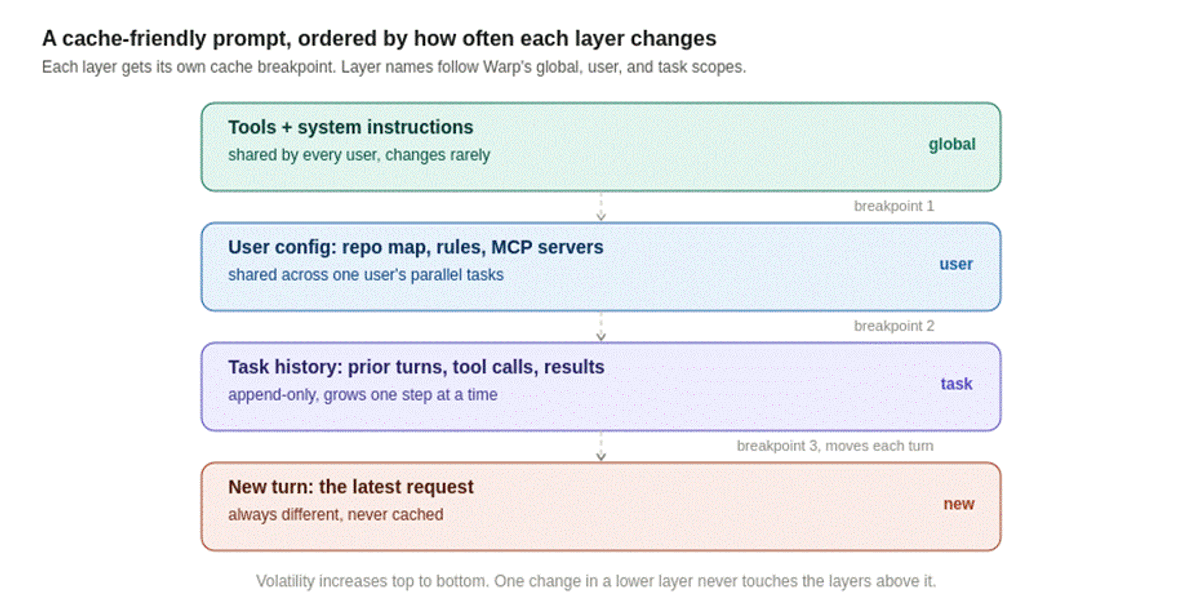
What to do: Put the most stable content first and the most volatile content last: tool definitions, system instructions, stable reference material, conversation history, then the new turn.
Who did it: When OpenAI described the Codex agent loop, the cookbook summary notes that Codex CLI keeps system instructions, tool definitions, sandbox configuration, and environment context identical and in the same order on every request. When the working directory or approval mode changes mid-session, Codex appends a new message instead of editing the earlier ones.
How to implement it: Audit one real request. Mark every field that can differ between two calls in the same session. Anything marked goes below the last stable block.
Strategy 2: Move per-user and per-request values out of the system prompt
What to do: Keep the system prompt identical for every user. Render user names, dates, plans, and feature flags into a later message.
Who did it: ProjectDiscovery's security agent sat at a 7% cache hit rate because per-user values were rendered into the system prompt. Moving that content to the end of the request took them to 74% in one deployment, and further tuning reached 84% with a 59% cut in LLM spend. ML.ai's guide to LLM inference cost walks through their breakpoint layout.
Warp made the same move. Siraj, a technical lead at Warp, told the OpenAI Build Hour that the team removed all changing content from the system prompt and moved user-specific configuration, such as rules and MCP servers, into a separate context message after the system prompt and tools. The shared prefix gives a user roughly 15,000 cached tokens on their first request.
How to implement it: The date is the usual offender. Put it in the user turn.
# Cache-hostile: a different prefix every day for every user
system = f"Today is {today}. The user is {user.name} on the {user.plan} plan. {RULES}"

# Cache-friendly: identical system prompt, changing facts moved to the end
system = RULES
messages = [
    {"role": "user", "content": f"<context>date={today}; plan={user.plan}</context>"},
    {"role": "user", "content": question},
]
Strategy 3: Cache in layers so every request hits something
What to do: Decide which content is shared by all users, by one user, and by one task, and give each its own layer and breakpoint.
Who did it. Warp, which says more than 700,000 developers use its agentic development environment, described three scopes at the Build Hour:
Siraj's cost example: 10,000 tokens of system prompt, 5,000 of tools, and a 100-token user prompt cost about 2.5 cents uncached and about two tenths of a cent with a cache hit.
How to implement it. On Anthropic, one breakpoint per layer uses three of your four slots and leaves one for the growing conversation.
Strategy 4: Keep the context append-only
What to do: Never edit an earlier message, tool call, or tool result. If something changes, say so in a new message.
Who did it: Yichao “Peak” Ji of Manus wrote that the KV-cache hit rate is “the single most important metric” for a production agent. Manus runs at about 100 input tokens per output token, and its rules include append-only context and deterministic serialization. At the Build Hour, Siraj gave the Warp version: when a user changes the goal of a task, append a message saying so. Editing the original request voids the cache for every tool call after it.
How to implement it: Anthropic now supports this directly on Claude Opus 5 and Opus 4.8: append a {"role": "system"} message inside messages instead of editing the top-level system field. Anthropic's docs note this is not available on Claude Sonnet 5.
Strategy 5: Fix the tool list and restrict tools per turn instead
What to do. Send the full tool set on every request. Limit which tools the model may call on a given turn with a setting that sits outside the prefix.
Who did it. OpenAI recommends allowed_tools for exactly this: list the whole toolkit in tools, then name the subset for this turn. Manus goes further and masks token logits during decoding so tools are never removed from context. The PwC study recommends a fixed set of general-purpose functions, with extra capability delivered through code generation, because changing tool definitions invalidates the cached prefix.
tools = [read_file, search_code, run_tests, edit_file, web_fetch]  # identical every call
tool_choice = {"type": "allowed_tools", "mode": "auto",
               "tools": [{"type": "function", "name": "read_file"},
                         {"type": "function", "name": "search_code"}]}
Strategy 6: Put breakpoints where the prefix stops changing
What to do. Place each cache_control marker on the last block that is identical across the requests you want to share a cache.
Who documented it. Anthropic's docs walk through the mistake. A prompt has five static blocks and a sixth block holding a timestamp and the user message. With the breakpoint on block 6, every request writes a new entry and never reads one, because the lookback only finds entries earlier requests wrote. Moving the breakpoint to block 5 makes every later request a read. Automatic caching falls into the same trap here, because it marks the last block.
How to implement it. A four-breakpoint layout for a coding agent:
response = client.messages.create(
    model="claude-sonnet-5",
    max_tokens=2048,
    tools=[*TOOLS[:-1], {**TOOLS[-1], "cache_control": {"type": "ephemeral", "ttl": "1h"}}],
    system=[
            {"type": "text", "text": AGENT_RULES,
             "cache_control": {"type": "ephemeral", "ttl": "1h"}},        # global layer
            {"type": "text", "text": repo_map_and_user_rules,
             "cache_control": {"type": "ephemeral"}},                     # user layer
    ],
    messages=history + [{
            "role": "user",
            "content": [{"type": "text", "text": new_turn,
                         "cache_control": {"type": "ephemeral"}}],   # task layer, moves each turn
    }],
)
Longer lifetimes must come before shorter ones. If one turn can add 20 or more blocks, add an intermediate breakpoint, because Anthropic's lookback stops after 20 positions. A run of consecutive tool_use blocks counts as one position.
On GPT-5.6 and later, the equivalent is explicit mode:
response = client.responses.create(
    model=MODEL,  # a GPT-5.6 or later model
    prompt_cache_options={"mode": "explicit"},
    input=[
            {"role": "developer", "content": [{
                "type": "input_text", "text": AGENT_RULES,
            "prompt_cache_breakpoint": {"mode": "explicit"}}]},
            {"role": "user", "content": [{"type": "input_text", "text": new_turn}]},
    ],
)
In explicit-only mode, content after the last breakpoint is billed at the normal input rate with no write charge, which keeps one-off content out of the cache.
Strategy 7: Route related requests to the same machine
What to do: On OpenAI models before GPT-5.6, send a stable prompt_cache_key for requests that share a prefix, sized so each key carries about 15 requests per minute.
Who did it: OpenAI's cookbook reports that one coding customer went from a 60% to an 87% hit rate after adding the key. Warp's hit rate more than doubled when it introduced a task-scoped key, according to Siraj.
How to implement it: Per-user keys suit people who work in one code base across many chats. Per-conversation keys scale better when users run many unrelated threads. For busy groups, hash into buckets:
import hashlib

def prompt_cache_key(user_id: str, buckets: int = 64) -> str:
    # Stable mapping; tune buckets so each key stays near 15 requests per minute
    return f"pck-{int(hashlib.sha256(user_id.encode()).hexdigest(), 16) % buckets}"
On GPT-5.6 and later, OpenAI routes for caching automatically. The key is still worth sending to keep cache accounting separate per customer, which the guide says also blocks cache-hit probing across users.
Strategy 8: Match cache lifetime to request gaps, and pre-warm
What to do: Use short lifetimes for tight loops, longer ones for human-paced sessions, and warm the shared prefix before the first user arrives.
Who did it: Kettleson said at the Build Hour that coding customers using OpenAI's extended retention saved up to 20% on input tokens. Anthropic added a pre-warm call: send max_tokens: 0 and the API writes the cache and returns no output, so no output tokens are billed.
How to implement it:
# Run at startup, then at least every 5 minutes (or use a 1-hour TTL)
client.messages.create(
    model="claude-sonnet-5",
    max_tokens=0,
    system=[{"type": "text", "text": AGENT_RULES,
                 "cache_control": {"type": "ephemeral"}}],   # breakpoint on the shared block
    messages=[{"role": "user", "content": "warmup"}],
)
Use the same thinking and effort settings as real traffic, or the warm entry will not match. Pre-warming is rejected with streaming, extended thinking, structured outputs, and inside batch requests.
For document work, the same idea is what made Anthropic's Contextual Retrieval affordable: load each document into the cache once, then generate context for every chunk against it, for a one-time cost of $1.02 per million document tokens.
Strategy 9: Schedule compaction instead of trimming every turn
What to do: When the context must shrink, cut a large amount at once and less often.
Who did it: OpenAI's Realtime API has a 32,000-token window. Its retention_ratio setting drops about 30% of history in one step instead of trimming a little on every turn, which would void the cache each time. Kettleson reported 70% savings on 30-minute sessions. In her compaction demo, compacting every 20,000 tokens produced the lowest hit rate (45%) and still the lowest cost, because input tokens fell from 245,000 to 82,000.
How to implement it: Treat compaction as a cost decision with two sides: fewer input tokens versus one cache rewrite. Pick the threshold with your evals, and keep it well away from the context limit so it fires rarely.
A coding agent can apply several of these strategies for you. The next section shows which ones matter most.
Which caching strategy fits an agentic coding workload?
For coding agents, cache the growing conversation as well as the system prompt. We modeled one session to show why, using Anthropic's published Claude Sonnet 5 rates ($2.00 input, $2.50 5-minute write, $0.20 read per million tokens). GPT-5.6 uses the same multipliers, so the percentages carry over.
Method. A 40-step agent task with a 20,000-token static prefix (tools and system prompt) that grows by 1,500 tokens per step for tool results and replies. That is 2.03 million input tokens in total. Output tokens are the same in every scenario and are left out.
| Scenario | Input cost | Versus no caching | Versus best case |
|---|---|---|---|
| No caching | $4.06 | 0% | 6.9x |
| System prompt and tools cached only | $2.67 | 34.3% lower | 4.5x |
| Rolling cache, prefix kept stable | $0.59 | 85.5% lower | 1.0x |
| Rolling cache, one break at step 20 | $0.70 | 82.7% lower | 1.19x |
| Rolling cache, breaks at steps 10, 20, 30 | $0.92 | 77.2% lower | 1.57x |
| Timestamp at the top of the system prompt | $5.08 | 25.0% higher | 8.6x |
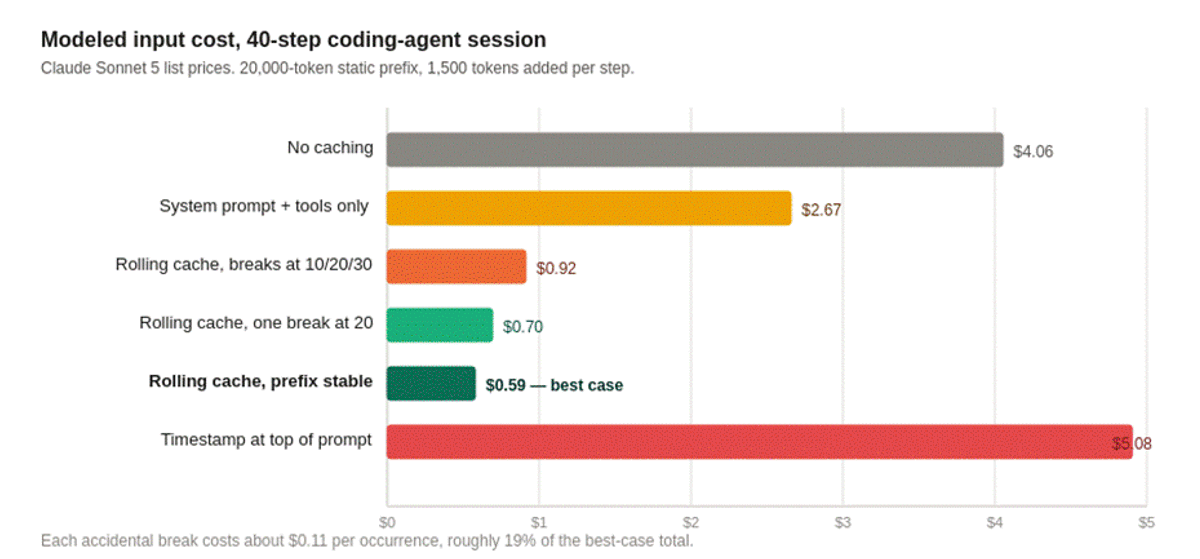
Three things follow:
The first number to pull from your own logs is the ratio of static prefix to accumulated history. If history is larger, rolling caching and append-only context matter more than anything you do to the system prompt.
The cheaper lever sits one level up: fewer steps. Input grows faster than linearly with step count because every step re-sends the history. An agent that plans before editing, and keeps its search output out of the main conversation, sends fewer and shorter prefixes to begin with. ML.ai Code was built around those two decisions, covered in the ML.ai section below.
How do you measure your prompt cache hit rate?
Read the usage fields on every response and log them per request, per workload. The totals on an invoice cannot tell you whether a hit rate fell.
| Provider | Tokens read from cache | Tokens written to cache | Uncached tokens |
|---|---|---|---|
| Anthropic | usage.cache_read_input_tokens | usage.cache_creation_input_tokens | usage.input_tokens (tokens after the last breakpoint only) |
| OpenAI | usage.prompt_tokens_details.cached_tokens (Chat Completions) or usage.input_tokens_details.cached_tokens (Responses) | See the cache-write rate on your usage dashboard | Remaining prompt tokens |
| Amazon Bedrock | cacheReadInputTokens | cacheWriteInputTokens | inputTokens |
On Anthropic, input_tokens is not your total input. Total input is the sum of all three fields.
def log_cache(usage, workload: str):
    read = usage.cache_read_input_tokens or 0
    write = usage.cache_creation_input_tokens or 0
    fresh = usage.input_tokens or 0
    total = read + write + fresh
    hit_rate = read / total if total else 0.0
    # base-rate multiples: write 1.25x, read 0.1x, fresh 1x
    relative_cost = (1.25 * write + 0.1 * read + fresh) / total if total else 1.0
    metrics.emit("prompt_cache.hit_rate", hit_rate, tags={"workload": workload})
    metrics.emit("prompt_cache.relative_input_cost", relative_cost, tags={"workload": workload})
Here is how to read the result:
Kettleson's reminder applies: the theoretical ceiling is always higher than what you see, because providers balance load across machines. Alert on a drop in the ratio. A hit rate below 100% is normal.
Is prompt caching safe for multi-tenant and regulated data?
It is safe when you know the isolation boundary and the retention policy. Both vary by provider.
Who can share your cache?
Anthropic isolates caches per organization and, on the Claude API, per workspace. Bedrock and Google Cloud isolate at the organization level. OpenAI caches are never shared across organizations or regional processing boundaries.
Inside one account, caching behaves like any shared resource. AWS recommends a tenant prefix for multi-tenant apps: prepend a SHA-256 hash of the tenant ID to the cached content, which gives each tenant its own entry for roughly 16 extra tokens.
import hashlib
instructions = f"{hashlib.sha256(tenant_id.encode()).hexdigest()}:{INSTRUCTIONS}"
Why cache timing is a side channel
A hit returns the first token faster, and anyone can measure that. Gu et al. ran statistical timing audits on real APIs and detected global cache sharing across users at seven providers, OpenAI among them, before providers moved to per-organization isolation. The same timing gap leaked a model detail: evidence that OpenAI's embedding model is a decoder-only transformer. OpenAI's guide now states that caches are not shared across organizations. Inside your own organization, the rule is the same: one tenant's content should never share a cache entry with another's.
What is retained, and for how long
Anthropic states that caching is eligible for zero data retention, that KV representations and hashes are held in memory only, and that raw prompt text is not stored. On OpenAI models before GPT-5.6, extended retention may store encrypted KV tensors in GPU-local storage. Organizations without zero data retention default to 24-hour retention on models that support both options. Organizations with it default to in-memory. Check your organization's setting before you assume either.
How does ML.ai keep coding-agent sessions cheap to cache?
ML.ai builds the layer that decides what goes into each request, which is where cache hit rates are won or lost. There are two products for this reader.
ML.ai Code: fewer, shorter prefixes from the editor
ML.ai Code is an AI coding agent for VS Code and Cursor. It reads the repository, proposes changes, and runs commands after you approve them. Several of its controls map directly to the caching mechanics above.
One habit to pair with it: ML.ai Code lets you set reasoning effort per message, from low to max. Both Anthropic and OpenAI render effort into the prompt, so changing it can void the message cache on some models. Set effort when a task starts and keep it for that task.
Install ML.ai Code on the VS Code Marketplace and open an existing project. Your first request can be read-only, such as “Explain how authentication is wired here. Do not modify files.”
ML.ai Inference: routing that respects what the cache is worth
For teams running agents and pipelines at volume, ML.ai Inference puts one endpoint in front of more than 40 models and sends each request to the most cost-efficient model that still clears your quality bar. It mirrors your existing frontier calls in a shadow phase with no user impact, fine-tunes task models on that traffic, and shifts load only after your evals pass.
ML.ai's published ML.ai Code example maps step types to fixed tiers: classifying intent and extracting fields run on ML.ai Standard, while drafting and verifying run on ML.ai High. The published example puts a completed task at $0.43 against $0.70 when every step runs on a frontier model. NeoSapien, which runs a voice-first consumer assistant, reported a 42% lower monthly AI bill, 28% faster responses, and zero quality regressions, with full rollout in 21 days.
If your bill is mostly re-read context and you want a second set of eyes on the layout, book a 30-minute call. ML.ai runs a 30-day pilot on one workload with the cost and quality targets agreed in writing first, and you owe nothing if they are missed. For the wider comparison, see ML.ai's review of LLM gateways on routing, caching, and cost.
Where to start with prompt caching this week
You now know what the cache stores, why one read pays for a 5-minute write, which 10 settings void it without an error, and which layout moves teams such as Warp, Manus, and ProjectDiscovery used to reach high hit rates.
Start with one query. Add the three cache usage fields to your request logs, compute hit rate per workload, and look at the lowest one. In most agents, the fix is moving a single changing value below the last stable block.
Then reduce what you send in the first place. If your coding agent explores a repository from scratch on every task, install ML.ai Code and start the next task in Plan mode. If the bill is spread across many agents and pipelines, start an ML.ai Inference pilot on the workload with the lowest hit rate.
Frequently Asked Questions
Does prompt caching work with the Batch API?
Yes on Anthropic, where caching multipliers stack with the 50% batch discount. On OpenAI, the cookbook notes that pre-GPT-5 models are not cached on the Batch API. Its author measured Flex processing with extended caching at an 8.5% higher hit rate than Batch across 10,000 requests, a 23% cut in input token cost, at the same 50% discount.
Do cached tokens count toward rate limits?
On Anthropic, no. Its documentation says cache hits are not deducted against your rate limit, which makes a high hit rate a throughput gain as well as a cost gain. Check your provider's rate-limit documentation for its rule.
Can I cache images, PDFs, and audio?
Yes. Anthropic caches tools, system blocks, text, images, documents, tool calls, and tool results, but not thinking blocks directly or empty text blocks. OpenAI caches text, images, documents, and supported audio. The cookbook lists a 98.75% discount on cached audio input for gpt-realtime.
Does prompt caching help RAG when retrieved chunks change on every query?
Only for the part before the first chunk. The provider APIs covered here require an exact prefix match, so put instructions and stable documents first and retrieved chunks last. Research systems such as CacheBlend reuse KV caches for chunks in any position by recomputing a small subset of tokens, reporting 2.2 to 3.3 times faster TTFT, but that applies to self-hosted serving.
Why is my cache hit rate below 100% when my prompt never changes?
Caching is best-effort. Load balancing, machine overflow, expiry, parallel requests sent before the first response, and cross-region routing all cause misses on identical prompts. Look for a drop in the trend, and use the provider's diagnostics tool to confirm the prefix really is identical.
Should I lengthen a short prompt to reach the caching minimum?
Often, yes. OpenAI's cookbook works the example: a 900-token prompt never caches, while an 1,100-token prompt with a 50% hit rate saves 33% on input tokens. Anthropic's docs make the same recommendation for prompts just under the minimum. With a 1.25x write charge, you need at least one read per write for the change to pay.
Written by
Taran Srivastava
Senior Product Manager