Cursor vs GitHub Copilot: Which Fits High-Volume Engineering Teams in 2026?

Taran Srivastava
Senior Product Manager

GitHub Copilot fits a high-volume team when your code, reviews, and procurement already run through GitHub and Microsoft, your developers work across several IDEs, and most AI use is completions and chat.
Cursor fits when the team is ready to standardize on one editor and runs agent-heavy, multi-file, parallel work where deeper agent tooling pays for a seat that costs about twice as much. For 50 engineers, the seats alone come to $11,400 a year on Copilot Business against $24,000 on Cursor Teams. Since June 2026, both tools also bill real model usage on top of the seat, so the number that decides the choice at scale is your cost per merged change.
This blog gives an engineering lead the pieces to make that call with evidence: a dedicated breakdown of each tool, the seat and usage math at 50 and 200 engineers, what six studies and rollouts actually measured, what developers say on the forums, and a 30-day pilot plan you can run on your own repositories.
Why are high-volume teams comparing Cursor and GitHub Copilot right now?
Teams usually reopen this comparison because the bill changed shape. Three shifts landed within twelve months, and each one changes which tool looks cheaper.
Both tools now meter model usage on top of the seat
On 1 June 2026, GitHub moved every Copilot plan to usage-based billing: premium requests were retired, and each plan now includes a dollar allotment of GitHub AI Credits drawn down by input, output, and cached tokens.
ML.ai's breakdown of that change in the GitHub Copilot alternatives guide covers the details, including the end of the fallback to a cheaper model. Cursor made the same move a year earlier: in June 2025 it replaced 500 fast requests on Pro with $20 of usage at API rates, and in June 2026 it split Teams into Standard and Premium seats. On both tools, the seat price is now a floor.
Agent work multiplied tokens per developer
Chat answers are cheap.
Agent sessions that read files, run tests, and retry are not, because every turn re-sends context. That is why the same seat can cost one developer $15 a month in usage and another $300. The LLM inference cost guide shows one production coding-agent bill where 86.5% of spend went on cache reads, not generated code.
Teams already run more than one tool
According to figures compiled by Uvik from the Stack Overflow and JetBrains surveys, 59% of developers use three or more AI coding tools in parallel, and JetBrains found 29% of developers use Copilot at work against 18% for Cursor. So the real decision for many leads is which tool becomes the paid default, and what you measure to justify it.
How do Cursor and GitHub Copilot compare at a glance?
The table compares the two on the factors that decide team-scale rollouts. Prices are list prices from each vendor's pricing page in September 2026.
| Decision factor | GitHub Copilot | Cursor |
|---|---|---|
| What it is | Extension across VS Code, Visual Studio, JetBrains, Xcode and more, plus agents on GitHub.com and a CLI | A standalone AI-first editor (a VS Code fork), plus CLI, cloud agents, and GitHub bots |
| Team seat price | Business $19, Enterprise $39 per user per month | Teams Standard $40, Teams Premium $120 per user per month; Enterprise custom |
| Usage included per team seat | Credits equal to the seat price (1,900 on Business, 3,900 on Enterprise; 1 credit = $0.01) | Standard allowance; Premium carries 5x Standard's usage |
| What happens past the allowance | Governed by credits and admin budgets; no fallback model | On-demand usage billed in arrears, with spend controls |
| Completions | Included and consume zero credits | Tab and Auto included; frontier models draw from a usage pool |
| Agent depth | Agent mode, cloud coding agent assigned from issues, code review | Agent, parallel agents, cloud agents, Projects with coordinator agents, Bugbot, Security Review, Rollouts |
| Where code runs | GitHub's cloud and your runners | Cursor's cloud, or self-hosted machines inside your network |
| Governance | Policies, content exclusion, audit logs, IP indemnity on org plans | Privacy mode, SSO on Teams; SCIM, audit logs, pooled usage on Enterprise |
| Procurement | Covered by an existing Microsoft or GitHub agreement | A new vendor review |
Sources: GitHub Copilot plans, GitHub Docs, Cursor pricing, Cursor Teams pricing docs, Cursor changelog.
The table points to one pattern. Copilot's advantages sit around the code: distribution, procurement, and the GitHub platform. Cursor's advantages sit inside the work: what the agent can do with a repository once it is running.
What does GitHub Copilot do well for a large engineering team?
GitHub Copilot's strength at scale is that it arrives where your engineers already work. It installs into the editors they already use, runs agents on the platform that already holds your code and reviews, and is covered by the agreement your legal team has already signed.
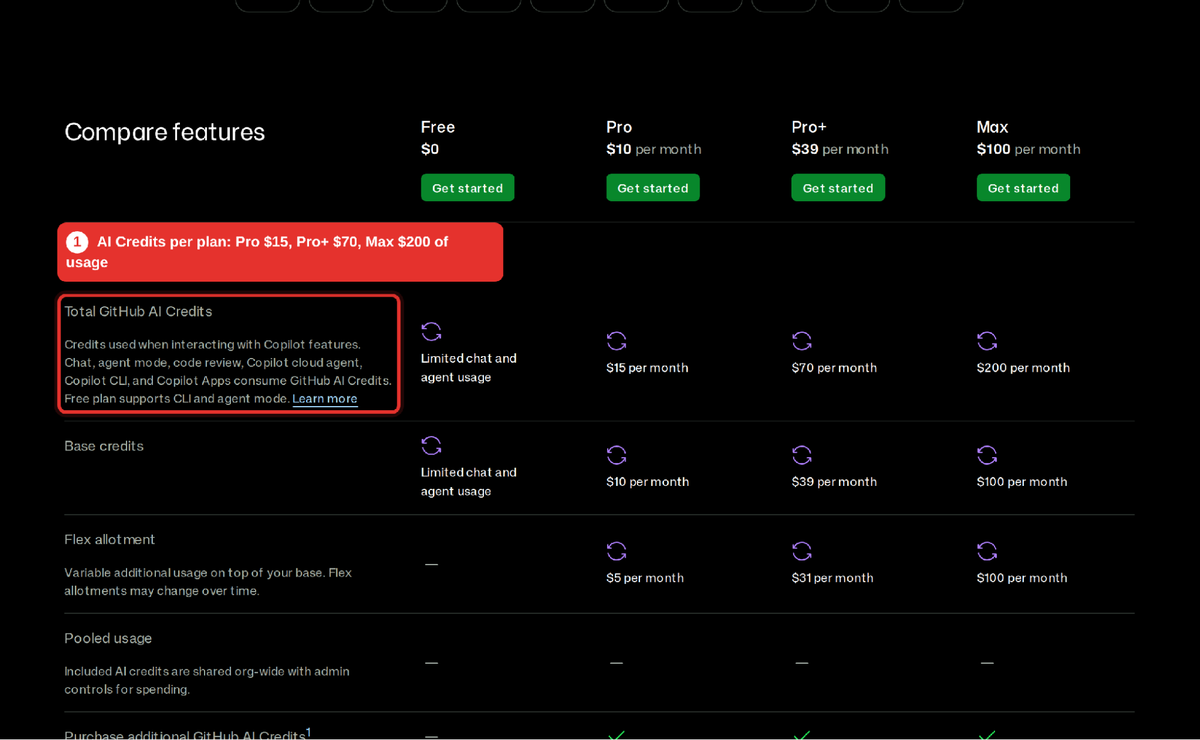
Since June 2026, chat, agent mode, code review and the cloud agent draw on AI Credits. Source: GitHub Copilot plans.
It reaches every IDE on the team
Copilot runs in VS Code, Visual Studio, JetBrains IDEs, and more, plus the terminal and GitHub Mobile. For a company where backend teams live in IntelliJ, game teams in Visual Studio, and web teams in VS Code, that breadth decides the question before features do. Cursor asks every developer to move into one editor.
Agents and review run on the platform that holds your code
Copilot's cloud agent can be assigned an issue and open a pull request, and Copilot code review comments on PRs inside GitHub. For teams that already route everything through GitHub Issues, Actions, and branch protection, there is no new surface to govern. One caution from the billing change: code review now draws GitHub Actions minutes in addition to AI Credits, so a review-heavy rollout has two meters.
Procurement, policy, and indemnity are already solved
GitHub's own plan FAQ says the organization plans differ from individual plans mainly in license management, policy management, and IP indemnity. Microsoft reports that 90% of the Fortune 100 use Copilot, and in a regulated company that adoption often reflects an existing data agreement more than a model preference. If a new vendor review takes months at your company, Copilot's effective price includes those months saved.
The billing change moved the risk to agent-heavy users
Business includes 1,900 credits ($19) per seat and Enterprise 3,900 ($39), per GitHub Docs. Completions and next-edit suggestions stay free, so a team that mostly tab-completes pays close to the seat price. A team running long agent sessions on premium models can burn through $19 in days, and without a fallback model, work stops at the budget line.
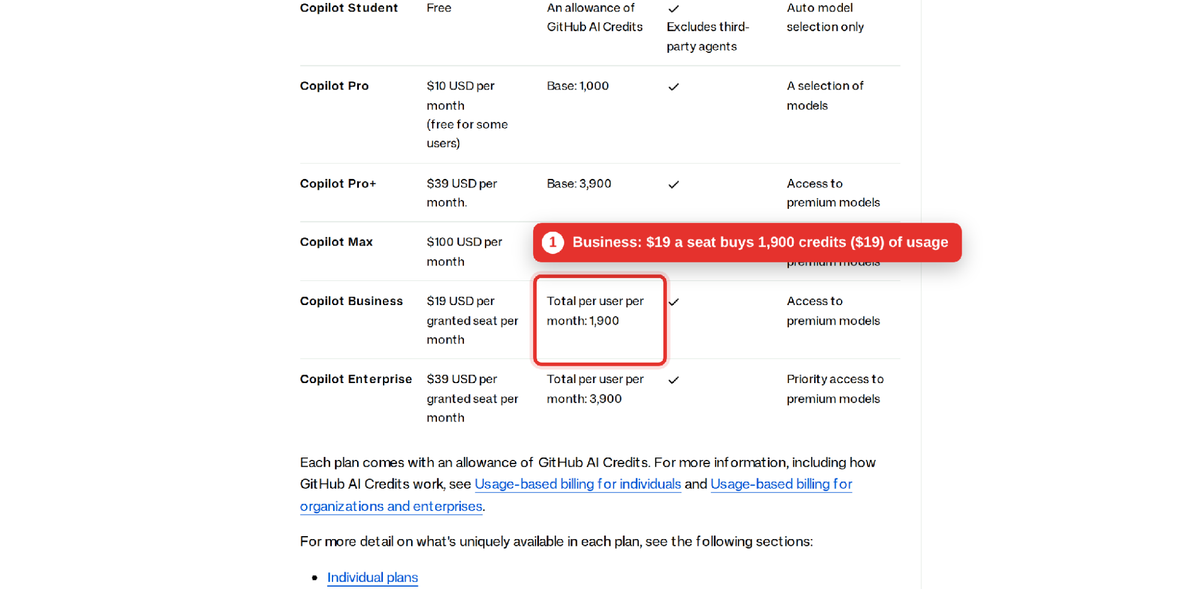
Copilot Business: $19 per seat includes 1,900 credits, worth $19 of usage. Source: GitHub Docs.
Where Copilot falls short for high-volume agent work
Copilot's agents are improving, but its design centers on assisting one developer in one editor, with heavier autonomy pushed to GitHub.com. Teams that want many agents running in parallel against one codebase, with shared context that persists across tasks, will find more of that built into Cursor today. The Okta field study later in this guide also shows the organizational risk: individual developers felt faster, while team output metrics did not move.
What does Cursor do well for a large engineering team?
Cursor's strength at scale is agent depth: it is built around the agent doing multi-file work, and in 2026 it added the pieces that let a team run many agents at once and check their output before and after merge.
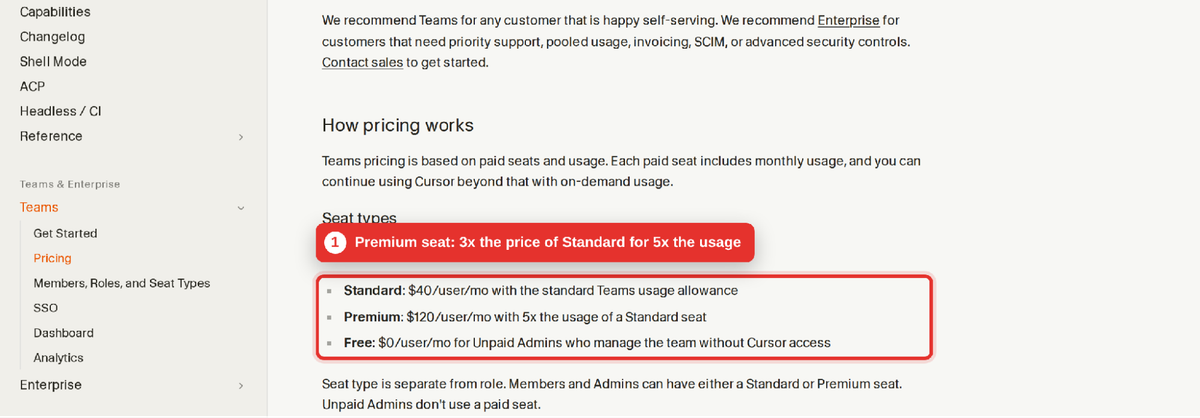
Cursor Teams: Standard at $40, Premium at $120 with five times the usage. Source: Cursor Docs.
The editor is built around the agent
Cursor is a VS Code fork, so extensions and keybindings carry over, but the product assumes the agent is the main way work gets done. Cursor's own research with University of Chicago economist Suproteem Sarkar found that organizations merged 39% more pull requests after Cursor's agent became the default, and that senior developers accepted agent edits at higher rates than juniors. Treat that as a vendor-commissioned study, but note the mechanism it describes: experienced developers wrote more plans before generating code.
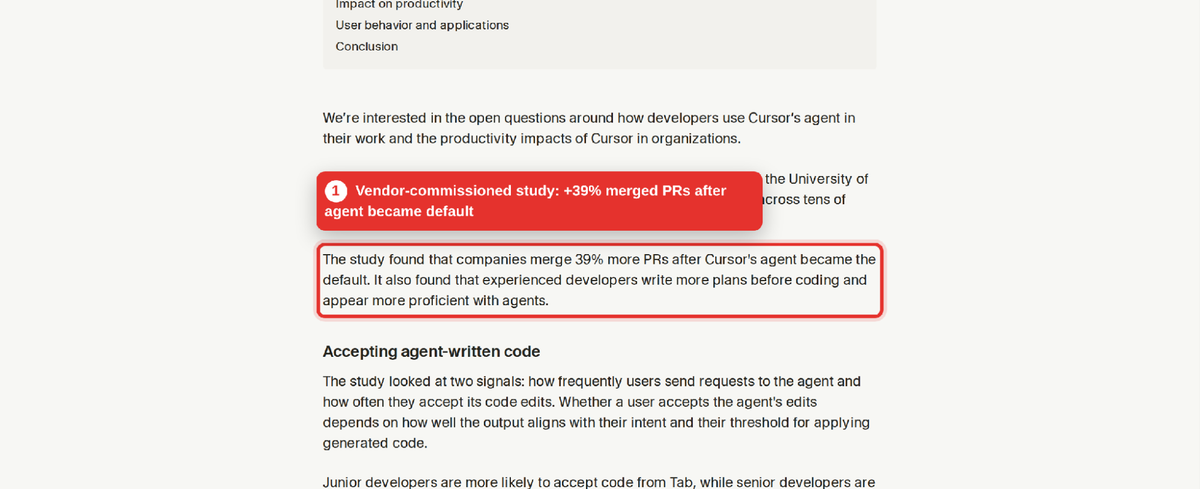
The +39% merged PR figure comes from a study Cursor published with a University of Chicago researcher. Source: Cursor blog.
Parallel agents, cloud agents, and Projects
Cursor 2.0 (October 2025) added parallel agents on git worktrees or remote machines. In September 2026, Projects added a coordinator agent that plans a large body of work, delegates it to many subagents, keeps shared context files across machines, and can watch a Slack channel or a schedule for new work. For a platform team running migrations across dozens of services, this is the feature set Copilot does not match inside the editor.
Review, security, and deploy checks after the code is written
Bugbot reviews pull requests, and on 23 September 2026, Cursor launched Security Review and Rollouts for Teams and Enterprise. Security Review posts one comment per PR covering injection, auth bypasses, committed secrets, SSRF, and vulnerable dependencies. Rollouts writes a monitoring plan for each PR and checks logs, metrics, and traces per environment after deployment. These matter because, as the research section shows, the cost of AI-written code tends to surface after the merge.
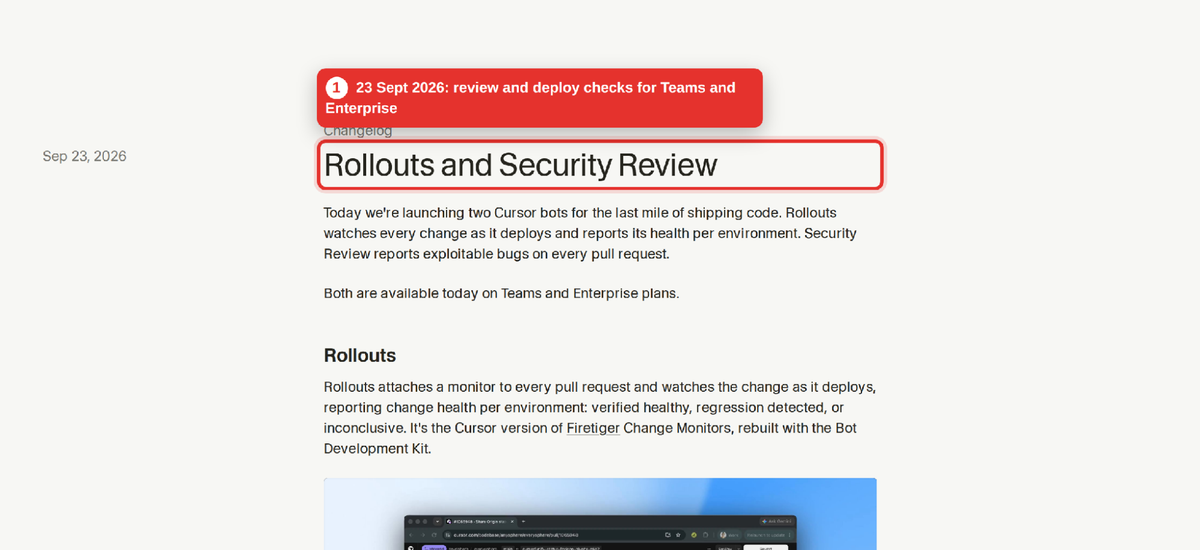
Cursor added PR security review and post-deploy checks on 23 September 2026. Source: Cursor changelog.
Code and secrets can stay inside your network
Since September 2026, Cursor supports self-hosted machines that keep tool execution, build outputs, and secrets on your infrastructure while the agent runs. Privacy mode, set by a team admin, guarantees code is not used for training by Cursor or its model providers, and Cursor lists SOC 2, ISO 27001, and ISO 42001 certifications on its pricing page.
Where Cursor falls short for high-volume teams
Three trade-offs recur. It is one editor, so JetBrains and Visual Studio shops must switch or run two tools. Pricing has moved several times: after the June 2025 change, Cursor committed to refunding unexpected charges incurred between 16 June and 4 July. And the heaviest users on third-party models (Claude, GPT) draw from the pool that empties fastest, and Cursor now offers a $120 Premium seat with five times the Standard allowance for them.
What does each tool cost at 50 and 200 engineers?
At list price, Cursor Teams Standard costs about twice Copilot Business per seat, and the gap scales linearly with headcount. Usage overages then sit on top of both, and they depend on how much agent work your team runs.
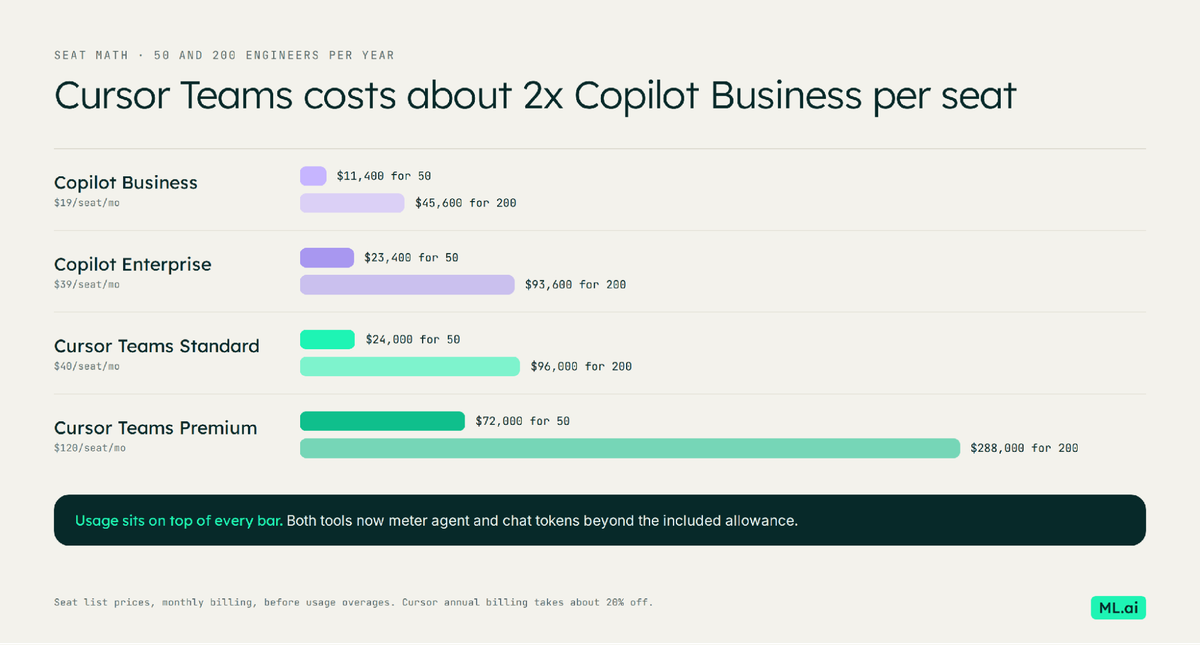
Seat list prices per year, before usage overages.
| Plan | Per seat per month | 50 engineers per year | 200 engineers per year |
|---|---|---|---|
| Copilot Business | $19 | $11,400 | $45,600 |
| Copilot Enterprise | $39 | $23,400 | $93,600 |
| Cursor Teams Standard | $40 | $24,000 | $96,000 |
| Cursor Teams Premium | $120 | $72,000 | $288,000 |
Seat prices only, monthly billing, before usage beyond the included allowance. Cursor's annual billing takes about 20% off its seats.
Our read: team seats mostly pay for governance
We compared the model usage each plan includes per dollar of seat price, using the figures published on each vendor's pricing pages. The pattern is the same on both tools: the individual power-user plans include more usage per dollar than the team plans.
| Plan | Price | Included model usage | Usage per seat dollar |
|---|---|---|---|
| Copilot Business | $19 | $19 in credits | 1.0x |
| Copilot Pro+ (individual) | $39 | $70 in credits | 1.8x |
| Copilot Max (individual) | $100 | $200 in credits | 2.0x |
| Cursor Pro (individual) | $20 | $20 third-party usage | 1.0x |
| Cursor Ultra (individual) | $200 | $400 third-party usage | 2.0x |
| Cursor Teams Premium vs Standard | 3x the price | 5x the usage | 1.67x Standard |
Sources: GitHub Copilot plans, Flexprice's summary of Cursor's published pools, Cursor Teams docs.
What that means in practice: on a team plan you pay for admin controls, SSO, policy, and billing in one place, and the usage allowance is modest. Your agent-heavy developers will exceed it on either tool, so budget overages per heavy user, and on Cursor, compare the cost of Premium seats for those users against on-demand spend.
What does the research actually say about productivity with each tool?
Measured at the task level, both tools make developers faster. Measured at the team or repository level over months, the gains shrink, fade, or show up alongside new costs. For a high-volume team, the second measurement is the one that pays the bill.
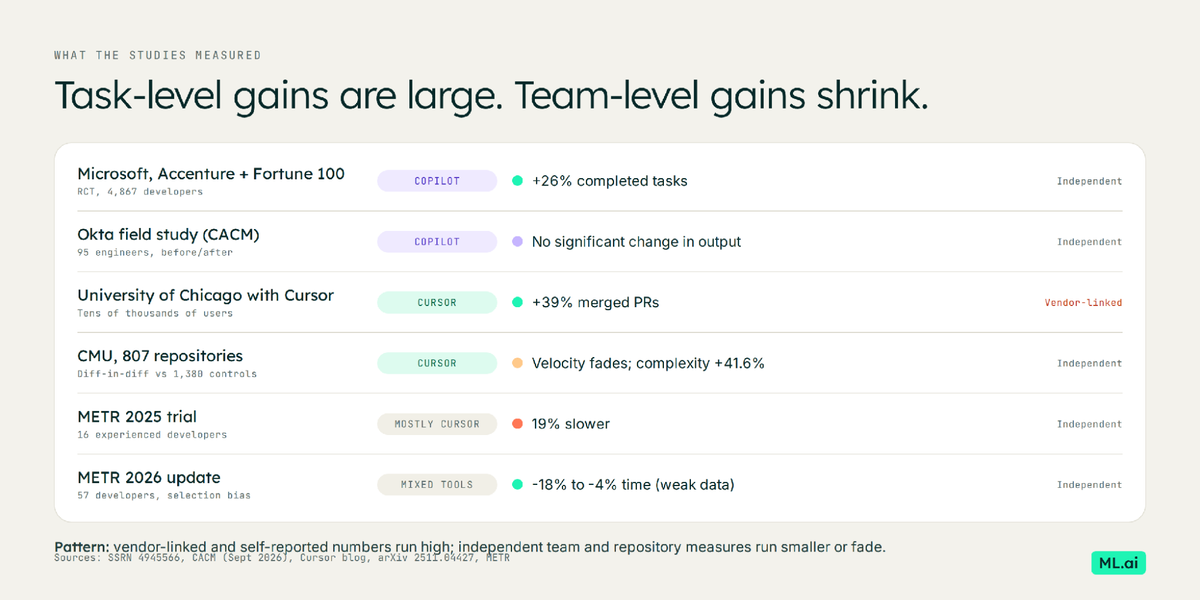
Independent team-level measures come in smaller than vendor-linked and self-reported numbers.
Copilot at Okta: developers felt better, output metrics did not move
In a field study at Okta published in Communications of the ACM in September 2026, Fei Liu and Todd McKinnon linked survey responses from 95 engineers to their GitHub and Jira metrics before and after the Copilot rollout. Engineers reported large gains in motivation and perceived skill, and self-reported weekly hours fell from 44.77 to 40.83. Yet the authors found "no statistically significant improvement in engineering output metrics". Only one output metric rose significantly: the number of PR reviews engineers performed. They call this the efficiency-throughput gap.
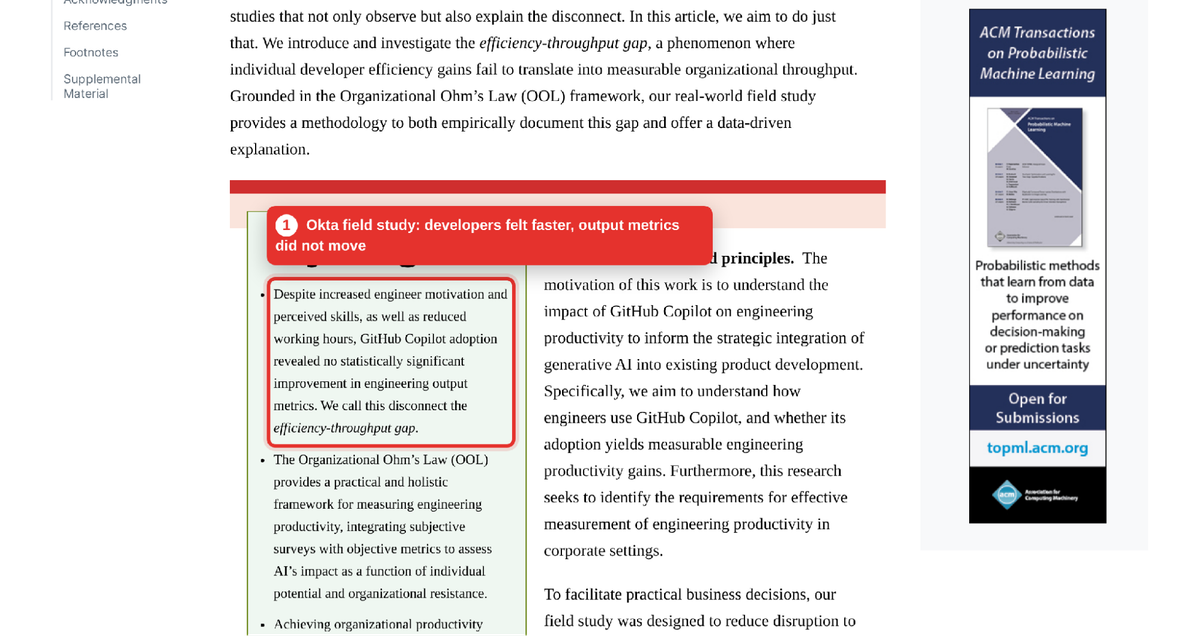
Okta's field study found no statistically significant improvement in output metrics after Copilot. Source: Communications of the ACM.
Copilot across Microsoft, Accenture, and a Fortune 100 company: 26% more completed tasks
A set of three randomized field experiments covering 4,867 developers found a 26% increase in completed tasks for developers given Copilot, measured through pull requests, commits, and builds. The gains were larger for less experienced developers. This is the strongest pro-Copilot evidence, and it measures individual output, which is exactly where Okta also saw movement.
Cursor in 807 open-source repositories: a fast start, then complexity
Researchers at Carnegie Mellon compared 807 repositories that adopted Cursor with 1,380 matched repositories that did not. Lines added jumped 281% in the first month and 48% in the second, then faded toward baseline. Meanwhile static analysis warnings rose about 30% and code complexity about 41.6%, and the authors report "a substantial and persistent increase in static analysis warnings and code complexity". Their models also estimate that doubling code complexity reduces later velocity by 64.5%.
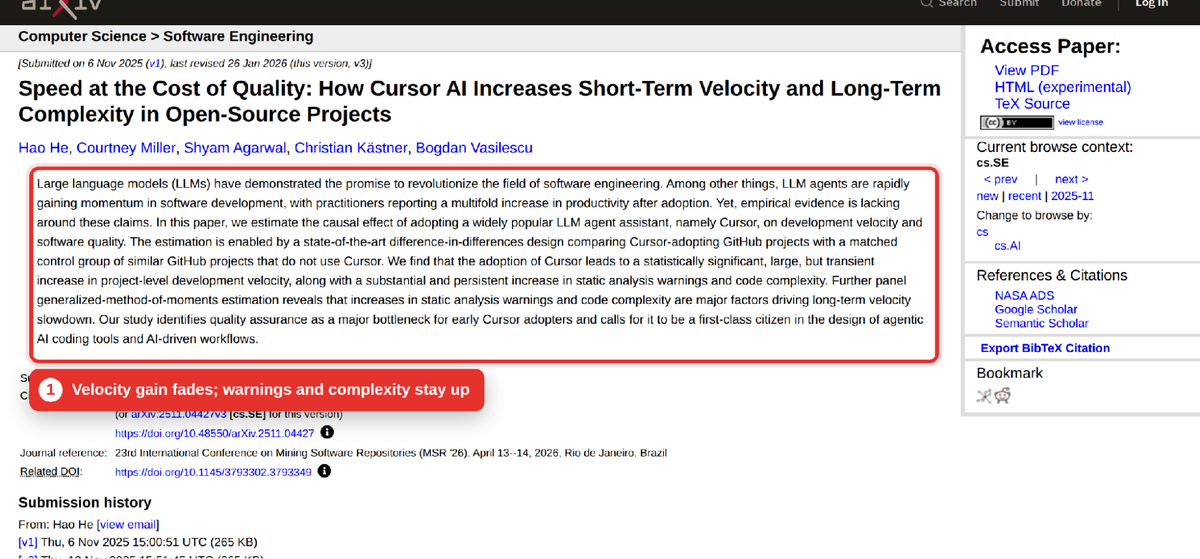
Velocity rose briefly after Cursor adoption; warnings and complexity stayed higher. Source: arXiv 2511.04427.
METR: the 2025 slowdown is out of date, and the new data is hard to read
METR's 2025 trial found experienced open-source developers took 19% longer with AI tools, mainly Cursor with Claude. In its February 2026 update, METR estimated a speedup of 18% for returning developers and 4% for new recruits, but warned the data is weak because many developers now refuse to work without AI. The team's own reading is that developers "are more sped up from AI tools now" than in early 2025, with the size of the gain still uncertain.
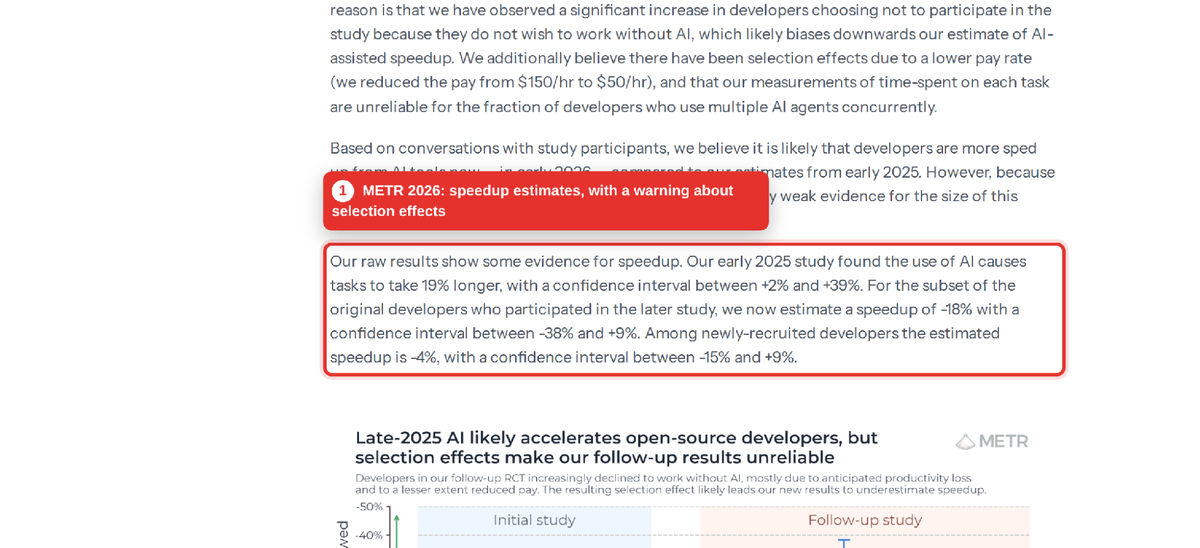
METR's 2026 update reports speedup estimates with a warning about selection effects. Source: METR.
Reading the evidence together
Put side by side, one pattern holds across tools. Vendor-linked and self-reported numbers are large, and independent measures of team throughput are smaller or temporary. The same studies point at where the gain leaks: into review load (Okta), into complexity that slows later work (CMU), and into tasks developers choose not to measure (METR). That makes the most useful question for a lead: which tool, set up how, turns individual speed into merged, maintainable changes at a cost you can predict?
Where does the bottleneck move after you roll out either tool?
It moves downstream, to review, quality, and token spend. Writing code gets faster, so the steps after writing it become the constraint, and each tool is now adding features aimed at those steps.
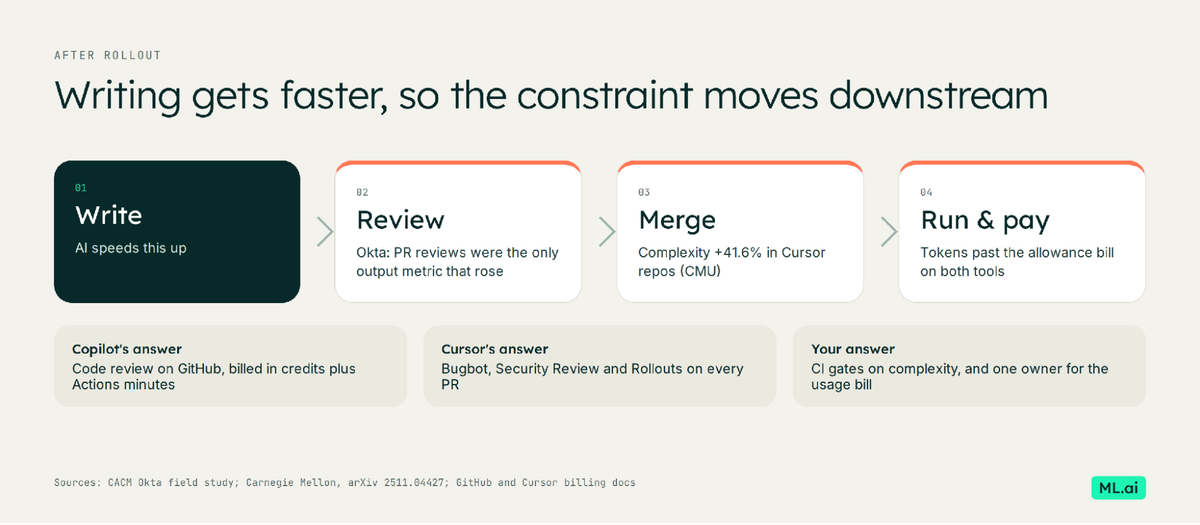
After rollout, review load, complexity and token spend become the constraint.
Review load rises first
At Okta, PR reviews were the one output metric that increased. More AI-written code means more diffs for senior engineers to read, and the reviewer pool does not grow with the seat count. Copilot's answer is code review on GitHub (billed in credits plus Actions minutes); Cursor's is Bugbot and Security Review. Measure median time-to-first-review before and after rollout, because it tells you whether the gain is reaching production.
Complexity arrives quietly
The CMU study found complexity rose even after controlling for codebase growth. A team that turns on either tool without a static-analysis gate on PRs is borrowing velocity from next quarter. Put complexity and warning thresholds in CI before you widen the rollout.
Token spend becomes a line item someone owns
Under usage billing, a few heavy agent users can drive most of the bill. Both tools now show per-user usage to admins. Decide in advance who reviews that dashboard, what a heavy user costs you, and when a heavy user moves to a Premium seat, a higher Copilot budget, or a cheaper model for routine steps.
How have real engineering organizations rolled out Cursor and GitHub Copilot?
Four large rollouts show the shape of each tool at scale. For each one, the useful part is what they measured and what they kept an eye on.
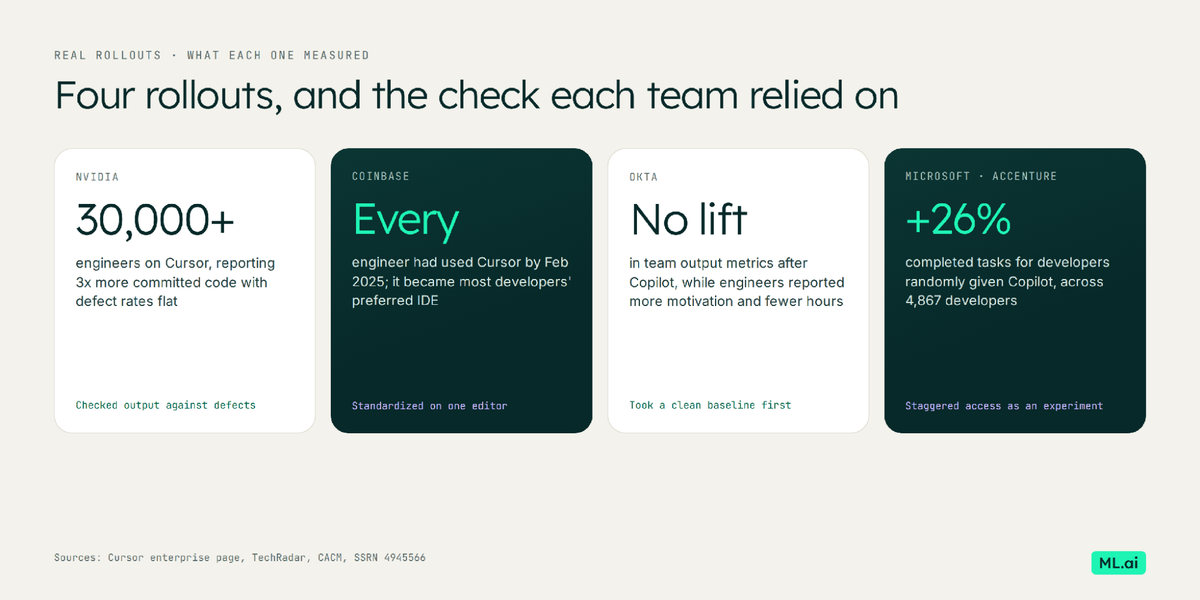
Four rollouts and the check each team relied on.
NVIDIA: Cursor across 30,000+ engineers, with defect rates as the check
NVIDIA's CEO is quoted on Cursor's enterprise page: "My favorite enterprise AI service is Cursor." Cursor reports that more than 30,000 NVIDIA engineers now use it and commit three times more code, with defect rates flat, according to NVIDIA. Observers questioned volume as a metric, and the flat defect rate is the claim that matters.
What to copy: pair every output metric with a quality metric that you already trust, such as escaped defects or reverts.
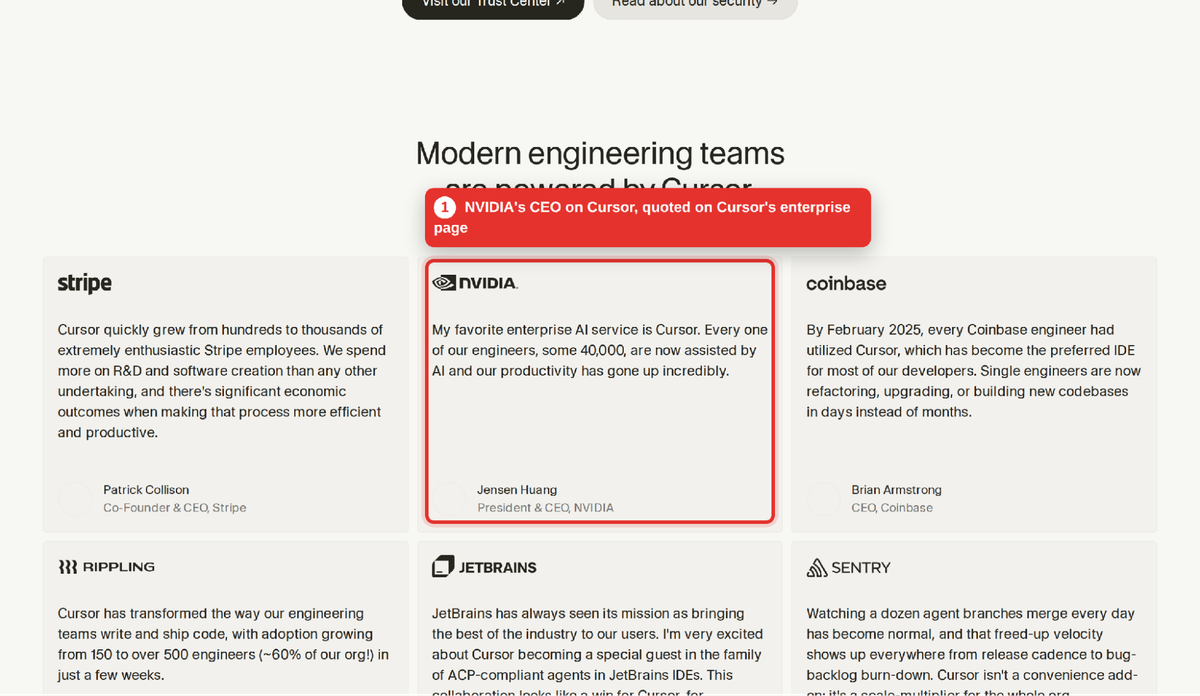
NVIDIA's CEO and Coinbase on Cursor, quoted on Cursor's enterprise page.
Coinbase: every engineer on Cursor within a year
Cursor's enterprise page also cites Coinbase: by February 2025 every Coinbase engineer had used Cursor, and it had become the preferred IDE for most of them, with single engineers refactoring or building codebases in days. Coinbase standardized on one editor, which is the precondition for Cursor's advantages to show up.
What to copy: decide the editor question first. Cursor pays off when it is the team's default editor, and much less when it is one option among four.
Okta: Copilot rolled out with a measurement design built in
Okta rolled out Copilot, discouraged unsanctioned AI tools so the baseline stayed clean, and linked survey data to engineering metrics through its developer-analytics platform. That design is why it could see the efficiency-throughput gap at all. The authors' conclusion is that realizing gains requires changing teams, processes, and infrastructure alongside the tool.
What to copy: take a three-month baseline before rollout, and measure team throughput (merged PRs, cycle time, review time) as well as developer sentiment.
Microsoft and Accenture: randomized access to Copilot
Randomizing who got Copilot first turned an ordinary rollout into an experiment. The 26% gain in completed tasks came from comparing developers who received access with those who had not yet.
What to copy: if you are rolling out to 200 engineers, stagger it by team and compare the early and late groups on the same metrics.
What are developers saying about Cursor and GitHub Copilot on the forums?
Developer discussion on Reddit, Hacker News, and the Cursor forum keeps returning to cost predictability more than model quality. Four threads come up repeatedly.
Cursor's pricing changes cost it trust
The June 2025 switch to usage-based Pro triggered Reddit threads and Hacker News discussions with thousands of upvotes, and Cursor opened a pricing megathread to field the complaints. Cursor clarified that median Pro usage covered roughly 225 Claude Sonnet requests before the pool ran out. In March 2026, an r/cursor thread raised a subtler concern: agent planning and context-caching tokens count against the pool without being visible to the person typing the prompt.
Copilot's billing change moved the complaint to GitHub
After GitHub's usage-billing announcement, ML.ai counted all 551 comments on the largest Hacker News thread for its Copilot alternatives analysis: 33% used cost or billing language, and 12% mentioned token consumption. The same thread surfaced why enterprises stay: an existing Microsoft data agreement covers Copilot, while a new vendor needs lawyers.
Developers run both
Many developers keep Copilot for completions across IDEs and use Cursor or another agent tool for heavy multi-file work. That matches the survey data on tool stacking, and it is a legitimate end state for a team, as long as someone owns the combined bill.
Hands-on video comparisons worth watching
If your team wants to see both tools on real code before a pilot, these walkthroughs compare them side by side: DevOps & AI Toolkit: Cursor vs. GitHub Copilot, Builder.io: GitHub Copilot vs Cursor, Qodo: GitHub Copilot vs Cursor, Merge Ready: Copilot vs Cursor agent showdown, Marco Lenzo: Cursor vs GitHub Copilot, and Technical Rajni: I tested both. Several were recorded before the 2026 billing changes, so check prices against the tables above.
How should your team choose between Cursor and GitHub Copilot?
Choose by answering five questions in order, then confirm the answer with a 30-day pilot on your own repositories. The map below lays out which answer points to which tool.
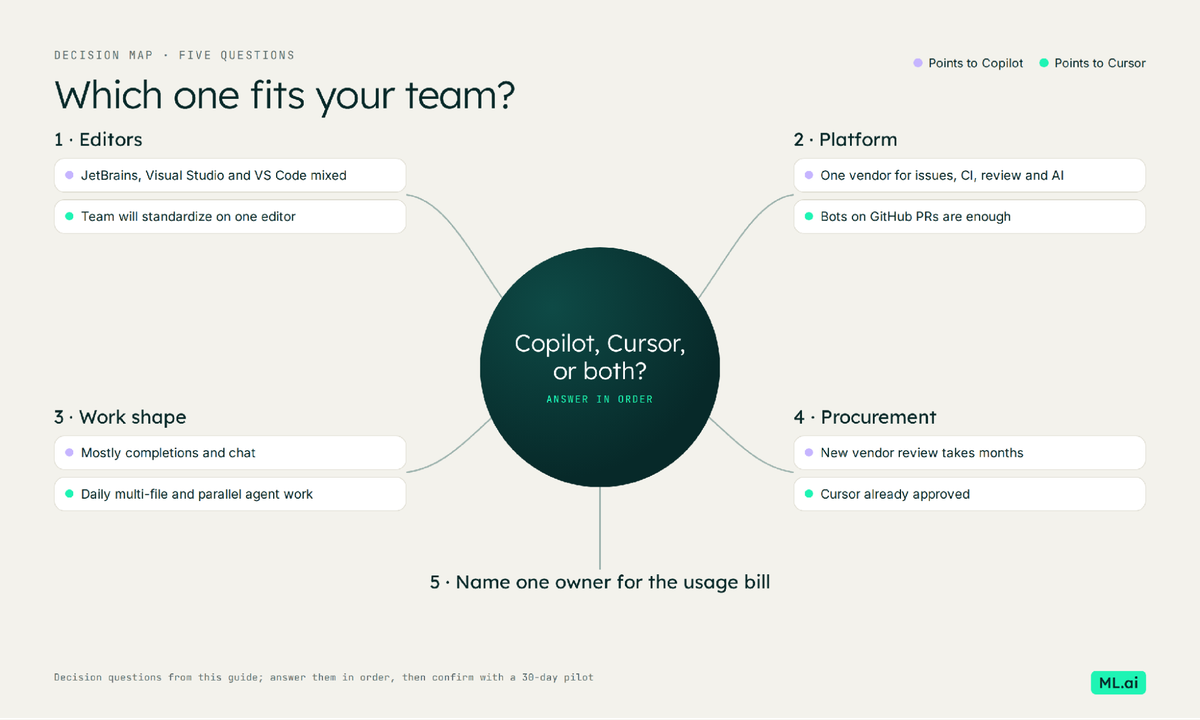
Answer the five questions in order, then confirm with a 30-day pilot.
Question 1: How many editors does your team use?
If a meaningful share of engineers work in JetBrains or Visual Studio and will not switch, Copilot is the default, and Cursor becomes an optional second tool for specific teams.
Question 2: Does your review and CI flow live in GitHub?
If issues, Actions, and branch protection all run on GitHub, Copilot's cloud agent and code review slot in without a new surface. Cursor's Bugbot and Security Review also run on GitHub PRs, so this question tips toward Copilot only when you want one vendor for everything.
Question 3: What share of work is agent-heavy?
If most developers want completions and chat, Copilot Business at $19 is hard to beat, since completions consume no credits. If a platform or migration team runs long multi-file agent sessions and parallel work every day, Cursor's agent tooling earns its higher seat price for that group.
Question 4: How long does a new vendor review take?
If adding a vendor means a security review measured in months, count that time as part of Cursor's price. If Cursor is already approved, this factor disappears.
Question 5: Who owns the usage bill?
On both tools, the seat is a floor. Pick a named owner, a monthly budget per seat, and a rule for heavy users before rollout.
A 30-day pilot that settles it
Pick two comparable teams and one real backlog. Run one tool per team for 30 days, with the same review rules, and track five numbers: merged PRs per engineer, median time to first review, revert rate, change in static-analysis warnings, and total spend divided by merged PRs. That last figure, cost per merged change, is the one that scales to 200 engineers.
Where does ML.ai Code fit alongside Cursor or GitHub Copilot?
ML.ai Code is an AI coding agent that installs into VS Code and into Cursor, so it works with either choice. It focuses on the two problems this guide keeps returning to: the token cost of agent sessions, and keeping every change reviewable before it lands.
It lowers the cost of each agent task
Most agents send every step of a task (classify the intent, extract the fields, draft the change, verify it) to the same frontier model. ML.ai Code picks the most cost-efficient model that clears your quality bar for each step. Its published breakdown for one completed task shows $0.70 with a frontier model on every step against $0.43 routed per step, about 39% less. For the math behind that approach, see the model routing guide.
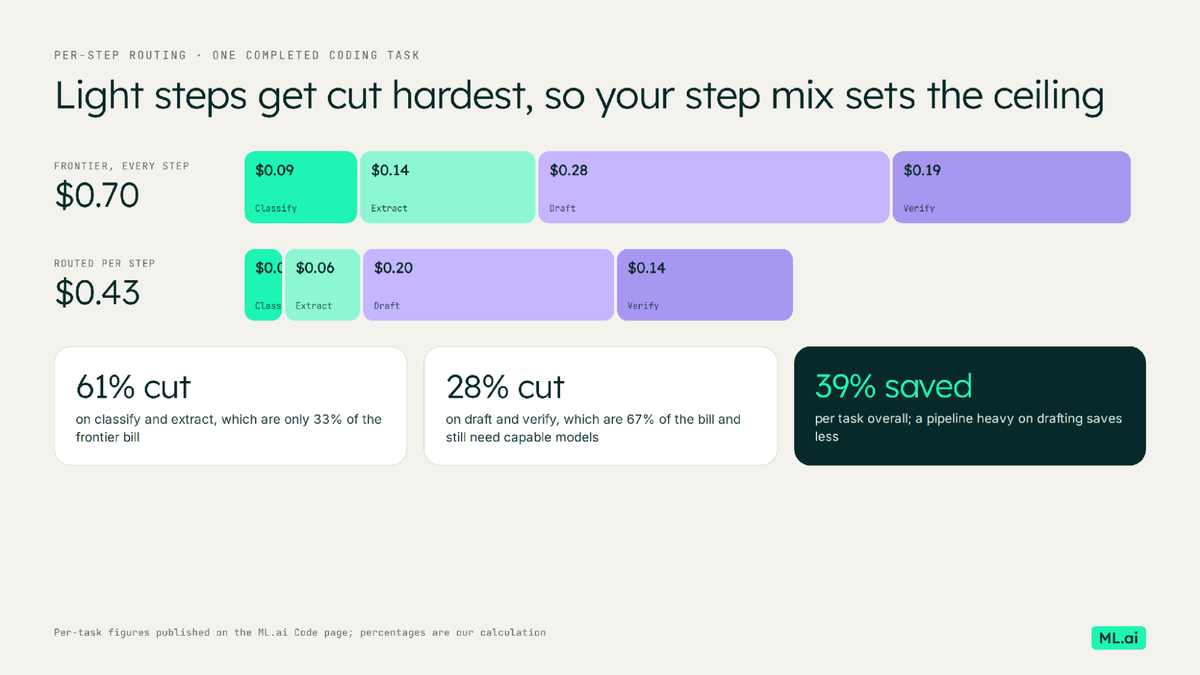
Routing each step to the cheapest capable model cut one published task from $0.70 to $0.43.
It keeps quality flat with verification
On a 50-instance slice of SWE-bench Verified, ML.ai Code solved 86% of issues against 58% for a leading frontier model in a single shot, using retries, test-driven verification, and multi-sample selection. That is the same lesson as the research above: the gain comes from the loop that checks the work.
Nothing lands without your approval
Four focused agents split the work. Explore and Architect read and plan, Plan writes a reviewable plan file, and only General can change code. A native diff opens before an edit, and nothing is written to disk until you choose Allow. Its command safety classifier parses every shell command before it runs, so sudo, xargs, and redirections cannot hide a destructive action. Your access token stays in VS Code Secret Storage, and the engine listens on localhost only.
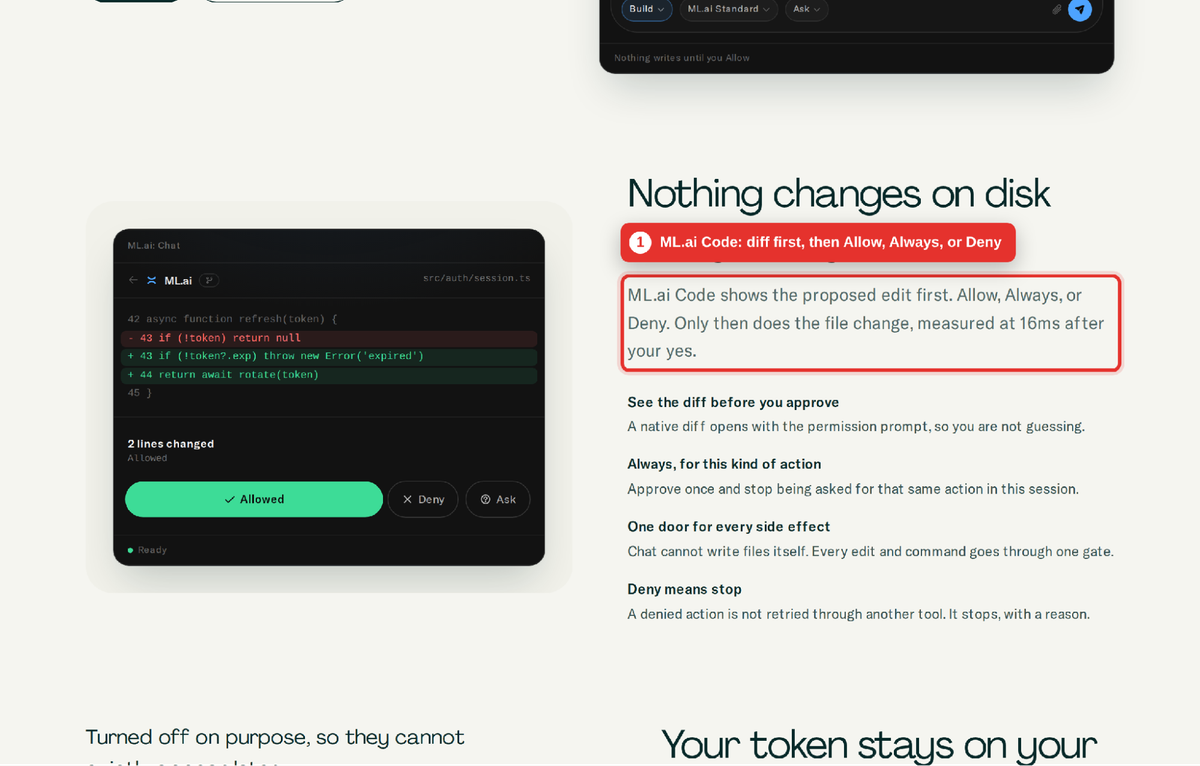
ML.ai Code opens the diff first and changes nothing until you choose Allow.
You can install ML.ai Code for VS Code (Cursor can install the same package) and start with a request that changes nothing, such as asking it to explain how authentication is wired in your repository. For a team rollout, a cost-per-task comparison against your current Cursor or Copilot setup is the fastest way to see what routing saves on your own traffic: book a call to set one up.
Pick the tool your workflow already points to, then measure cost per merged change
You can now make this call on evidence: Copilot where editors, GitHub, and procurement point to it; Cursor where one editor and heavy agent work make its depth pay; and both where teams split along those lines. The first step is small. Pull last quarter's merged PRs and review times for two teams, so your pilot has a baseline to beat.
Whichever tool you choose, agent tokens will be the fastest-growing line on the bill. ML.ai Code runs inside VS Code or Cursor, routes each step to the cheapest model that clears your bar, and shows the diff before anything changes. Install ML.ai Code, or book a call to compare cost per task on your own repositories.
Frequently Asked Questions
Is Cursor better than GitHub Copilot for large teams?
It depends on how your team works. Cursor has deeper agent tooling (parallel agents, Projects, Security Review, Rollouts) and suits teams standardized on one editor running heavy agent work. Copilot costs about half as much per seat, covers more IDEs, and fits companies already on GitHub and Microsoft agreements.
How much does GitHub Copilot cost for a team in 2026?
Copilot Business is $19 per user per month and Enterprise is $39, each including AI Credits equal to the seat price. Completions consume no credits; chat, agent mode, code review, and the cloud agent draw on credits by token use, and code review also uses Actions minutes.
How much does Cursor cost for a team in 2026?
Cursor Teams Standard is $40 per user per month and Premium is $120 with five times Standard's usage. Enterprise is custom-priced and adds pooled usage, SCIM, and audit logs. Annual billing takes about 20% off, and usage beyond the allowance is billed on demand.
Can you use Cursor and GitHub Copilot together?
Yes. Many developers keep Copilot for completions across IDEs and use Cursor for agent-heavy work. Budget for both seats plus both usage meters, and name one owner for the combined spend.
Does GitHub Copilot or Cursor make developers more productive?
Both speed up individual tasks. At Okta, Copilot improved developer motivation and hours without a significant rise in team output, and in open-source repositories Cursor raised velocity briefly while complexity rose for longer. Productivity at team level depends on review capacity and quality gates as much as on the tool.
Which is safer for enterprise code: Cursor or GitHub Copilot?
Both offer enterprise controls. Copilot's org plans include policy management and IP indemnity under existing GitHub agreements. Cursor offers privacy mode, SSO, SCIM and audit logs on Enterprise, self-hosted machines, and SOC 2, ISO 27001, and ISO 42001 certifications.
Written by
Taran Srivastava
Senior Product Manager