
October 28, 2026
OpenAI API Pricing Explained: What You're Really Paying For
 Taran Srivastava · 18 min read
OpenAI API pricing on the Standard tier is $2 per million input tokens and $10 per million output tokens for GPT-6.1 Sol, $10 and $50 for GPT-6 Astra, and $0.10 and $0.50 for GPT-6 Luna, according to the official pricing page. For an AI engineer running agents, those two numbers predict surprisingly little of the invoice.
We modeled one 40-turn coding-agent session on GPT-6.1 Sol list prices. It costs $7.40 with no caching, $1.80 with prompt caching, and $0.83 when cheap steps are routed to a smaller model. Once caching is on, hidden reasoning tokens make up 45% of what is left.
This blog covers every current price, the six meters that run on each call, how OpenAI compares with Claude, and the exact steps teams have used to cut their bill.
TL;DR
- GPT-6.1 Sol scores about the same as GPT-6 Astra on BenchLM's aggregate leaderboard (84.19 vs 84.03) at one-fifth of the price, so Astra is rarely the default choice.
- On GPT-5.6 and later, cache writes cost more than plain input: 1.25x for a 30-minute cache and 2.5x for a 12-hour one. A 30-minute cache pays for itself on the second request, a 12-hour cache on the third.
- Reasoning tokens are invisible in the response but billed at the full output rate. In OpenAI's own example, 86% of billed output was reasoning.
- Prompts above 272K input tokens switch to long-context pricing: input doubles and output rises by half.
- The service tier alone moves the same request from 0.5x (Flex and Batch) to 2x (Fast) or 6x (Ultrafast).
- Caching plus routing is where most measured savings come from. Teams report 47% to 63% from caching alone.
What does the OpenAI API cost per model in October 2026?
OpenAI now sells three general-purpose GPT-6 models at very different price points. All prices below are per one million tokens on the Standard tier, for prompts up to 272K input tokens.
| Model | Input | Cached input | 30-min cache write | 12-hour cache write | Output |
|---|---|---|---|---|---|
| gpt-6-astra | $10.00 | $1.00 | $12.50 | $25.00 | $50.00 |
| gpt-6.1-sol | $2.00 | $0.10 | $2.50 | $5.00 | $10.00 |
| gpt-6-luna | $0.10 | $0.01 | $0.125 | $0.25 | $0.50 |
A few specialized models sit next to them on the pricing page:
- gpt-5.3-codex costs $1.75 input and $14 output, with cached input at $0.175.
- chat-latest, the model behind ChatGPT, costs $5 input and $30 output.
- gpt-5.6-sol is listed at $4 input and $20 output, on promotional pricing that OpenAI says runs at least through November 21, 2026.
What changes when a prompt crosses 272K tokens?
OpenAI splits every flagship price into a short and a long context band. Short means 272K input tokens or fewer, and anything above that is billed at the long rate.
| Model | Long-context input | Cached input | Output |
|---|---|---|---|
| gpt-6-astra | $20.00 | $2.00 | $75.00 |
| gpt-6.1-sol | $4.00 | $0.20 | $15.00 |
| gpt-6-luna | $0.20 | $0.02 | $0.75 |
The band is set per request, so a coding agent that drifts from 260K to 280K tokens of context pays the long rate on that whole turn.
Which pricing changes landed in 2026?
The price sheet looks very different from a year ago, and older guides still quote models that are no longer the default.
- Priority became Fast mode. OpenAI renamed Priority processing to Fast mode on July 30, 2026, and added an Ultrafast tier above it.
- Cache writes became a billed line. Models from GPT-5.6 onward charge for writing tokens into the cache, where earlier models wrote for free.
- The top of the range got more expensive. OpenAI's highest standard output price rose from $10 (GPT-5, August 2025) to $50 (GPT-6 Astra, September 2026), per Whizi's price tracker.
- Regional processing costs extra. Data residency and FedRAMP endpoints add a 10% uplift for models released on or after March 5, 2026.
- Fine-tuning is winding down. The platform is closed to new users, and existing fine-tuned models stay available until their base models are deprecated.
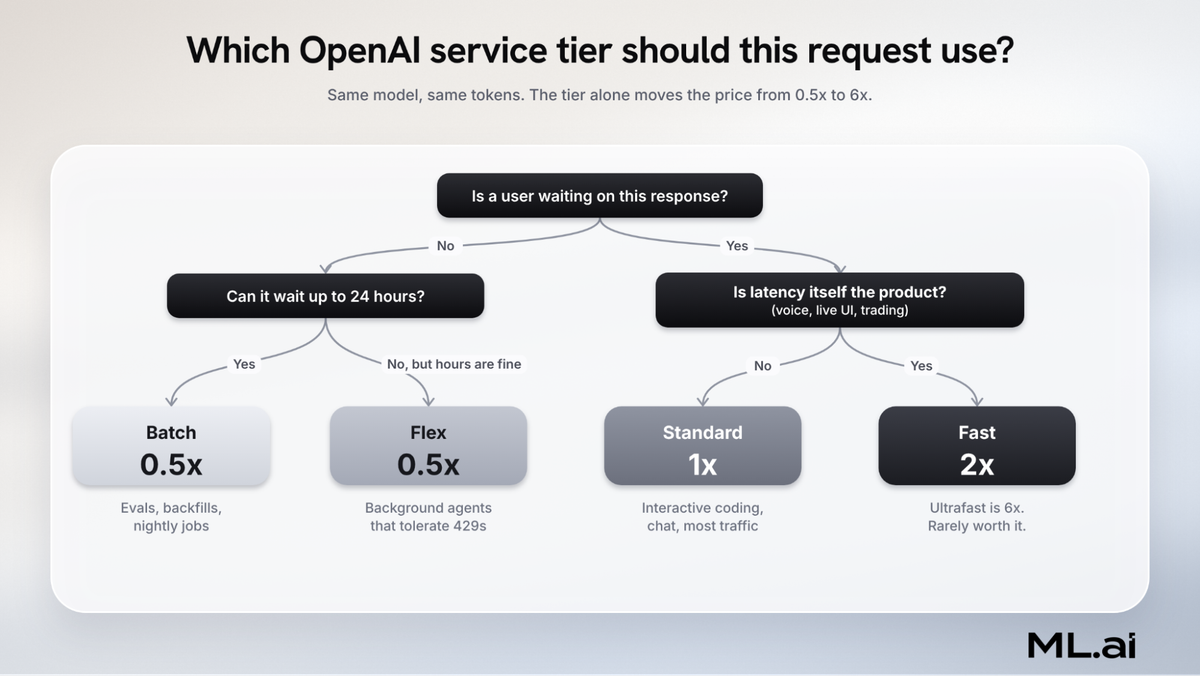
How do Standard, Flex, Batch, Fast and Ultrafast change the price?
Every OpenAI request runs on a service tier, and the tier multiplies the token price before anything else happens. You choose it per request with the service_tier parameter.
| Tier | Price vs Standard | GPT-6.1 Sol input / output | What you trade |
|---|---|---|---|
| Batch | 0.5x | $1 / $5 | Results within a 24-hour window |
| Flex | 0.5x | $1 / $5 | Slower responses and occasional 429 errors |
| Standard | 1x | $2 / $10 | Nothing, this is the default |
| Fast | 2x | $4 / $20 | Up to 2.5x faster output |
| Ultrafast | 6x | $12 / $60 | Lowest latency, Astra and Sol only |
The details behind each tier decide whether it fits your workload:
- Batch takes up to 50,000 requests or 200 MB per file, runs in its own rate-limit pool, and completes within 24 hours, per the Batch guide. If a batch expires, you still pay for the requests that finished.
- Flex is priced at Batch rates and still gets prompt-caching discounts. When capacity is short it returns a 429 Resource Unavailable error, and those requests are not charged, per the Flex guide.
- Fast shares the Standard rate limit. Cached-input discounts still apply at the doubled price.
What happens when Fast mode traffic ramps too quickly?
Fast mode has a ramp rule that most pricing guides skip. Once traffic passes 1 million input tokens per minute, OpenAI recommends growing it by no more than 50% every 15 minutes.
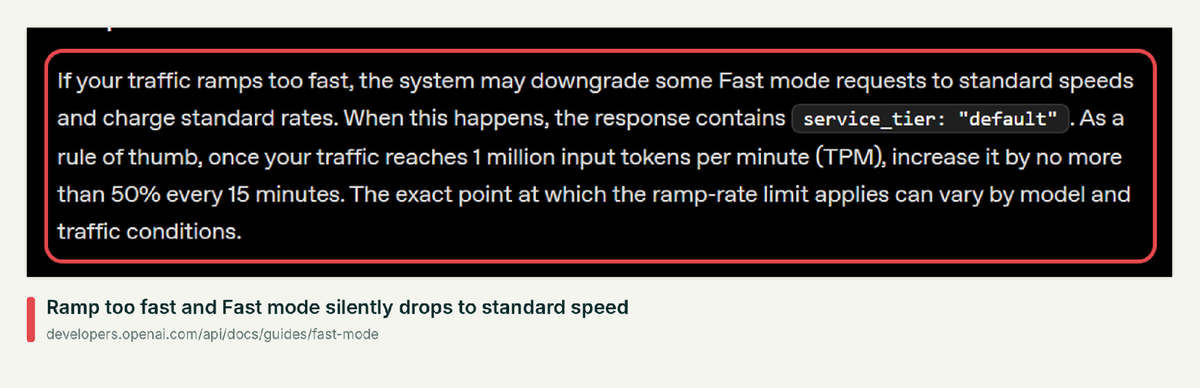
Downgraded requests come back with service_tier: "default", so log that field if you are paying for speed. The cost of leaving Fast on everywhere can be high: OpenClaw creator Peter Steinberger logged about $1.3 million of API usage in 30 days and said it would have been closer to $300K without Fast mode, as Tom's Hardware reported.
What are you paying for beyond input and output tokens?
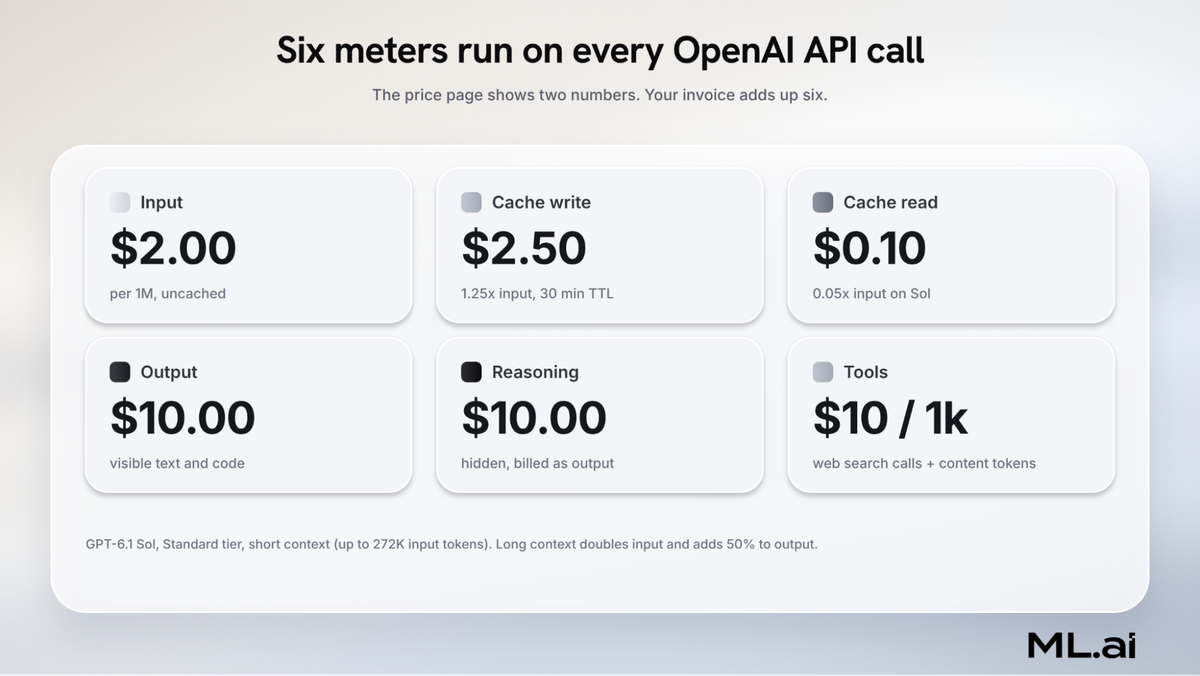
The pricing table shows two headline numbers per model. A real invoice adds up to six meters, and the four that are easy to miss are where budgets break.
Why do reasoning tokens cost so much?
GPT-6 models think before they answer, and you're billed for that thinking. The tokens never appear in your response, yet OpenAI charges them at the output rate.
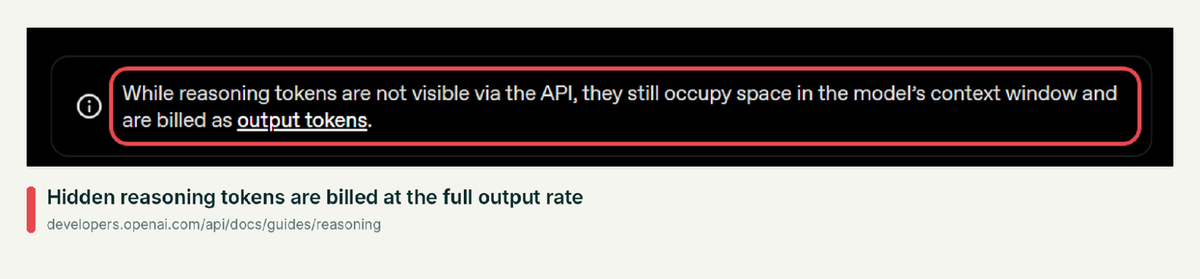
In the worked example in OpenAI's reasoning guide, a request with 75 input tokens produced 1,186 output tokens, and 1,024 of them were reasoning. That means 86% of the billed output was text the developer never saw.
- Effort is the dial. The reasoning.effort parameter accepts values from none to max, and support varies by model. GPT-6.1 Sol rejects none and minimal and defaults to medium.
- A cap can still cost you. If a request hits max_output_tokens, it ends with status: "incomplete", and you can pay for reasoning without receiving any visible answer. OpenAI suggests reserving at least 25,000 tokens for reasoning and output.
- Developers notice it on the invoice. One developer on the OpenAI forum estimated about $5 for roughly a million tokens and received a $20 bill, which another member traced to reasoning tokens counting as output.
When does a prompt cache write pay for itself?
Prompt caching is enabled by default for supported models. On GPT-5.6 and later, the first time a prefix is written to the cache, it costs more than sending it uncached.
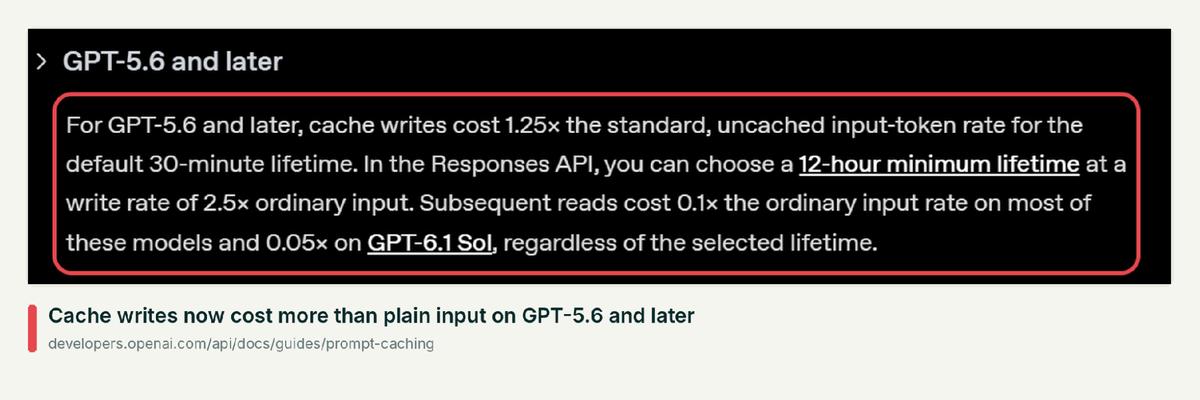
We worked out the break-even point from the published multipliers, counting each repeated prefix as a multiple of one uncached read:
- 30-minute cache (default): the write costs 1.25x, and each reuse costs 0.1x. Two requests cost 1.35x against 2x uncached, so it wins from the second request.
- 12-hour cache (Responses API only): the write costs 2.5x. Two requests cost 2.6x against 2x, so it only wins from the third request.
- GPT-6.1 Sol reads at 0.05x, which lowers the reuse cost but does not change either break-even point.
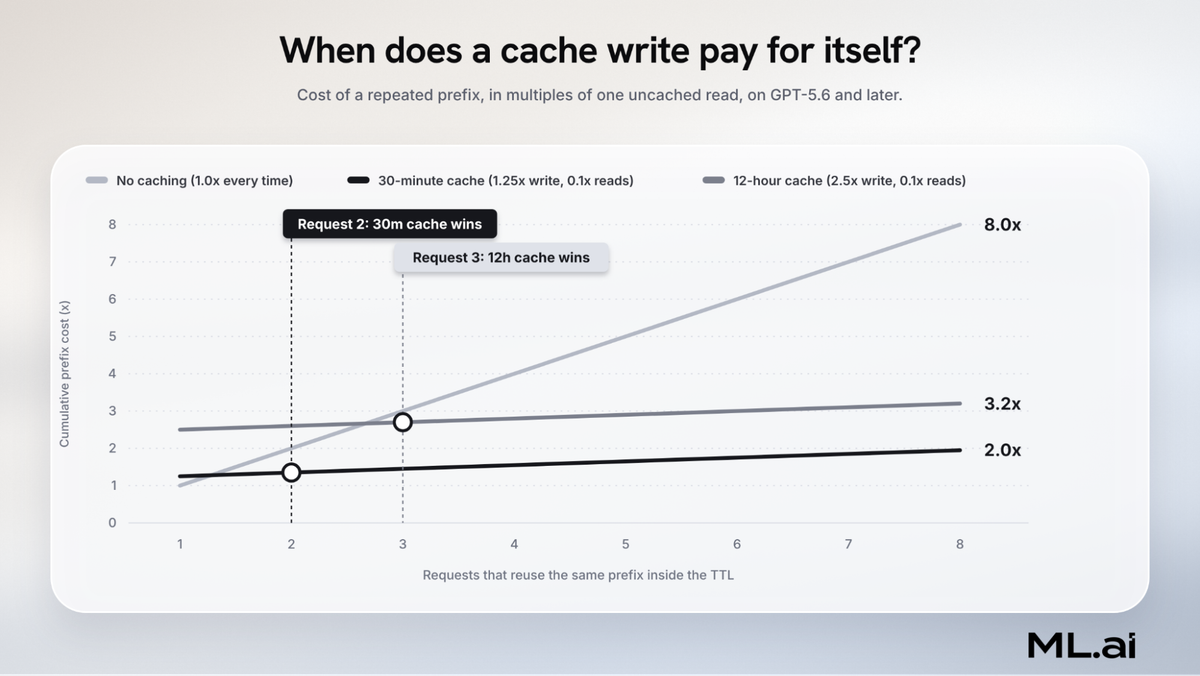
The practical rule: use the 12-hour lifetime only for prefixes you know will be hit at least three times, such as a shared system prompt across many users. Caching needs at least 1,024 visible input tokens, and the prompt caching guide suggests keeping each prompt_cache_key to about 15 requests per minute.
What do built-in tools add to the bill?
Tools carry a per-call fee on top of the tokens they pull into the context window.
| Tool | Price |
|---|---|
| Web search | $10 per 1,000 calls, plus search content tokens at the model's input rate |
| Web search preview (non-reasoning models) | $25 per 1,000 calls, content tokens free |
| File search | $2.50 per 1,000 calls, plus $0.10 per GB per day of storage after 1 GB free |
| Containers (Hosted Shell, Code Interpreter) | $0.03 for 1 GB up to $1.92 for 64 GB per 20-minute session, billed by the minute with a 5-minute minimum |
Search content tokens are the part people forget. In a case covered by Pradeep AGI on YouTube, a developer expected 57 web search calls to cost $1.71 and was billed $4.41, because one tool call can trigger several internal searches that are each billed.
How do usage tiers and spend limits work?
Rate limits rise with how much you have paid OpenAI in total, and each tier has a monthly usage ceiling.
| Tier | Qualifies at | Monthly usage limit | GPT-6.1 Sol rate limit |
|---|---|---|---|
| Free | Allowed geography | $100 | Not published |
| Build | $5 in credit purchases | $500 | 5,000 RPM, 1M TPM |
| Launch | $100 in credit purchases | $5,000 | 10,000 RPM, 4M TPM |
| Grow | $500 in credit purchases | $200,000 | 15,000 RPM, 40M TPM |
Treat a spend limit as an alert that can be overshot. In one OpenAI Developer Community thread, a coding agent found an API key in a project .env file and wrote its own runner scripts after its subscription ran out.
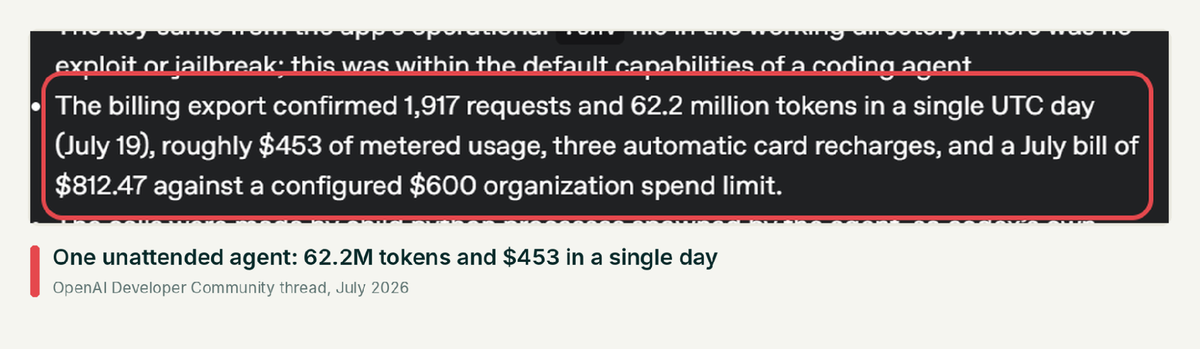
The fix is boring and effective: keep billable keys out of directories an agent can read, use project-scoped keys with their own limits, and alert on daily spend.
How much does an AI coding agent session cost on the OpenAI API?
Agent workloads are input-heavy because every turn resends the whole conversation. Agentic coding uses roughly 1,000x more tokens than code chat, according to a Stanford Digital Economy Lab study, and input tokens drive most of that cost.
The growth is quadratic. Each turn adds tool output to the context, and the next turn pays to read all of it again.
What does one 40-turn session cost under different setups?
Suppose we have a coding agent fixing a bug across a medium-sized repository. We modelled the session with these assumptions, all at GPT-6.1 Sol list prices:
- An 18K-token prefix for the system prompt, tool schemas and repository map
- 3K tokens of new context per turn from tool results and the previous reply
- 1,200 visible output tokens and 2,000 reasoning tokens per turn
- 40 turns, which adds up to 3.06 million input tokens and 128K output tokens
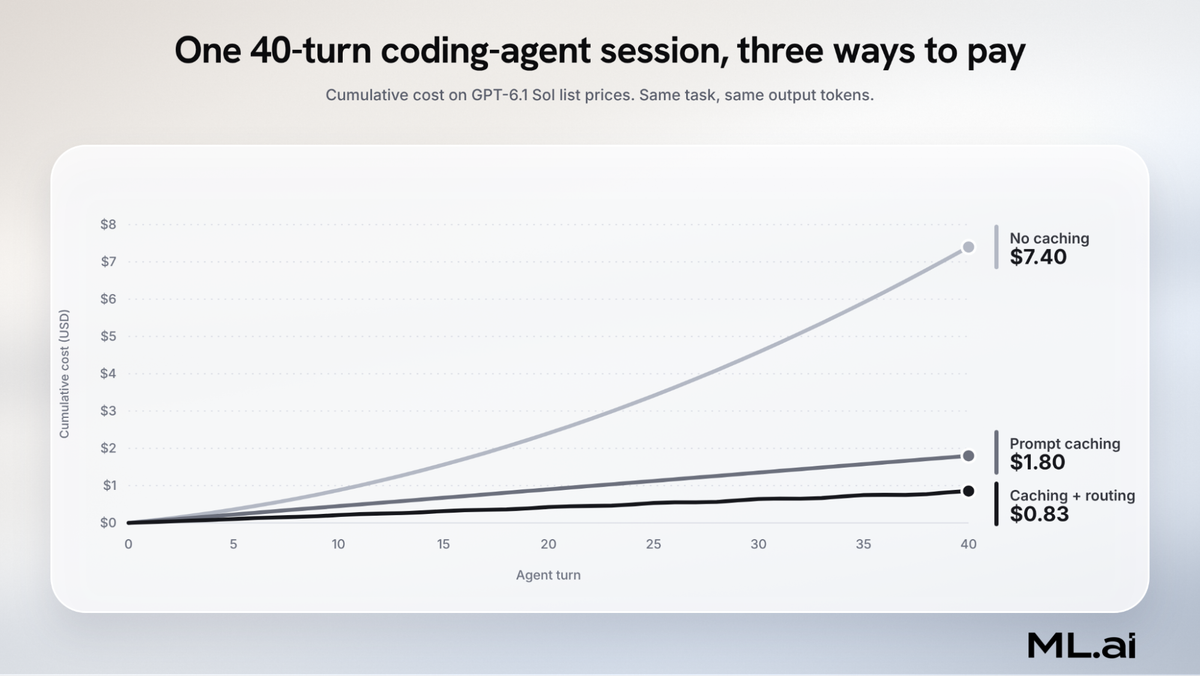
The results line up with what teams report in production:
- No caching costs $7.40. Input is 96% of the tokens, so it is most of the bill.
- Prompt caching costs $1.80, a 76% cut, because each turn reads the previous context at $0.10 instead of $2.00.
- Caching plus routing costs $0.83. Sending 70% of turns (file reads, searches, test runs) to GPT-6 Luna cuts another 54%.
The same session on GPT-6 Astra costs $37.00 uncached and $10.47 cached. Model choice moves the bill more than any other single setting.
Where does the money go once caching is on?
Caching changes which meter dominates. After it, output and reasoning take over the bill even though they are only 4% of the tokens.
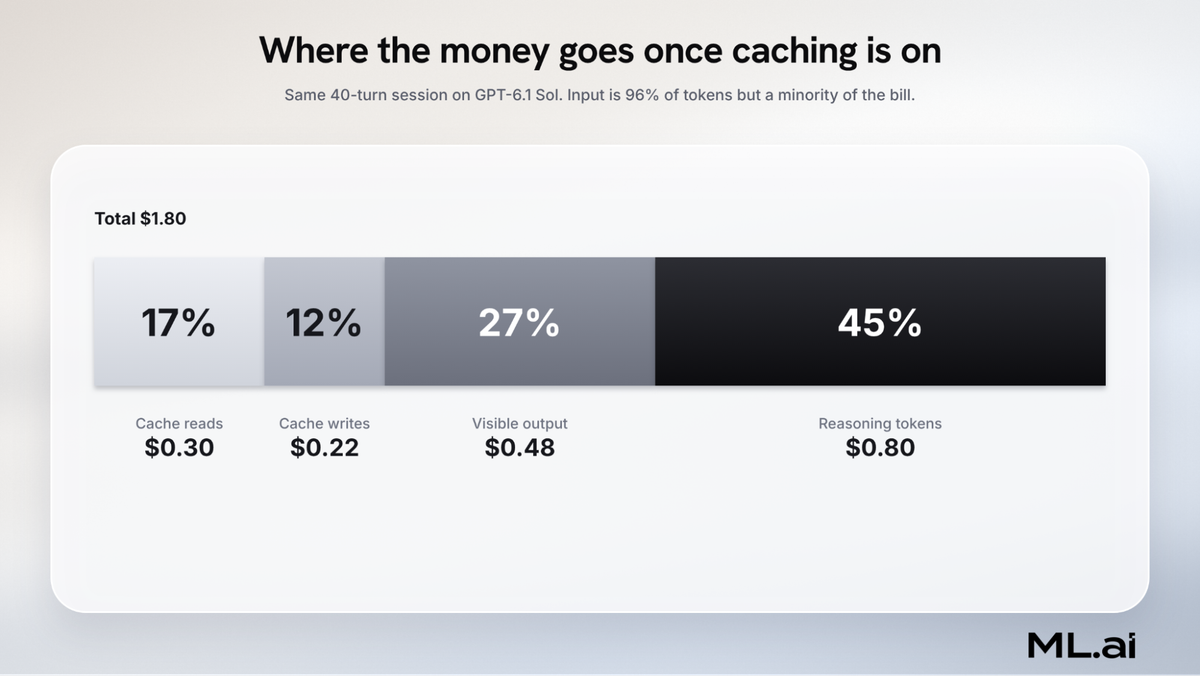
This is the step most cost guides miss. Once caching is in place, the next savings come from reducing reasoning effort on routine steps and capping output. Trimming the prompt further returns much less.
OpenAI vs Claude API pricing: which is cheaper for the same work?
At the headline level, OpenAI and Anthropic now price their mid and budget tiers identically. The gaps are in the flagship tier and in the rules around caching and long context.
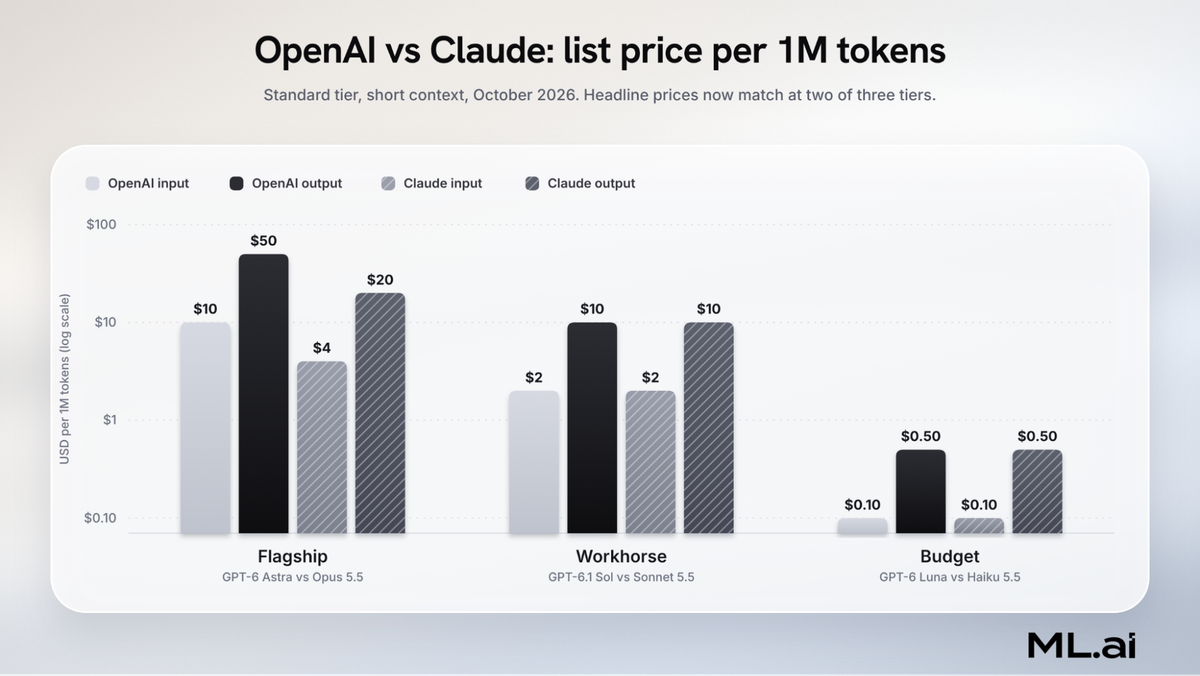
| GPT-6.1 Sol | Claude Sonnet 5.5 | GPT-6 Astra | Claude Opus 5.5 | |
|---|---|---|---|---|
| Input/output | $2 / $10 | $2 / $10 | $10 / $50 | $4 / $20 |
| Cache read | $0.10 | $0.10 | $1.00 | $0.20 |
| Cache write | 1.25x (30 min), 2.5x (12 h) | 1.25x (5 min), 2x (1 h) | 1.25x, 2.5x | 1.25x, 2x |
| Long-context surcharge | 2x input above 272K | None up to 1M tokens | 2x input above 272K | None up to 1M tokens |
| Batch discount | 50% | 50% | 50% | 50% |
Claude figures come from Anthropic's pricing documentation. Three differences decide which is cheaper for your workload:
- Long context favors Claude. Claude's current models (except Haiku 5.5, which steps up above 100K tokens) charge the same rate across a 1M-token window. An agent that regularly crosses 272K tokens pays double input on OpenAI.
- Tokenizers are not equal. Anthropic notes that Claude 4.7 and later produce about 30% more tokens for the same text. Identical per-token prices can therefore mean a higher bill on Claude for the same prompt.
- Cost per correct answer beats cost per token. On BenchLM, Claude Opus 5.5 holds the top aggregate score (86.69) at $4 and $20, while GPT-6 Astra scores 84.03 at $10 and $50. If you need flagship quality, Opus is the cheaper flagship today.
Our recommendation is to run your own evals on 50 to 100 real tasks per model and compare total cost per passing task. List prices are only a starting point, since the tokenizer and context rules can flip the result.
How have companies cut their OpenAI API bill, step by step?
The strongest public evidence comes from teams that measured before and after. Each one below changed a few things and reported the outcome.
How did Tars cut agent costs by 63% with prompt caching?
Tars, which builds AI agents, wrote up its caching rollout across about 53,000 calls in two-week before and after windows.
- Measured cost per request and per feature first, so changes could be attributed.
- Reordered prompts from most stable to least stable content.
- Kept tool definitions stable and sorted in a fixed order.
- Moved timestamps and IDs out of the prompt prefix.
- Added one explicit cache breakpoint and set a session ID for sticky routing.
The cached share of input tokens rose from 26.4% to 74.5%, and cost per million input tokens fell from $0.86 to $0.32. On OpenAI alone, it fell 47%, and median time to first token dropped from 1,807 ms on a miss to 838 ms on a hit.
Why does Manus treat cache hit rate as its main metric?
Manus, the general-purpose agent, calls KV-cache hit rate the most important number for a production agent in its context engineering write-up. Its agents run at roughly 100 input tokens for every output token, across about 50 tool calls per task.
- Keep the prompt prefix stable, with no timestamps at the top.
- Make context append-only; never edit earlier turns.
- Serialize JSON deterministically so key order never changes.
- Set cache breakpoints by hand where the framework does not.
After moving to GPT-6 caching, Manus reported its OpenAI cache hit rate rising from about 85% to consistently above 90%, on OpenAI's caching announcement.
How did Instacart save up to 50% with batch processing?
Instacart built an internal platform called Maple to push offline LLM jobs through batch APIs, described on its engineering blog.
- Split large CSV and Parquet jobs into batch files of at most 50,000 prompts or 200 MB.
- Uploaded batches, polled until done, then matched outputs back to inputs.
- Retried failures by error type instead of resubmitting whole files.
- Tracked cost per team through an internal AI gateway.
The team reports savings of up to 50% against real-time calls, on jobs that have passed 10 million prompts, with most batches finishing in under 12 hours.
How does Ramp route each request to a cheaper model?
Ramp runs an internal LLM gateway that picks a model route per request using Thompson sampling on latency and failure rates, as its team explains on the Ramp builders blog. During a rate-limit event, for example, the router picked a small model on Flex over Standard because latency was almost the same at half the price. Ramp's CTO has publicly put the overall saving at about 30%.
What pattern shows up across these cases?
Reading the cases side by side, the order of operations is consistent:
- Measure per feature first. Every team that reported a clean number had cost attribution before changing anything.
- Stabilize the prefix. Caching returns 47% to 76% on input, but only if nothing at the top of the prompt changes between calls.
- Route each step to the smallest capable model. Most agent turns do not need the flagship model, and routing returns 30% to 54% on top of caching.
- Move offline work to Batch or Flex. This is a flat 50% for anything nobody is waiting on.
- Then shape output and reasoning. Once input is cheap, the remaining money sits in output and reasoning tokens.
For a longer list of techniques with measured results, see our guide to token optimization techniques for production AI workloads.
How do you estimate your monthly OpenAI API bill?
A useful estimate needs more than average tokens times price. This formula covers the meters that move real bills:
| Monthly cost = requests × [(uncached input × input rate) + (cache writes × write rate) + (cached input × read rate) + ((visible output + reasoning) × output rate)] × tier multiplier × regional uplift + tool fees |
|---|
Then apply it to your own traffic. Suppose we have a team of 10 engineers who each run 6 agent sessions a day, 22 working days a month, using the 40-turn session modeled above:
- That is 1,320 sessions a month.
- On GPT-6.1 Sol with no caching: about $9,770.
- With prompt caching: about $2,370.
- With caching plus routing routine turns to GPT-6 Luna: about $1,090.
Run the same numbers with your own prefix size, turns per session, and reasoning effort. If you want the tooling to do the routing for you, see how teams compare small language models and frontier models for each agent step.
How ML.ai cuts coding-agent token spend without lowering output quality
Everything above comes down to two habits: send each step to the cheapest model that can do it, and stop paying for context and reasoning the task does not need. ML.ai builds both into the coding agent so engineers do not have to manage them by hand.
What does ML.ai do for individual developers?
ML.ai is an AI coding agent that works in your IDE, terminal, and desktop app. It reads the repository, plans the change, runs your tests, and shows you the diff before anything is written to disk.
- Per-step model routing. ML.ai picks a model for each step of a task, so file reads and searches do not run on a flagship model. This applies the same routing logic that cut our modeled session by a further 54%.
- A five-level reasoning effort dial. You choose low through max per message, with medium as the default, which is the lever for the 45% of the bill that reasoning takes up after caching.
- A live context meter. It turns amber at 65% and red at 85% of the window, so long sessions are visible before they hit long-context pricing.
- Read-only exploration agents. The Explore agent searches and explains without changing files, in its own session, so investigation does not bloat the main context.
- Code mode. In this experimental setting, the model calls tools by writing a short program, which saves roughly 1,700 tokens per turn by not resending every tool schema.
- One flat price. Individual plans are priced by parallel jobs, so there is no token counter to watch.
What does ML.ai offer engineering teams and enterprises?
Teams add shared Skills and routines, central usage and approval controls, SSO and an audit log. Enterprise deployments can run self-hosted or in your VPC, bring your own model endpoints, and keep data in-region.
For teams running high-volume LLM traffic outside the coding agent, ML.ai Inference applies the same routing to production workloads. ML.ai's pricing page puts the typical result at a 30% to 45% cut in model spend without lowering quality.
Join the ML.ai early access list or talk to the team about Team and Enterprise plans.
What usually works when cutting OpenAI API costs
The pattern across the pricing rules, our session model, and the public case studies is consistent. The list price per token is the least controllable part of the bill, and the structure of each request is the most controllable.
- Default to GPT-6.1 Sol and reserve GPT-6 Astra for tasks where evals show a clear quality gain.
- Keep prefixes stable and let the 30-minute cache do the work. Use the 12-hour cache only for prefixes hit three or more times.
- Route routine agent steps to GPT-6 Luna or a similar small model.
- Set reasoning effort per step and reserve tokens for it, so capped requests do not waste money.
- Watch the 272K line and compact before crossing it.
- Put offline work on Batch or Flex, and keep Fast mode for paths where latency is the product.
- Keep billable keys away from agents and alert on daily spend.
Altman wrote in Three Observations that the cost of a given level of AI falls about 10x every 12 months. Agents are consuming tokens faster than that, which is why your request structure now drives your bill more than the price list does.
FAQs
Is the OpenAI API free to use?
Not for production work. OpenAI's rate-limit guide lists a Free tier in allowed geographies with a $100 monthly usage limit, but paid tiers start once you buy $5 of credits. Old free trial credits have been discontinued.
Does ChatGPT Plus include OpenAI API access?
No. ChatGPT subscriptions and the API are billed separately. API usage is metered per token on a separate platform account, so a Plus or Pro plan does not reduce your API bill.
How much does 1 million tokens cost on the OpenAI API?
It depends on the model and on whether the tokens are input or output. One million input tokens cost $2 on GPT-6.1 Sol, $10 on GPT-6 Astra, and $0.10 on GPT-6 Luna, while output costs five times as much on each.
Are reasoning tokens charged on the OpenAI API?
Yes. Reasoning tokens are hidden from the response but billed at the output rate and counted in the context window. Lower reasoning.effort on routine steps to reduce them.
Is Flex processing cheaper than Batch?
They cost the same, half of Standard. Batch returns results within 24 hours from a separate rate-limit pool, while Flex returns responses on the normal API but may fail with uncharged 429 errors when capacity is short.
Why is my OpenAI bill higher than the pricing page suggests?
The usual causes are reasoning tokens billed as output, cache writes on GPT-5.6 and later, tool fees and search content tokens, prompts above 272K tokens, and Fast mode. Check usage.output_tokens_details.reasoning_tokens, cached_tokens, and the service_tier field in your responses to find which one it is.
Is prompt caching automatic on the OpenAI API?
Yes, it is on by default for supported models once a prompt has at least 1,024 visible input tokens. You get the best hit rate by keeping the start of every prompt identical and putting variable content at the end.