
October 28, 2026
VS Code AI Extension Cost Control: 9 Things to Check Before You Install
 Taran Srivastava · 15 min read
The VS Code AI extension you pick now decides a large share of your AI bill, because most agent spend comes from input tokens the extension assembles and resends on every turn. Look for nine controls: per-step model routing, cache-friendly sessions, context limits, a real Plan mode, effort settings, permission gates, in-editor diagnostics, honest usage visibility and team budgets. In our cost model below, the same day of agent work ranges from $16.80 to $0.42 in input cost, depending on just two factors.
This blog is for AI developers and AI engineers who run agents inside the editor every day and want the bill to follow the work they ship.
Why AI coding cost became an editor problem in 2026
For most of 2024 and 2025, an AI coding tool was a flat monthly seat. That stopped being true this year, and the change landed inside the editor.
Flat seats moved to metered tokens
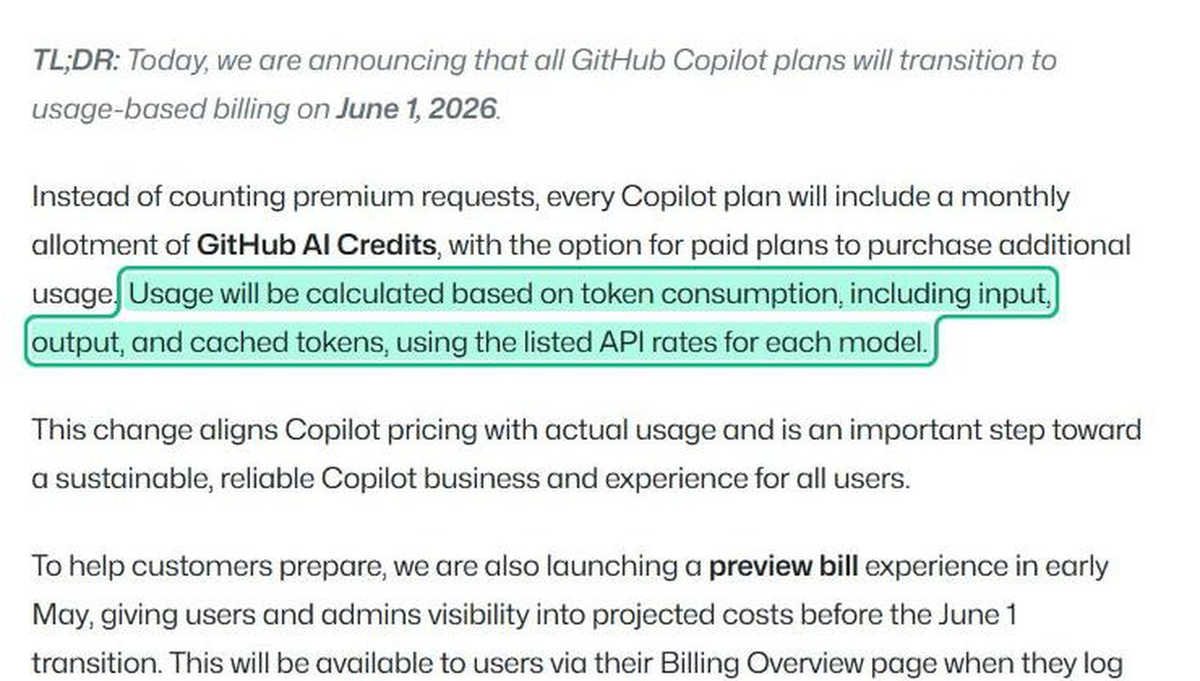
On June 1, 2026, GitHub moved every Copilot plan to usage-based billing. Each plan now includes a pool of AI Credits, and usage is charged on input, output, and cached tokens at each model's API rate.
The reaction was immediate. A Visual Studio Magazine editor burned 1,227 of 1,500 monthly credits on day one and projected a $180 bill for June. At company scale the numbers get larger. Uber's roughly 5,000 engineers used up the full 2026 AI budget by April, according to Fortune, and Gartner now forecasts that AI coding costs will pass the average developer salary by 2028.
The editor started showing cost, which tells you where the fight is
VS Code itself now treats cost as an editor feature. Release 1.126 added cost for a whole chat session, plus context-window usage, in the chat panel.
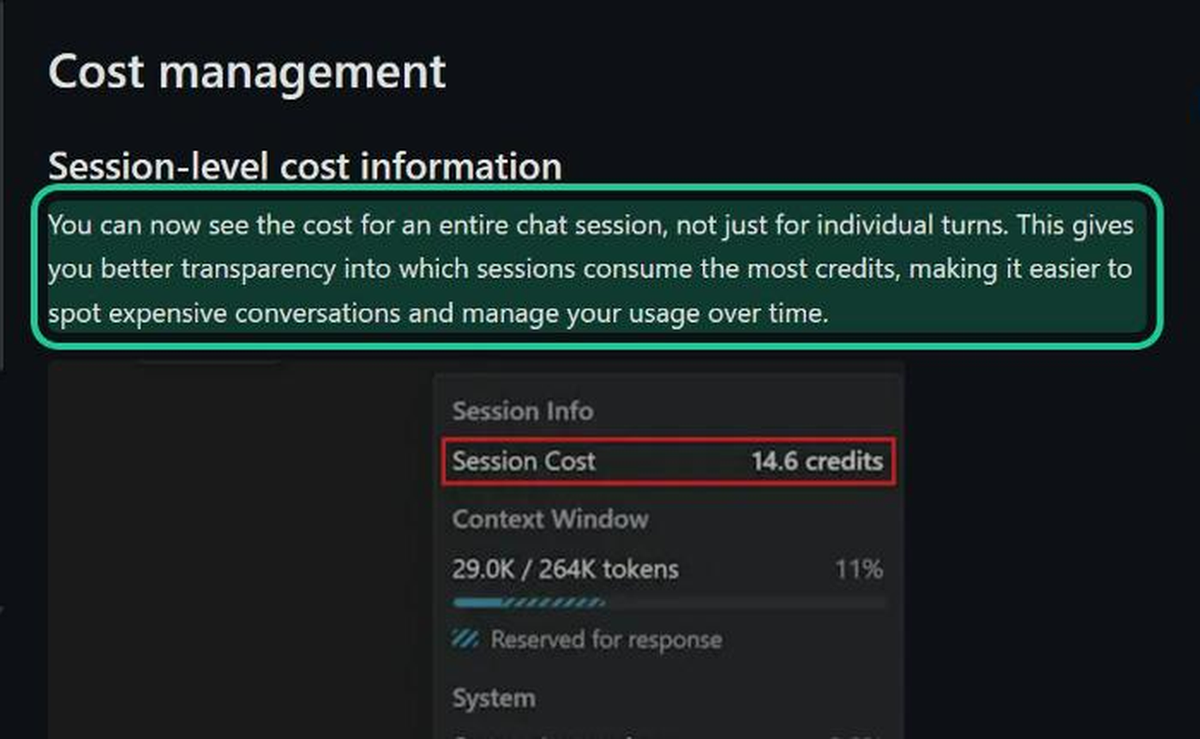
When the platform adds a cost readout to the chat panel, the message is plain: the extension is now the place where AI spend is won or lost. That changes what you should check before installing a VS Code AI extension.
Where an AI coding agent spends your tokens
Most developers guess that long answers cost the most. The research points somewhere else.
Input tokens drive the bill, and they repeat
A 2026 study from researchers at Michigan, Stanford, MIT, and Google DeepMind traced eight frontier models through SWE-bench Verified tasks. Three findings shape everything in this guide:
- Agentic coding used about 1,000x more tokens than code chat or code reasoning.
- Input tokens drove the overall cost, ahead of output tokens, even with caching on.
- Runs of the same task varied by up to 30x in total tokens, and higher spend did not buy higher accuracy.
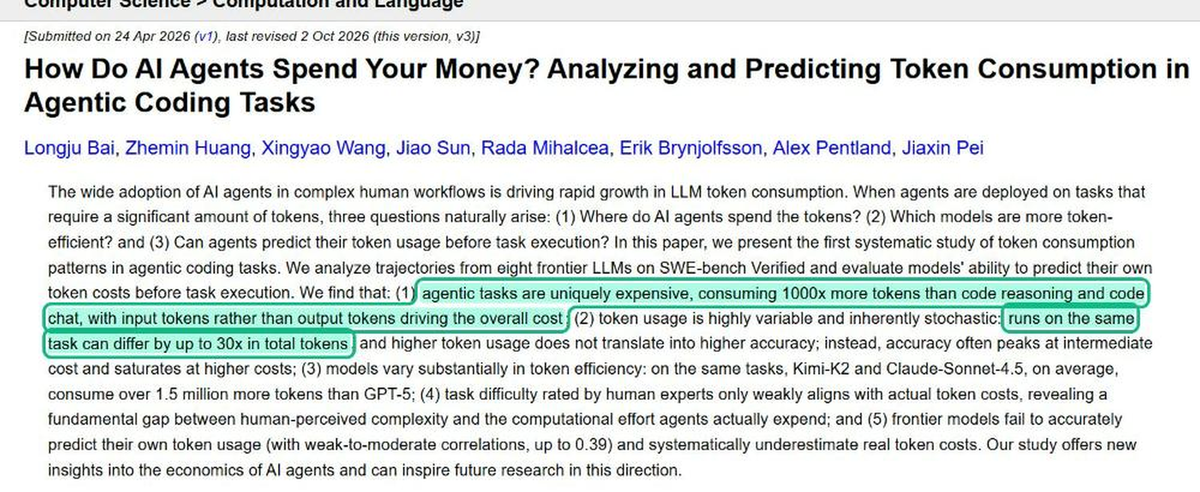
The same paper found that expensive runs spent about half their actions repeating file operations, and that models underestimate their own token use (best correlation 0.39). An agent cannot be trusted to budget for itself. The extension has to do it.
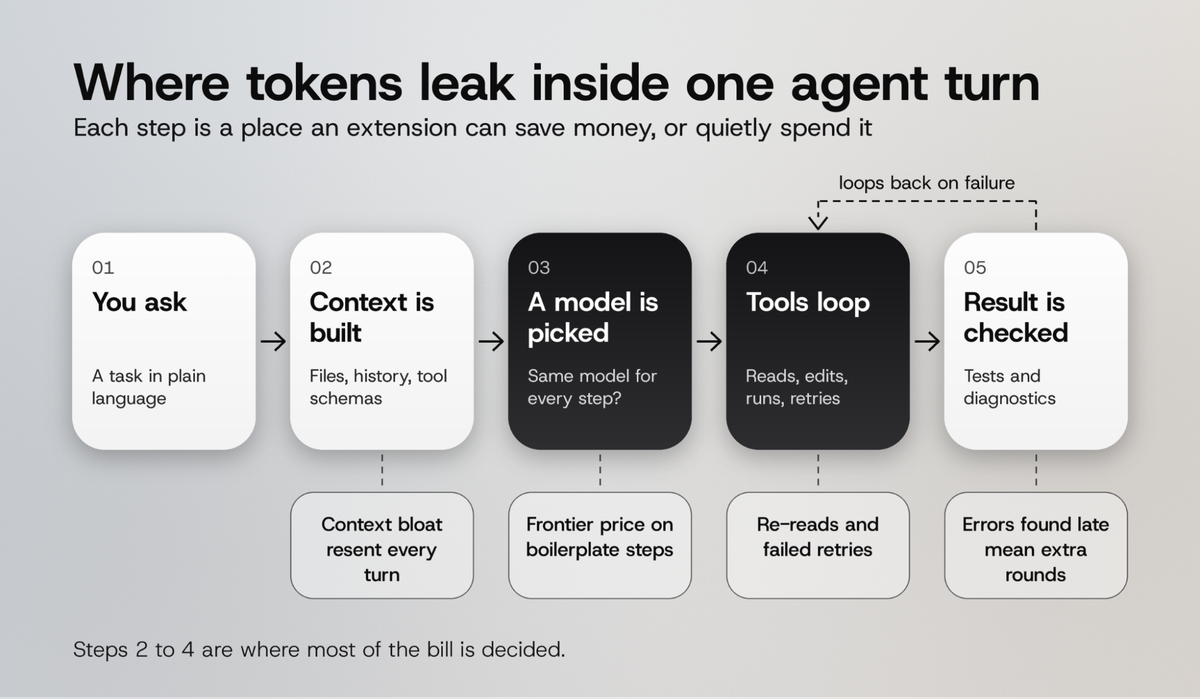
Every turn resends the conversation so far
Each agent turn ships the system prompt, tool definitions, file contents and the whole history back to the model. When the Visual Studio Magazine editor asked Copilot why his credits vanished, the explanation pointed straight at this:
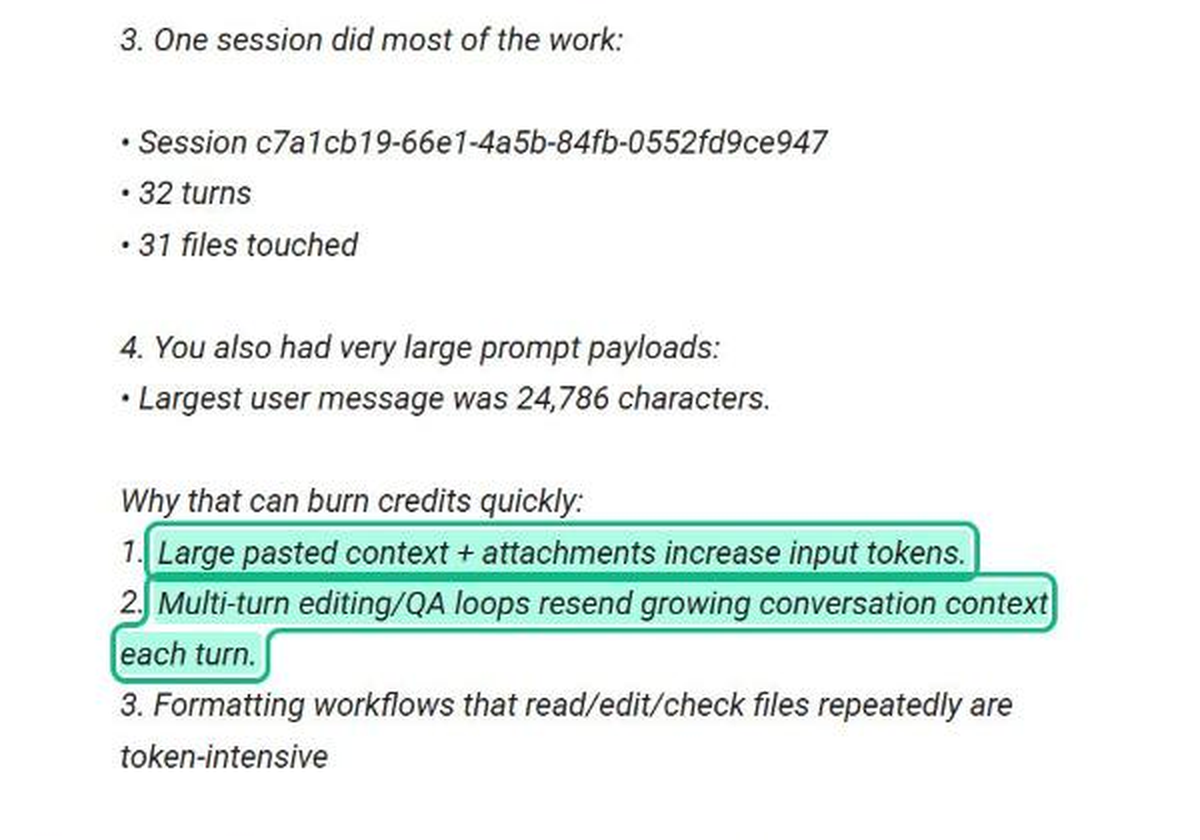
Here is how that adds up: A 32-turn session that starts at 10K tokens of context and grows by 3K per turn sends roughly 1.8M input tokens in total, even though the newest information in any single turn is small. Most of what you pay for is context the model has already seen.
How much each cost lever saves on one day of agent work
Vendor pages tend to quote savings without showing the math. Here is the math, using public list prices.
The cost model
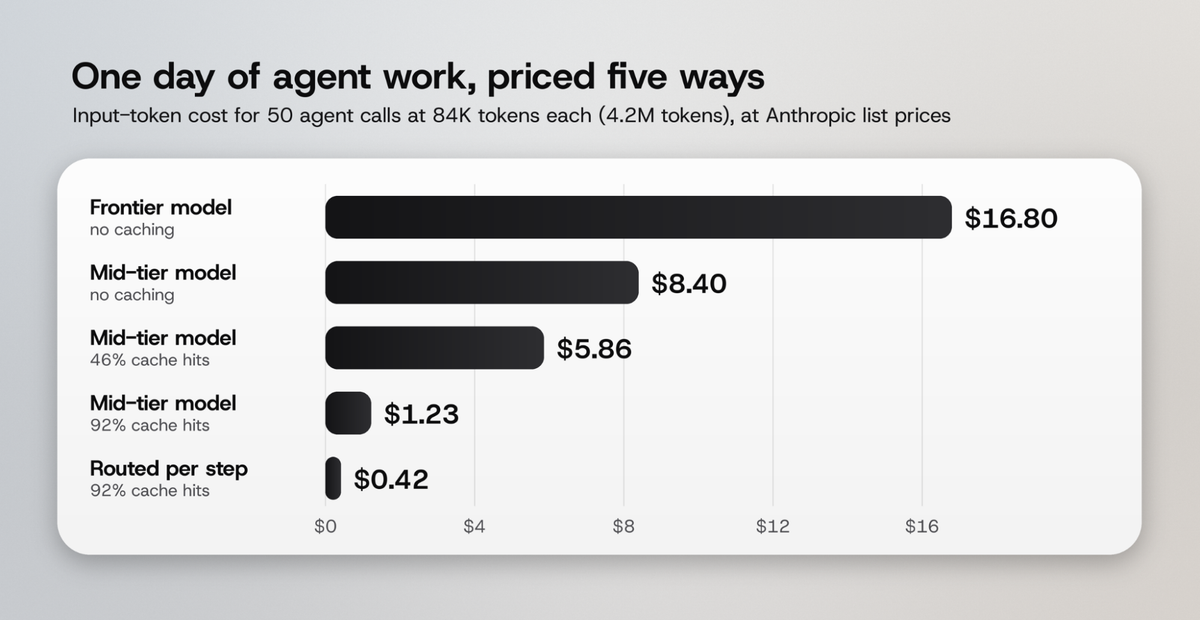
We priced one day of agent work: 50 model calls, each carrying 84K input tokens, for 4.2M input tokens in total. Prices come from Anthropic's prompt caching and pricing docs as of October 2026: Opus 5.5 at $4 per million input tokens, Sonnet 5.5 at $2, Haiku 5.5 at $0.10 for prompts under 100K tokens. Cached reads cost 0.05x the base price on Opus and Sonnet 5.5 and 0.1x on Haiku. Uncached tokens in a caching setup are billed as 5-minute cache writes at 1.25x. Output tokens are left out so the comparison isolates the input side.
What the numbers show
- Switching every call from a frontier model to a mid-tier model halves the bill, from $16.80 to $8.40.
- Good cache discipline does more than the model switch. At a 92% cache hit rate the mid-tier bill drops to $1.23, about 4.8x cheaper than the same model at 46%.
- Routing 70% of calls to the small model and keeping 30% on the mid-tier model brings the day to $0.42.
Caching and routing compound. Caching cuts the price of repeated context. Routing cuts the price of the steps that never needed a large model in the first place. A VS Code AI extension that handles both for you removes most of the bill without asking you to write shorter prompts.
The number that tells you if savings are real
Cost per request and cost per result can move in opposite directions. Developer Emmanuel Naweji showed this in a demo on agent cost tracking: his runs cost 13 cents per request but 21 cents per successful task once failed runs were counted. A weaker model can lower the first number and raise the second, because it fails and retries more.
Seb Nilsson put the rule in one line in his 2026 guide to agent token use: "Optimize for the cost of a successfully completed task." Use that metric for every test in the next section.
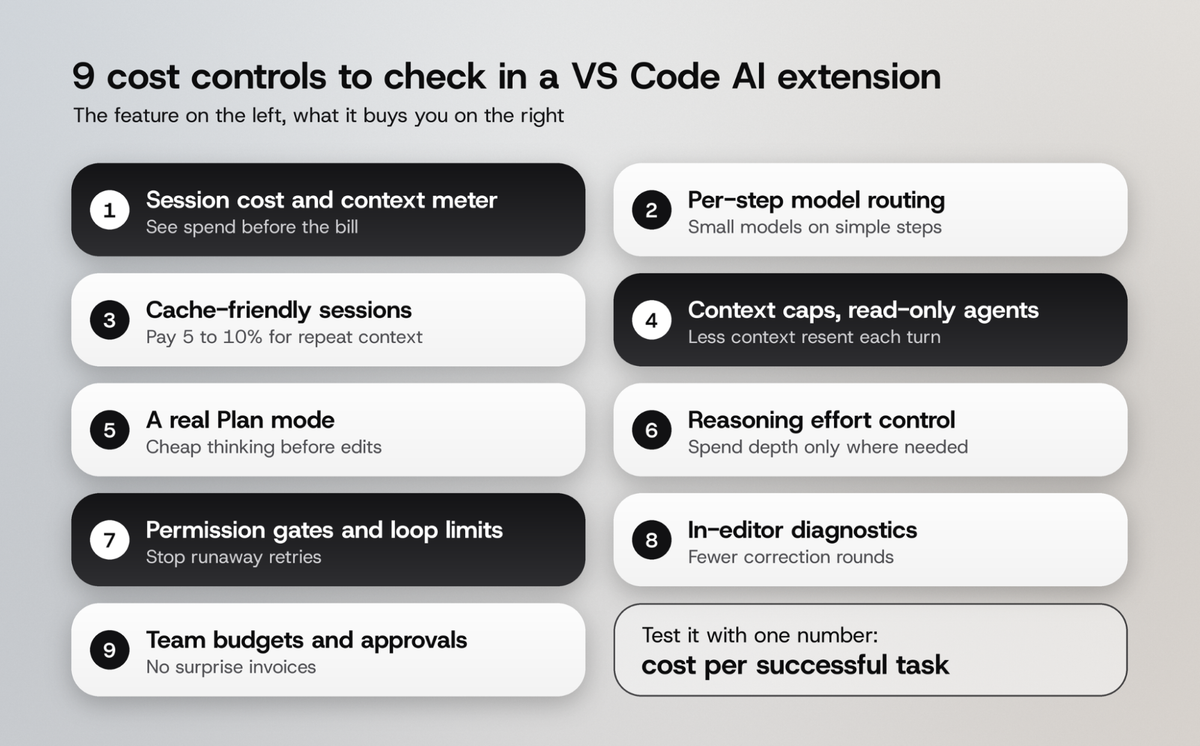
The 9 cost controls to look for in a VS Code AI extension
Each control below is written as what the feature does and what you get from it, followed by how to check it in under five minutes.
1. Usage visibility you can trust
What it does: shows how much of the context window a session is using, and what a session costs, while you work.
What you get: you catch a bloated session at turn 10 instead of on the invoice.
A meter is only useful if its number is real. An estimated dollar figure that drifts from the actual bill is worse than none, because it teaches you to trust the wrong thing. Prefer an extension that shows exact context-window tokens with clear thresholds, and that tells you plainly when it cannot show a reliable price. Check it by opening a long chat and confirming the context readout changes turn by turn.
2. Model routing for each step of a job
What it does: sends each step of a job to the model that fits it, a small model for searches and boilerplate, a frontier model for the hard edit.
What you get: frontier quality where it counts and small-model prices everywhere else.
The gap between model tiers is large. On Anthropic's list prices, Opus 5.5 input costs 40x Haiku 5.5 input. Research on routing has shown how much of that gap is recoverable: LMSYS's RouteLLM cut costs by over 85% while keeping 95% of GPT-4 quality on its benchmark. Our own guides on model routing and small vs frontier models cover where routing breaks down.
Check it by running a multi-step task and looking at which model handled each step. If the extension shows one model for the whole session, you are paying frontier rates for file searches.
3. Cache-friendly session design
What it does: keeps the stable parts of each request (system prompt, tool definitions, project rules) in the same order so the provider can serve them from cache.
What you get: repeated context billed at 5% to 10% of the normal input price.
Cache hits depend on the request prefix staying identical. Switching models mid-task, reordering tools, or injecting timestamps at the top of the prompt breaks the cache and re-bills the whole prefix at full price. The VS Code team reported agent sessions reaching over 93% prompt-cache reuse after its own optimization work (Visual Studio Magazine), so a high hit rate is achievable. Read our prompt caching explainer for the pitfalls.
4. Context limits and read-only helper agents
What it does: caps how much of each file or attachment goes to the model, and hands searches to a read-only agent that returns a summary instead of raw file dumps.
What you get: less context resent on every turn, which is where the arXiv study says the money goes.
Look for hard limits on attachment size and lines sent to the model, truncation that is marked instead of silent, and a separate explore or search agent that cannot edit files. The pattern works because the main session receives a few hundred tokens of findings instead of 40K tokens of source.
5. A Plan mode that is enforced
What it does: lets the agent investigate and write a plan with edit and write tools switched off.
What you get: a cheap planning pass that catches a wrong approach before the agent spends tokens implementing it.
Many tools offer "plan first" as a prompt suggestion. That is weaker than a mode where edit tools are denied at the tool layer. Nilsson's guide recommends planning with a strong model and implementing with a cheaper one, which only works when the plan phase is a separate, enforced step. Test it by asking for a code change in Plan mode: a real Plan mode refuses the edit.
6. Reasoning effort you can set per message
What it does: lets you choose how long the model thinks before answering, from low to maximum.
What you get: you stop paying deep-reasoning prices for a rename.
Effort is a direct cost dial. Higher effort means more reasoning tokens and more time. The useful version applies per message, so you can use low effort for a well-specified edit and raise it only for the race condition.
7. Permission gates and runaway-loop protection
What it does: asks before side effects, lets you deny a step with a reason, and blocks dangerous or opaque commands outright.
What you get: an agent that cannot loop all night on a failing command or retry a denied action through a different tool.
Unattended loops turn small per-step costs into large bills. Naweji describes an agent that looped overnight on a single malformed invoice at about one cent per step. Look for three things: a deny that stops the execution path, a reason sent back so the model narrows its next attempt, and saved approval rules you can list and revoke.
8. Diagnostics from the editor fed back to the model
What it does: after the agent edits a file, it reads the errors your language servers already report and gives them to the model in the same turn.
What you get: fewer correction rounds, since each round resends the full session.
Every "it broke the build, fix it" message is another full trip with the whole history attached. An extension that reads VS Code's own diagnostics catches type errors before you see them, across every language you have installed.
9. Team budgets, approvals and audit
What it does: gives admins central usage limits, approval controls, SSO and an audit log.
What you get: spend that finance can predict and engineering can explain.
This is the control that would have helped Uber. A personal budget alert is fine for one developer. A team needs pooled limits, per-user visibility and a record of who ran what. For regulated teams, ask whether you can bring your own model endpoints and keep traffic in your own VPC.
How to test a VS Code AI extension's cost controls in one afternoon
Feature lists are easy to write. This test shows what an extension does on your code.
The four-step test
- Pick three real tasks from your backlog: one small fix, one multi-file change, one investigation with no edits.
- Run each task twice in each extension you are comparing. The arXiv study found runs vary up to 30x, so one run tells you little.
- Record cost per successful task. Count a run as successful only when tests pass and you would merge the diff.
- Note the controls you touched: did you switch modes, change effort, deny a command, or start a fresh session? An extension that needs constant manual tuning will cost more on a busy week than it did in your test.
What a good result looks like
A strong VS Code AI extension shows a low spread between two runs of the same task, handles the investigation task without editing files, and needs zero or one correction round for a small fix. If one extension wins on cost per request but loses on cost per successful task, trust the second number.
What usually works: patterns across teams that cut AI coding spend
Across the research, release notes and developer reports in this guide, the same patterns repeat.
- Context is the bill. Every source that measured it found input tokens dominate. The cheapest change is sending less, more often from cache.
- Automatic routing outlasts manual model picking. Asking developers to choose cheaper models by hand rarely lasts. Teams that save consistently let the tool route each step.
- Productivity gains are modest, so cost has to be controlled. DX's study of 400+ companies found a median PR throughput gain of 7.76%, and METR's controlled trial found experienced developers 19% slower on their own repositories. When the upside is that size, an uncapped token bill can erase it.
- Unpredictable billing drives people away. In a GitHub community thread, one developer said metered costs made Copilot feel risky to use instead of helpful. Predictable pricing is a feature in its own right.
The teams that keep AI coding affordable rarely rely on willpower. They choose a VS Code AI extension where the cheap path is the default path.
How ML.ai controls AI coding cost inside VS Code
ML.ai is a coding agent built around the problem this guide describes. It runs as an extension inside VS Code (and Cursor), and every one of the nine controls above maps to something it does by default.
What ML.ai does for individual developers
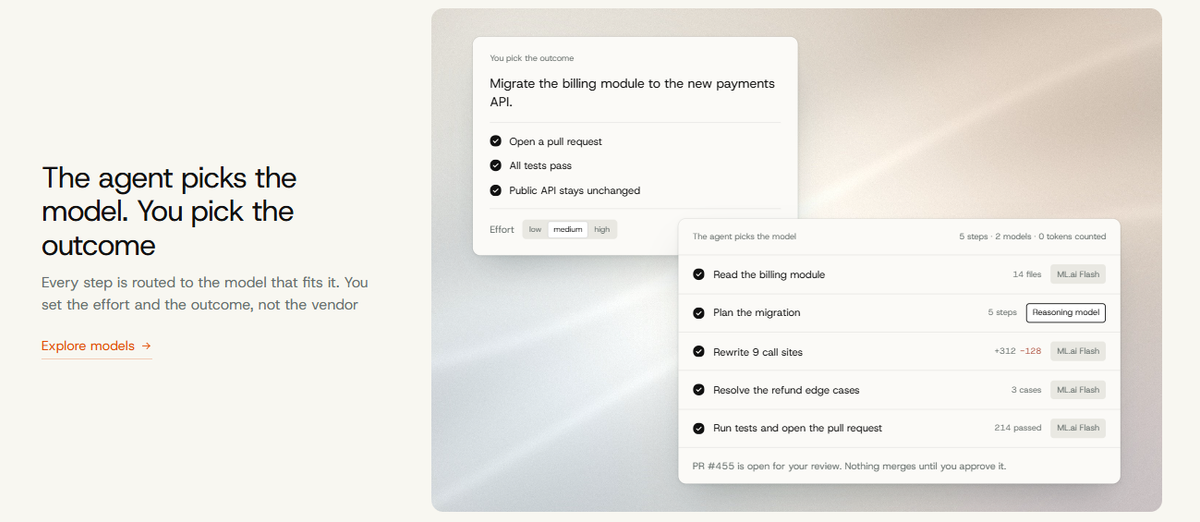
- Per-step routing. The agent picks the model for each step, a fast pass on boilerplate and a heavyweight model on the hard part. You set effort and constraints, and ML.ai handles model choice. See how ML.ai works.
- Flat pricing instead of token counting. ML.ai plans are priced flat, so you hand it software work and skip managing a token budget. Plans differ by how many jobs run in parallel: 2 on Infinite, 6 on Pro, and 20 on Max.
- Build and Plan modes. Plan mode investigates and writes a plan with the edit and write tools switched off at the tool layer.
- Reasoning effort per message, from low to max, with medium as the default.
- Read-only helper agents. Explore searches and explains without changing files, and Architect returns the order of work and trade-offs before any code is touched.
- Context discipline. A context meter turns amber at 65% and red at 85% of the window. Attachments are capped at 50 KB, 2,000 lines and 2,000 characters per line to the model, and truncation is always marked.
- Permission prompts and a command safety check. Allow, Always or Deny on every side effect, with a native diff before you approve an edit. Shell commands are parsed into every program they would run, and a fixed set of dangerous actions is refused in every mode.
- Editor diagnostics after every change, so the model hears about the type error it introduced in the same turn.
- Background runs that keep working while you continue in the main conversation.
ML.ai also takes a clear position on cost meters: it will not estimate a dollar figure and present it as fact. You get exact context usage, and flat pricing removes the need to watch a running total.
What ML.ai does for engineering teams and enterprises
The Team plan is $29 per seat per month, billed annually with a 5-seat minimum. Every seat gets Infinite Pro, plus shared Skills and routines, central usage and approval controls, SSO and an audit log. Enterprise adds self-hosted or VPC deployment, your own model endpoints, data residency and private routing.
For teams running high-volume LLM workloads outside the editor, ML.ai Inference applies the same routing approach to production traffic. NeoSapien, a voice-first assistant, cut its monthly AI bill by 42% with zero quality regressions and rolled out in 21 days.
How to start
Join the ML.ai early access list, then open a project folder, sign in once, and describe the task in plain language. It needs VS Code 1.125.0 or newer on macOS (Apple Silicon) or Windows 64-bit. For a team rollout or an enterprise pilot, talk to the ML.ai team.
Frequently Asked Questions
What is the best VS Code AI extension for controlling costs?
The best VS Code AI extension for cost control routes each step to a fitting model, keeps sessions cache-friendly, limits context, and shows you real usage. Test candidates on your own tasks and compare cost per successful task, since runs of the same task can vary up to 30x.
Why do AI coding agents use so many tokens?
Agents resend the system prompt, tool definitions, file contents, and full conversation history on every turn. Research on SWE-bench tasks found agentic coding uses about 1,000x more tokens than code chat, and input tokens drive most of the cost.
Does prompt caching reduce AI coding costs in VS Code?
Yes. Cached input on current Anthropic models is billed at 5% to 10% of the normal input price. In our cost model, raising the cache hit rate from 46% to 92% cut daily input cost from $5.86 to $1.23 on the same model.
Is a cheaper model always cheaper for coding?
No. A cheaper model can fail and retry more often, which raises the cost per finished task. Route simple steps to small models and keep hard edits on a strong model, then measure the total cost of tasks that pass.
How can engineering teams predict AI coding spend?
Use central budgets and approval controls, give each developer usage visibility, and prefer flat or pooled pricing over open-ended metering. Tools with SSO and an audit log also let finance see who ran what.