
November 12, 2026
Codex vs Cursor: How the Two Agents Differ in Daily Use
 Taran Srivastava · 11 min read
Pick Cursor if you want to stay inside an editor, switch models per task, and approve each diff as it lands. Pick Codex if you hand whole tasks to an agent from the terminal, desktop app, or cloud and already pay for ChatGPT.
The bigger difference in November 2026 is how each one meters you. Cursor's plans now start at $8 with Grok models included and other vendors billed at API list price, while Codex rides your ChatGPT plan and counts usage in five-hour windows.
Below is the Codex vs Cursor head-to-head on what developers weigh every day: workflow, cost, usage limits, model choice, and safety. At the end, we cover where ML.ai fits when the real problem is a meter stopping your work halfway.
Key takeaways
- Cursor is editor-first. Its agent, Plan mode, and model switching live inside a VS Code fork, with cloud agents on Premium and above.
- Codex is agent-first. The same agent runs in the CLI, IDE extension, ChatGPT desktop app, and Codex Cloud under one ChatGPT sign-in.
- Cursor Premium is $30 a month with a weekly pool for Grok models. Claude or GPT models inside Cursor are billed separately at API list price.
- Codex Plus is $20 a month, which OpenAI estimates at 15 to 160 local messages per five hours on GPT-6.1 Sol.
- In both tools, the model you pick moves the bill most. In Codex, the priciest model costs 100x the cheapest per output token.
What Codex and Cursor are in 2026
Both products changed a lot this year, so it helps to pin down what each one is today before comparing them. A coding agent here means a model that reads your repo, runs tools like tests or git, and edits files in a loop until a task is done. Autocomplete suggests the next line; an agent finishes the job.
Cursor is an AI code editor
- Cursor is a fork of VS Code built by Anysphere. You open your repo in it, describe a goal, and the agent plans, edits, runs commands and hands back diffs you accept or reject.
- It ships its own coding model, Composer, and also routes to third-party models from OpenAI, Anthropic, Google and others.
- Cursor subscriptions are now sold through X Subscription Corp and bundle Grok Chat, Imagine and Grok API access, which is why the pricing page reads so differently from a year ago.
Codex is OpenAI's coding agent
- Codex runs locally in the Codex CLI, inside your editor through the IDE extension, in the ChatGPT desktop app, and remotely in Codex Cloud, where it works in a sandbox and opens pull requests.
- It does not come with its own editor. You keep Neovim, VS Code, Visual Studio or whatever you already use.
- With ChatGPT sign-in it runs OpenAI models only, such as GPT-6.1 Sol, GPT-6.1 Terra and GPT-6 Luna.
How the daily workflow differs between Codex and Cursor
Daily use is where you feel the gap first, because the two tools ask you to work in different places. Here is what a normal day looks like in each.
Cursor keeps you inside the editor
- You type a goal, press
Shift+Tabinto Plan mode, review the plan, then let it build. One daily Cursor user on Hacker News said he spends 5 to 10 minutes on the plan, then lets runs go 30 to 45 minutes before coming back to a tested result. - You can choose a model for every task, for example an expensive model for planning and Composer for routine edits.
- Diffs appear inline with accept or reject. Some developers like this because it catches bad architecture early, while others find the prompts noisy.
Codex sits beside the editor you already use
- Many Codex users run it in a terminal split or the desktop app next to their editor. A C++ systems engineer in the same thread writes a TODO describing the change, asks Codex to implement it, and said it feels "more like working with a partner."
- Codex Cloud takes tasks remotely, reviews pull requests on GitHub and accepts requests from Slack or Linear on paid ChatGPT plans.
- The trade-off is model choice. Codex keeps you on OpenAI models, while Cursor lets you mix vendors and charges you per token for the outside ones.
Reading through that thread, a pattern stands out. Developers who left Cursor mostly cited price and editor noise, and developers who stayed mostly cited per-task model switching and Plan mode. Output quality barely came up as the deciding factor.
What Codex and Cursor cost per month in November 2026
On paper both start at $8, but the plan you need depends on which models you want. The figures below come from Cursor's pricing page and OpenAI's Codex pricing page.
| Plan level | Cursor | Codex |
|---|---|---|
| Free | Free, limited agent requests | Free, GPT-6 Luna in the desktop app |
| Entry | Plus at $8, Grok models only | Go at $8, lightweight tasks |
| Main individual plan | Premium at $30, 4x Plus usage | Plus at $20, CLI, IDE, app and cloud |
| Heavy use | Super at $100 (15x), Ultra at $200 (50x) | Pro at $100, $200 or $500 |
| Teams | From $30 per user per month | Business at $20 per user (annual), $25 monthly |
| Outside models | Billed at API list price on top | Not available with ChatGPT sign-in |
| How usage resets | Weekly allowance, top-offs available | Five-hour windows, weekly limits may apply |
Suppose you want Claude or GPT models inside Cursor. Premium and above include no allowance for third-party models, so every token on those models is billed at API rates on top of your $30. If you only use OpenAI models, Codex Plus at $20 is usually the cheaper path.
Where usage limits interrupt work mid-task
This is the pain point that shows up again and again in forums and comparison videos. Both tools meter you, just in different ways, and the way they meter decides when your work stops.
Codex counts five-hour windows
- On Plus, OpenAI estimates 15 to 160 local messages per five hours on GPT-6.1 Sol, and 350 to 3,000 on GPT-6 Luna. Cloud tasks use more, and weekly limits can also apply (Codex pricing).
- Fast mode uses included usage 2.5x faster, and Ultrafast uses it 8x faster.
- If you hit the limit during a turn, Codex lets that turn finish. After that you buy credits, switch to an API key or wait. Pro plans currently have no five-hour limit.
- One comparison video made the practical point well: because the window rolls, a long session can run dry before it refreshes, with little warning.
Cursor counts a weekly pool plus API spend
- Each tier has a usage pool shared across Cursor and Grok that refreshes weekly, so one heavy day does not wipe out the month. Past it, you buy top-offs or wait.
- Third-party model use sits outside that pool. A long agent run on a frontier model is pay as you go, so set spending caps before you start one.
Suppose we have a team of four engineers migrating a billing module over a week. On Codex Plus, an engineer can run out of a window halfway through a long session and wait. On Cursor Premium with a Claude model nobody gets stopped, but the bill grows with every token and the finance lead finds out at month end.
How model choice changes your bill in each tool
Across both tools, the biggest cost lever is which model does the work. Here is how wide that gap is inside Codex alone.
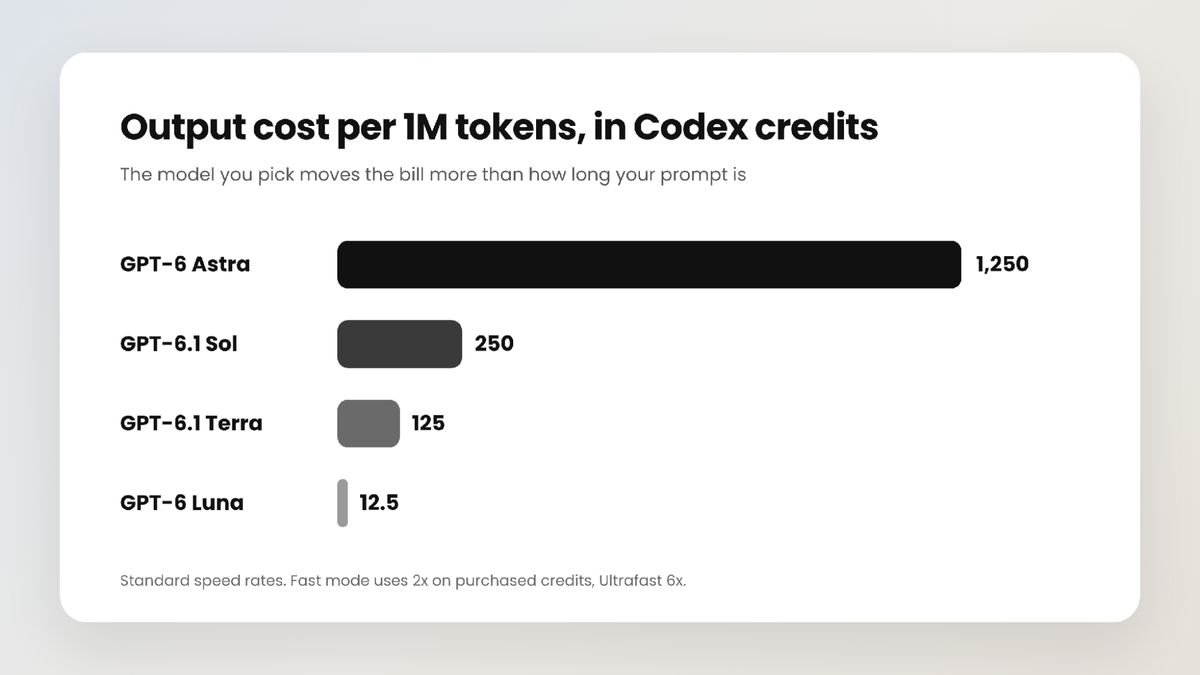
Codex credit rates per 1M output tokens at Standard speed. Source: OpenAI Codex pricing.
- GPT-6 Astra output costs 1,250 credits per 1M tokens, GPT-6.1 Sol 250, GPT-6.1 Terra 125 and GPT-6 Luna 12.5. That is a 100x spread from top to bottom.
- Cursor follows the same logic. One HN user put Opus 4.8 at $5 input and $25 output per million tokens, against $0.50 and $2.50 for Composer, and estimated 70 to 90% savings from using a lighter model on long tasks that need little reasoning.
The habit that falls out of this is simple. Plan on the expensive model, then build on the cheap one, and you cut most of the spend without losing the quality of the plan.
Practical ways to cut spend on either agent
These come from OpenAI's own guidance and from what practitioners report working. Each one applies to Codex and Cursor alike.
- Shrink
AGENTS.md. It loads on every turn. OpenAI suggests nestingAGENTS.mdfiles by folder so only the relevant rules load (Codex pricing). - Turn off MCP servers you are not using. Each connected server adds context to every message you send.
- Point the agent at the files it needs. Developers on HN describe agents reading files obsessively and wandering off on tangents, which burns tokens fast.
- Stop a bad path early. Reviewing the diff afterwards still pays for the whole detour, while stopping a run the moment it drifts saves the rest.
- Keep Fast mode for when speed counts. It costs 2x to 8x more than Standard on the same model.
Which agent to pick for your workflow
If you are still torn on codex vs cursor, start from how you hand off work. The rest of the decision usually follows from that answer.
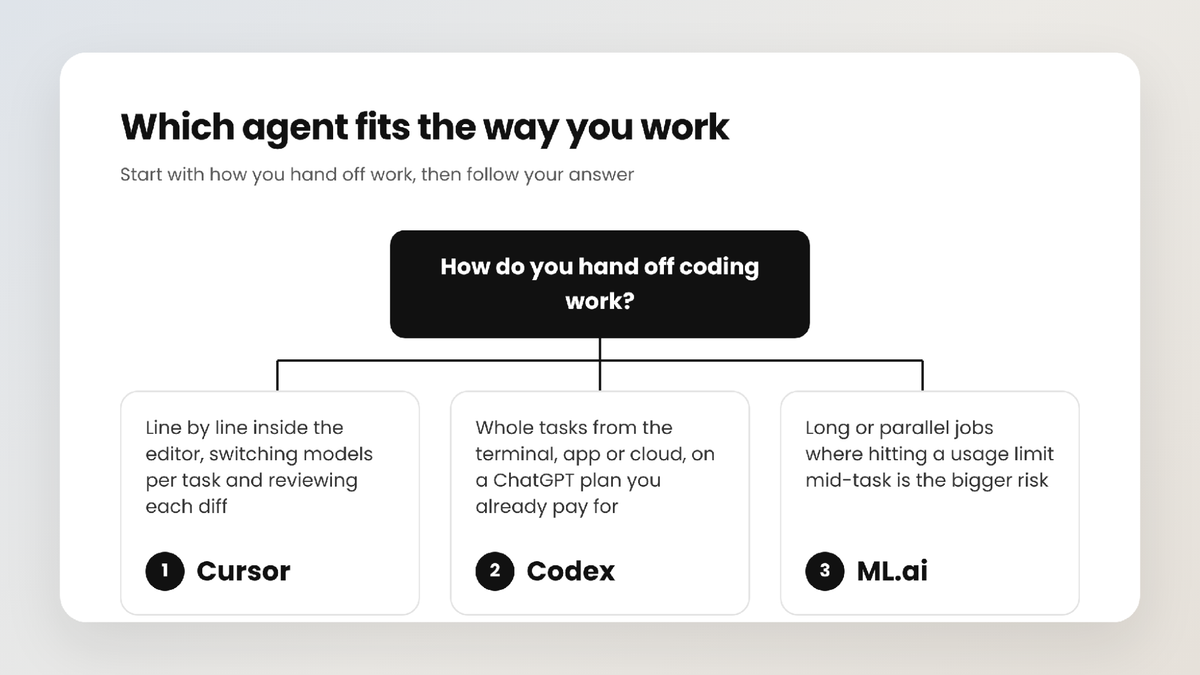
- Pick Cursor if you review code line by line and switch vendors per task. You get inline accept or reject, Plan mode and one bill across models.
- Pick Codex if you live in the terminal and already pay for ChatGPT. You get the same agent across CLI, IDE, app and cloud, with pull requests opened for you.
- Consider ML.ai if the meter itself is what slows you down, such as long migrations, overnight jobs or several tasks at once. You get flat seat pricing and runs that finish.
How ML.ai keeps long coding jobs from stalling
Codex and Cursor both tie how much you can do to tokens, credits or windows. ML.ai is a coding agent built around a different model: you pay per seat, and the work runs to the end.
- Flat per-seat pricing. ML.ai shows no token count, no credit balance and no mid-task stop. Your plan sets how many jobs run in parallel: 2 on Infinite, 6 on Infinite Pro and 20 on Infinite Max. Fair-use rules apply, so infinite means unlimited jobs within your concurrency. See ML.ai pricing.
- Per-step model routing. ML.ai routes each step of a task to the model that fits it, a fast model for reading files and rewriting call sites, a reasoning model for planning and edge cases. You set the effort and the outcome, and the agent picks the model. That is the plan-expensive, build-cheap habit done for you.
- Review before anything changes. Plan mode investigates without touching files. Anything with a side effect asks first with Allow, Always or Deny, edits open a diff before you approve, and edits outside the declared files stop and ask. A command safety check refuses things like
sudoor a delete outside the workspace. - Parallel background runs. Launch several jobs, each in its own sandbox, and get a diff or pull request back. Nothing merges until you approve it.
- Works where you already work. There is a desktop app for macOS, an IDE extension for VS Code and JetBrains, and a CLI, with MCP servers, skills and project memory carried across sessions.
For engineering teams, ML.ai covers SOC 2, ISO 27001 and FedRAMP High, enforces zero data retention with model providers, keeps audit logs and supports RBAC, SSO, SCIM and OIDC. Every session runs in its own VM, and private networking is available.
As Aryan Yadav, Co-Founder and CTO at NeoSapien, put it: "We stopped picking models one by one. ML.ai learned the ones we needed and ran them cheaper than we could."
If your Codex window or Cursor top-offs keep cutting runs short, try ML.ai on one long task, such as a dependency upgrade or a module migration, and check whether it finishes overnight. Running a team? Book a call to plan concurrency for your engineers.
What usually works when choosing a coding agent
The pattern across forums and videos is consistent. Developers rarely switch tools over output quality anymore, since frontier models score close to each other. They switch over workflow fit and over cost surprises.
- Decide where you want to work first: inside the editor or beside it.
- Then decide which cost shape you can live with: per token, rolling windows or a flat seat.
- Run one real task from your backlog in your shortlist before committing a team to either.
Frequently Asked Questions
Is Codex cheaper than Cursor?
For OpenAI-only work, usually yes. Codex Plus is $20 a month and covers the CLI, IDE extension, app and cloud. Cursor Premium is $30 and includes Grok models, with other vendors billed at API list price on top.
Does Codex have a free plan?
Yes. The ChatGPT Free plan includes GPT-6 Luna at Standard speed in the desktop app, subject to rollout. The CLI, IDE extension and cloud features start on Plus.
What happens when I hit the Codex usage limit?
Codex lets the current turn finish. After that you can buy credits, run local chats with an API key at API rates, or wait for the window to reset.
Can I use Claude models in Cursor?
Yes. Third-party models such as Claude and GPT are available on Premium and above, billed by usage at API list price. They do not draw from your plan's included pool.
Which is better for large refactors, Codex or Cursor?
Both handle long multi-file tasks. Cursor lets you plan on a frontier model and pick a cheaper one per step, while Codex Cloud runs the job in a sandbox and opens a pull request. Plan around five-hour windows in Codex and around token spend in Cursor.
Is there a coding agent without token limits?
ML.ai charges per seat with no visible token budget, credit balance or mid-task stop. Your plan sets how many jobs run in parallel, and fair-use rules apply.