
November 3, 2026
Best AI for Coding in 2026: Which Tool to Pick for Which Task
 Taran Srivastava · 14 min read
The best AI for coding in 2026 is ML.ai for long, multi-step, or parallel work, because it charges a flat price per seat with no token count and no mid-task stop. Claude Code, OpenAI Codex, Cursor, GitHub Copilot and Gemini CLI each win a narrower job, and all five meter your usage in some way.
Model quality is no longer what separates these tools. A September 2026 study found the top two coding agents each solve 396 of the 500 SWE-bench Verified tasks, so the leaderboard can no longer rank them. What separates them now is how each one bills you, what happens when you hit a limit, and which workflow it was built for.
TL;DR
- ML.ai: best for migrations, overnight runs, and many jobs at once. Flat $10 to $40 a month, no visible token budget.
- Claude Code: best for hard reasoning and terminal-driven refactors. $20 a month, with 5-hour and weekly limits.
- OpenAI Codex: best for handing tickets off from ChatGPT and reviewing PRs later. $20 a month, with 5-hour message caps on Plus.
- Cursor: best for tab completions and quick edits inside the editor. $8 to $200 a month, usage-based.
- GitHub Copilot: best for teams that already run everything on GitHub. $10 to $100 a month, billed in AI Credits.
- Gemini CLI: best when the budget is zero. Free 1,000 requests a day with a Google account.
Why developers keep switching AI coding tools
Most developers searching for the best AI for coding already use one. They are looking because their current tool stopped halfway through a job, sent a bill they did not expect, or forgot the codebase after the context filled up.
The usage is real and heavy. In the Stack Overflow 2026 Developer Survey of more than 30,000 developers, 66% use coding assistants or agents, and 31% of daily users spend four or more hours a day with them. The same survey found only 6.6% would trust AI output for important decisions.
That gap drives three common complaints:
- Limits that end the session. 5-hour windows, weekly caps and credit pools cut work off in the middle of a task.
- Costs that scale with effort. Agents that read many files and retry tests burn tokens fast, and the meter shows it after the fact.
- Review load. When trust is low, every change needs a human check, so a tool that cannot show you the diff before it writes adds work.
Here is how one developer on Hacker News put the first problem.

How we compared the six tools
We read the current plan pages for all six tools in October 2026 and recorded two things: the monthly price, and what stops you from working. Five of the six meter usage through 5-hour windows, weekly caps, credit pools or daily request quotas. Only one prices purely by how many jobs you run at once.
That is the lens for the list below. When models score within a point or two of each other, the limit you hit on a busy Tuesday decides which tool you keep.
The 6 best AI coding tools in 2026, ranked by task
1. ML.ai: best for long tasks without a token meter
ML.ai is an AI coding agent that takes an issue, reproduces the bug, edits the code, runs your tests, and opens a pull request. It works in a desktop app, an IDE extension for VS Code and JetBrains, and a CLI, all under one account.
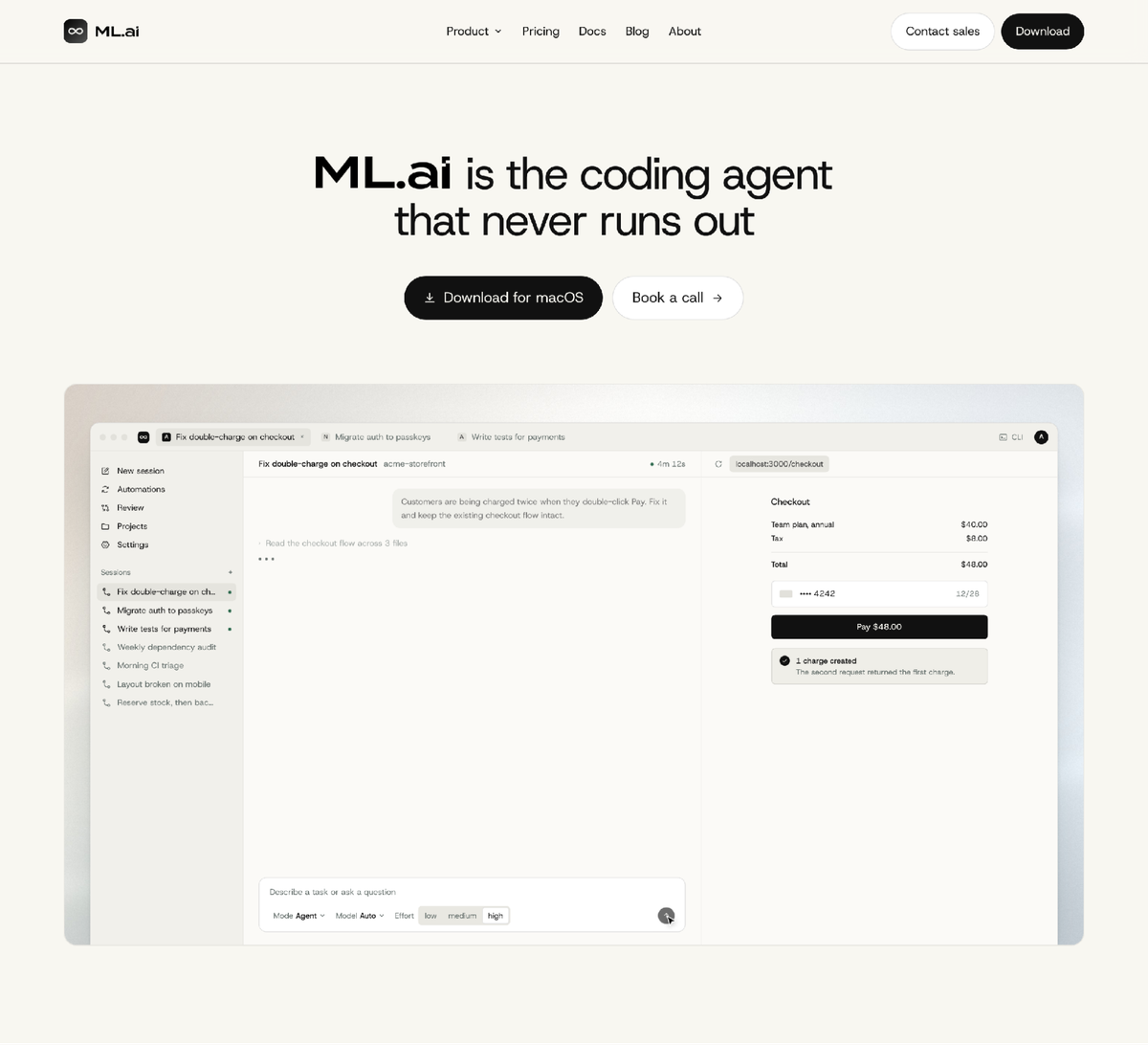
The difference from every other tool here is the billing. ML.ai shows no token count, no credit balance and no mid-task stop, and you pay per seat. The plans differ only in how many jobs run in parallel.
What each feature does for you:
- The agent picks the model per step. Light steps like reading files go to ML.ai Flash, while planning and edge cases go to a reasoning model. You get frontier quality on hard steps without paying frontier rates on easy ones.
- Reasoning effort from low to max. You choose how hard the agent thinks for each message. You save time and compute on small edits, and spend it only where the problem is hard.
- Build mode and Plan mode. Build edits, runs commands, and verifies the result. Plan investigates and writes a plan with the edit and write tools switched off, so you can explore a risky change with zero chance of touching your files.
- Permission prompts with a diff first. Every side effect asks first, and edits open a native diff before you approve. You review a change you have seen, which cuts the review load that low trust creates.
- Parallel background jobs. Each job runs in its own sandbox and survives the panel being closed. You can hand off a migration and keep working on something else.
- Editor diagnostics after every change. The agent asks your editor's language servers what broke after it edits a file. Type errors get caught in the same turn instead of in CI.
- Skills, MCP servers and memory. Packaged workflows like commit messages, connections to your own tools, and project notes carried across sessions mean you explain your setup once.
Here is what per-step routing looks like on a real task.
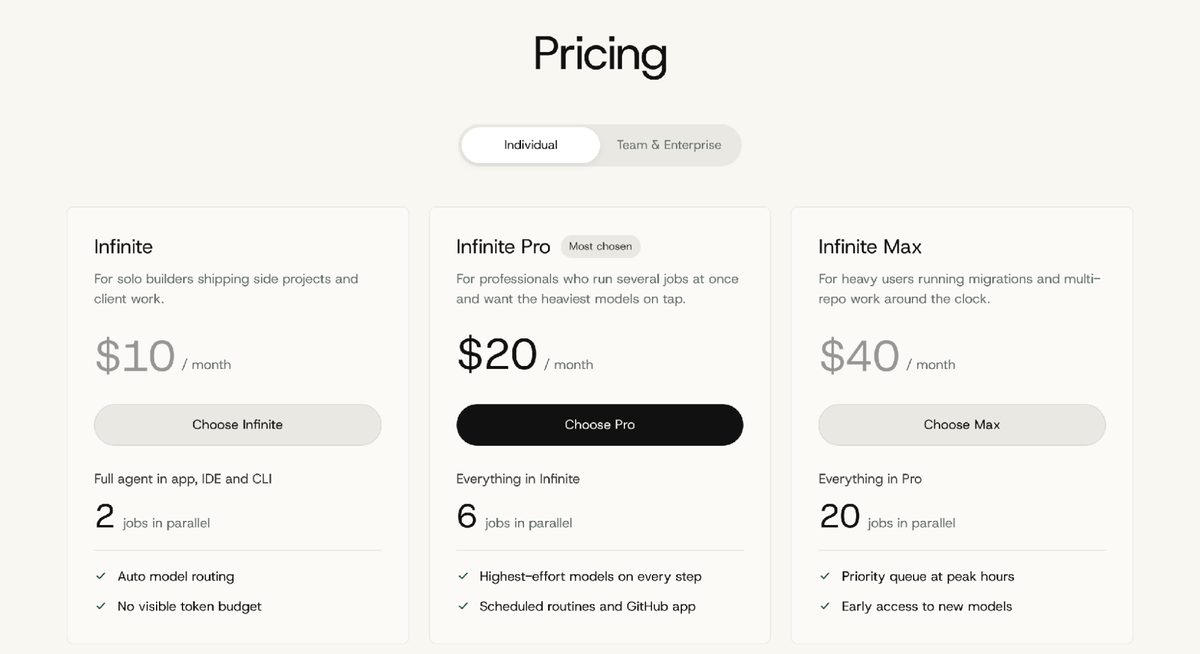
Pricing: Infinite costs $10 a month for 2 parallel jobs, Infinite Pro costs $20 for 6 jobs with the highest-effort models on every step, and Infinite Max costs $40 for 20 jobs. Team is $29 per seat per month, billed annually.
For enterprises: ML.ai holds SOC 2, ISO 27001 and FedRAMP High, enforces zero data retention with model providers, and runs each session in its own VM. Teams get SSO, SCIM and audit logs, and enterprise plans add bring-your-own model endpoints and deployment inside your VPC. Read more about ML.ai for enterprise engineering teams.
Pick ML.ai if you run migrations, multi-repo changes or overnight jobs, or you are tired of rationing a weekly cap. See ML.ai pricing or download the app and run your first job.
2. Claude Code: best for hard reasoning in the terminal
Claude Code is Anthropic's terminal-first coding agent, and it is strong at deep refactors where the model has to hold a lot of logic at once. It now defaults to Anthropic's top model on all plans.
- Pricing: Pro is $20 a month, or $17 billed annually. Max starts at $100 for 5x or 20x Pro usage.
- Limits: usage resets every 5 hours, weekly caps apply, and Claude Code shares one pool with your chat usage. Heavy users on the 20x plan still report pacing themselves.
- API cost if you go direct: Sonnet 5.5 is $2 per million input tokens and $10 per million output. Our Claude API pricing guide breaks down caching and batch discounts.
Pick Claude Code if your hardest tasks are reasoning-heavy and you work in the terminal.
3. OpenAI Codex: best for async tasks from ChatGPT
Codex lets you hand a ticket to a cloud agent from ChatGPT, the CLI or your IDE, then review the pull request later. It suits developers who already live in ChatGPT.
- Pricing: Plus is $20 a month. Pro comes at $100, $200 or $500.
- Limits: on Plus, the top model allows roughly 15 to 160 local messages per 5 hours depending on task size. Pro currently has no 5-hour limit.
- API cost if you go direct: see our OpenAI API pricing breakdown.
Pick Codex if you want to queue work from ChatGPT and come back to finished PRs.
4. Cursor: best for in-editor flow
Cursor is an AI-first fork of VS Code built around fast tab completions and inline edits. In 2026 its plans were rebuilt around a shared usage pool with Grok models.
- Pricing: Plus is $8 a month with Grok models only. Premium is $30 for 4x Plus usage, with third-party models billed separately at API list price. Super is $100 and Ultra is $200.
- Limits: everything is usage-based now. One Hacker News user reported spending around $2,000 a week on premium models before changing habits.
Pick Cursor if most of your AI use is completions and short edits while you type.
5. GitHub Copilot: best for GitHub-first teams
Copilot fits teams that want repos, pull request review and AI under one vendor and one procurement process. Since June 1, 2026, every plan is billed in GitHub AI Credits, where one credit equals one cent and each model is charged per token at its API rate.
- Pricing: Pro is $10 a month with $15 in credits, Pro+ is $39 with $70, and Max is $100 with $200. Business is $19 per user and Enterprise is $39.
- Limits: code completions do not use credits, but agent work does. When credits run out, there is no automatic fall back to a cheaper model.
Pick Copilot if your company already standardizes on GitHub and wants one bill.
6. Gemini CLI: best when the budget is zero
Gemini CLI is Google's open-source terminal agent. Its main draw is a generous free quota and a very large context window for reading big codebases.
- Pricing: free with a Google account at 1,000 requests a day. Google AI Pro raises that to 1,500 a day and AI Ultra to 2,000.
- Limits: with an unpaid API key, the quota drops to 250 requests a day on the Flash model only.
Pick Gemini CLI if you are learning, prototyping, or need to read a large repo without paying.
What each AI coding tool costs, side by side
Here is every tool on one page, using prices from each vendor's plan page in October 2026.
| Tool | Entry paid plan | Heavy-use plan | What stops you |
|---|---|---|---|
| ML.ai | $10/month | $40/month | Parallel job count only (2, 6 or 20) |
| Claude Code | $20/month | $100+/month | 5-hour sessions plus weekly caps |
| OpenAI Codex | $20/month | $100 to $500/month | 5-hour message caps on Plus |
| Cursor | $8/month | $200/month | Shared usage pool, extra models at API price |
| GitHub Copilot | $10/month | $100/month | Monthly AI Credits |
| Gemini CLI | Free | Google AI Ultra | Daily request quota |
The table shows a pattern worth acting on. Five tools sell you a quantity of tokens dressed up as a plan, so the harder you push, the sooner you stop. ML.ai sells concurrency instead, so the harder you push, the more you get from the same $20.
How much you can save by changing one setting
The fastest saving most developers miss is reasoning effort. On CursorBench 4.0, the same top model scored 57.8% at Max effort for $13.43 a task, and 56.0% at High effort for $3.97 a task.
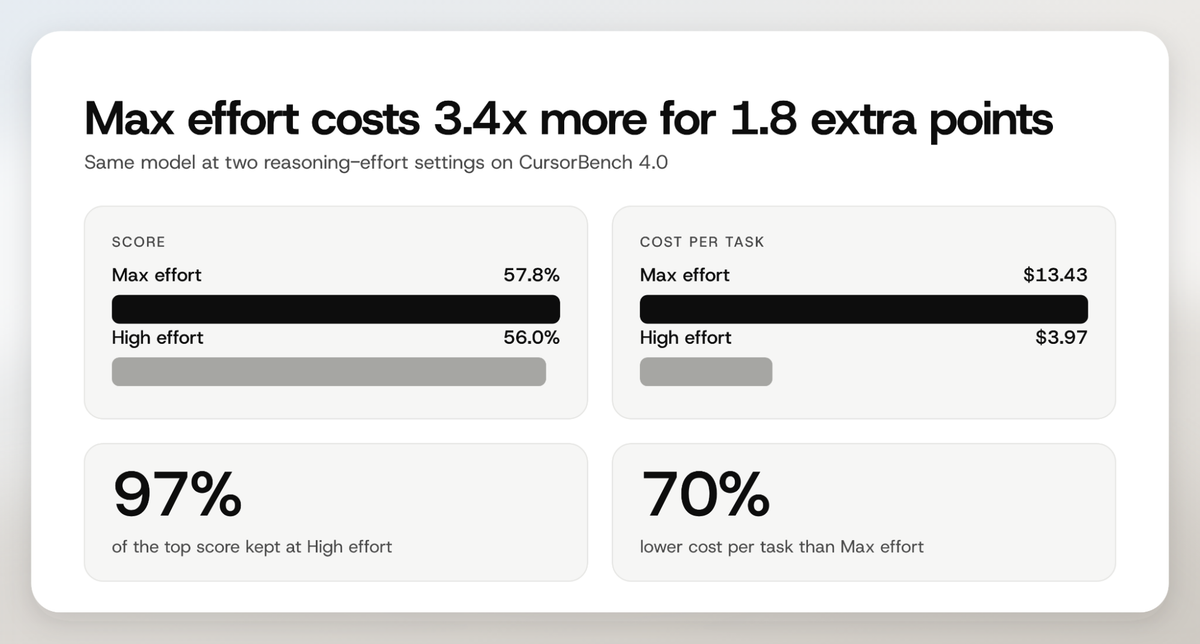
In simple terms, dropping one effort level kept 97% of the score and cut the cost per task by 70%. Suppose you run 200 agent tasks a month. At Max effort, that is about $2,686, and at High effort it is about $794.
Two research findings support a "set it and let it finish" habit:
- Interrupting costs accuracy. The SWE-Touch paper found that when users edit code mid-task, resolve rates drop by 7.7 points on average across nine models. Let the agent finish, then review the diff.
- Speed gains are real but small so far. METR's February 2026 update measured an 18% speedup for returning developers, after its 2025 study found tasks took 19% longer with AI. METR calls the new signal weak evidence, so treat any tool's speed claim with care.
ML.ai bakes this into the product. You set effort per message, and the router keeps easy steps on ML.ai Flash, so you never pay reasoning-model rates to read a file.
How teams cut their AI coding spend
Real teams have published the exact steps they took. Here are two worth copying, plus one warning.
YUV.AI cut its monthly bill by 70% with prompt caching
YUV.AI ran about 100,000 conversations a month. Its steps:
- Audited every prompt to find the parts that never change.
- Moved the system prompt and few-shot examples to the front, then marked them with cache_control.
- Tracked the cache hit rate until it settled at 73%.
The bill fell from $50,000 to $15,000 a month, and latency dropped from 2.1 seconds to 0.8 seconds.
Thomson Reuters Labs cut cost by 60% by warming the cache first
Thomson Reuters Labs sent many parallel calls against a 30,000-token document. Firing them all at once gave a cache hit rate of just 4.2%, because no call had written the cache yet. The fix was one small cache-warming call before the fan-out, then logging cache read and write tokens on every call. Cost fell about 60% and responses got 20% faster.
Manifest shut its router down after four months
Routing is not free money. Manifest deprecated its LLM router after four months and 7,000 users, saying the savings were paid for somewhere else. The lesson is that routing works when it is built into the agent and judged on finished tasks, not bolted on as a separate proxy.
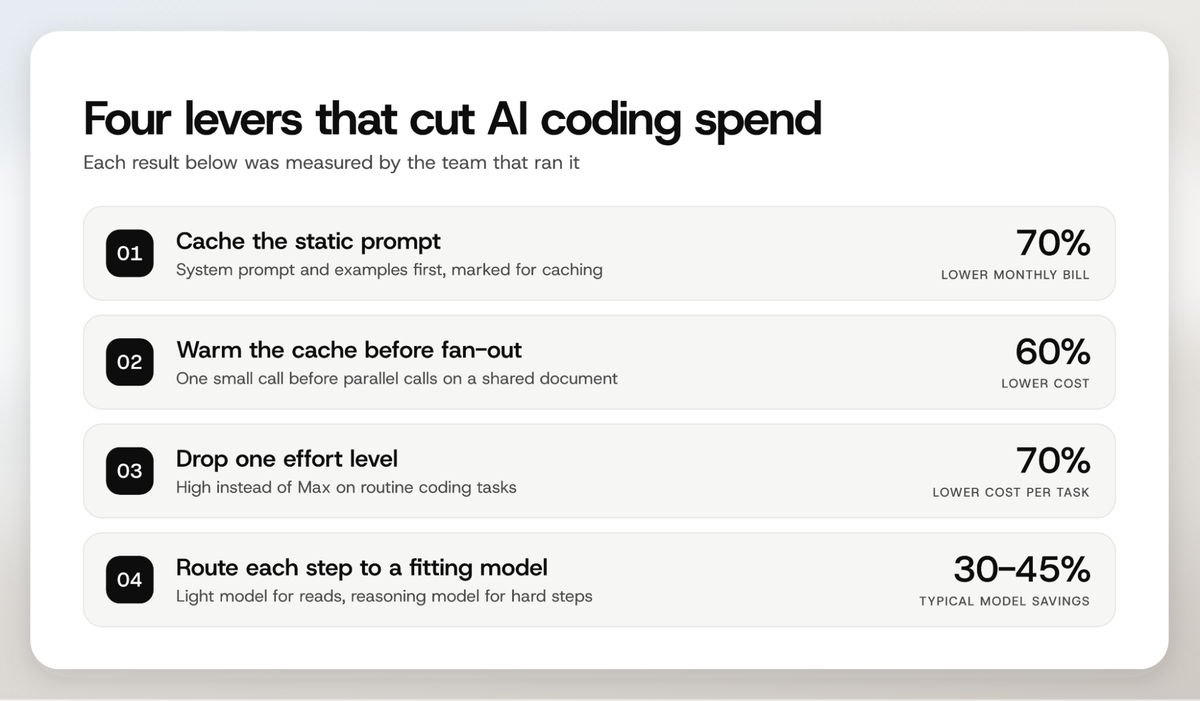
Our guides on 14 token optimization techniques and five ways teams are cutting AI spend go deeper on each lever. If you already run a frontier model through your own stack, ML.ai Inference routes traffic that does not need it and typically saves 30 to 45% on model spend.
What developers say about usage limits
The forums tell the same story across every metered tool. Developers on top plans still hit walls and plan their week around them.

Source: Hacker News, October 2026
The same thing shows up for Codex users who pay for two tools at once.

Source: Hacker News, September 2026
The common workaround is to stack subscriptions and switch when one runs dry. That spreads your context across tools and doubles your bill, which is exactly the problem a flat, per-seat agent avoids.
How to pick the best AI for coding for your work
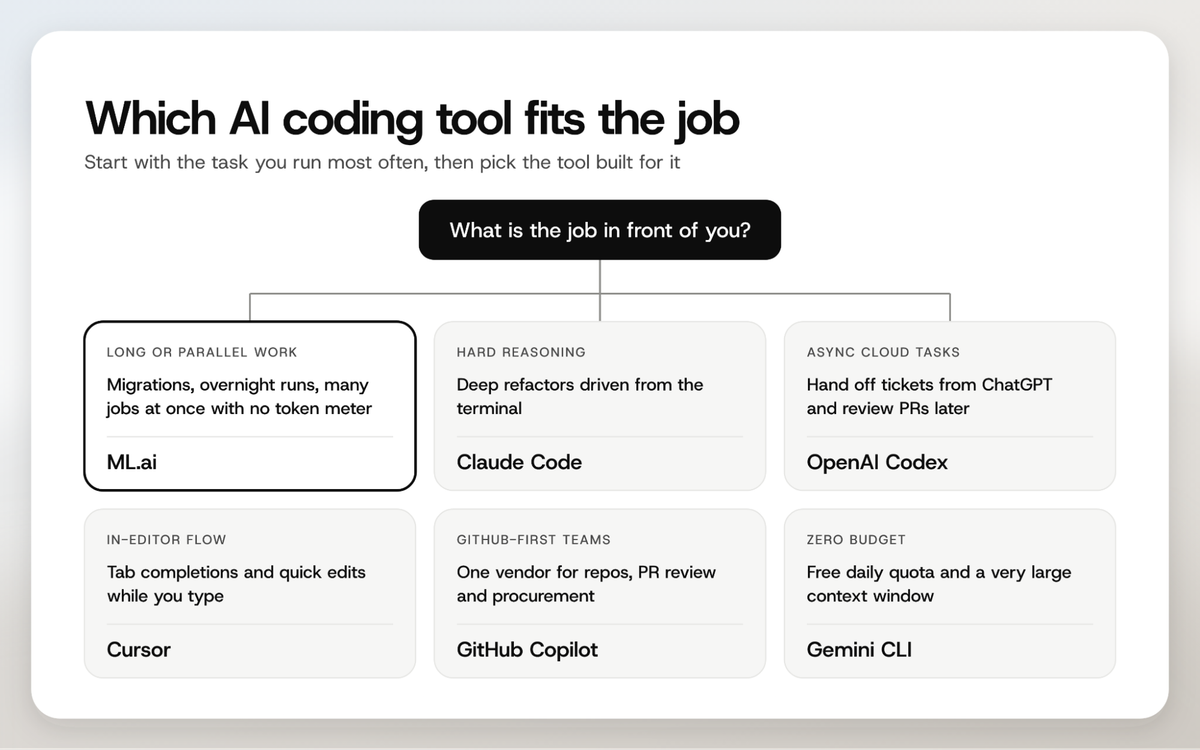
Start with the job you run most often, not the model you like best. Then check three things before you commit:
- What stops the work. Ask whether a 5-hour window, a weekly cap or a credit balance can end a task halfway.
- What you review. Prefer a tool that shows the diff before it writes and asks before running commands.
- What it costs at your real volume. Multiply your weekly task count by the tool's real limits, not its headline price.
Larger companies are moving this way already. McKinsey's 2026 State of AI found 40% of organizations with more than $1 billion in revenue are now scaling AI agents, up from 27% a year earlier. At that scale, a predictable per-seat price is easier to budget than a token meter.
What usually works
Across pricing pages, research, and forum threads, one pattern repeats. Teams that save money set effort per task, let the agent finish before stepping in, cache what never changes, and route easy steps to cheaper models. Teams that overspend run every task at maximum effort and pay per token for it.
You can do all of that by hand on a metered tool, or you can use one that does it for you. ML.ai routes every step, lets you set effort per message, and charges a flat price per seat with no token count. Start with ML.ai and run your next migration without watching a meter, or book a call to see ML.ai for your team.
Frequently Asked Questions
What is the best AI for coding in 2026?
ML.ai is the best AI for coding when you run long, multi-step or parallel tasks, because it charges per seat with no token budget. Claude Code is strongest for hard reasoning in the terminal, Cursor for in-editor completions, and Gemini CLI for free use. The right pick depends on the task you run most.
Which AI coding tool has no usage limits?
ML.ai shows no token count, credit balance or mid-task stop on any plan. Its tiers differ only in how many jobs run in parallel: 2, 6 or 20. Claude Code, Codex, Cursor, Copilot and Gemini CLI all meter usage through time windows, credits or daily quotas.
Is Claude Code or Codex better for coding?
Claude Code is better for deep, reasoning-heavy refactors from the terminal. Codex is better for handing tickets off from ChatGPT and reviewing pull requests later. Both cost $20 a month at entry level, and both cap usage in 5-hour windows.
What is the cheapest AI for coding?
Gemini CLI is free at 1,000 requests a day with a Google account. Among paid tools, Cursor Plus starts at $8 a month with Grok models only, while ML.ai Infinite and GitHub Copilot Pro both start at $10. ML.ai is the only one of these with no visible token budget.
How can I reduce my AI coding costs?
Drop reasoning effort one level on routine tasks, which cut cost per task by 70% on CursorBench while keeping 97% of the score. Cache your static prompts, warm the cache before parallel calls, and send easy steps to a lighter model. ML.ai does the routing and per-message effort control for you.
Does AI make coding faster?
The evidence is mixed. METR's 2025 study found developers took 19% longer with AI, while its February 2026 update measured an 18% speedup for returning developers but called the result weak evidence. Gains are largest on well-scoped tasks where the agent can run tests and finish without interruption.